KB:Draftsman のデザインatorを非表示にする方法

Altium Designer Altium Designer
アセンブリビューで、コンポーネントのデジグネータ表示をすばやく無効/有効にできます。

Solution Details

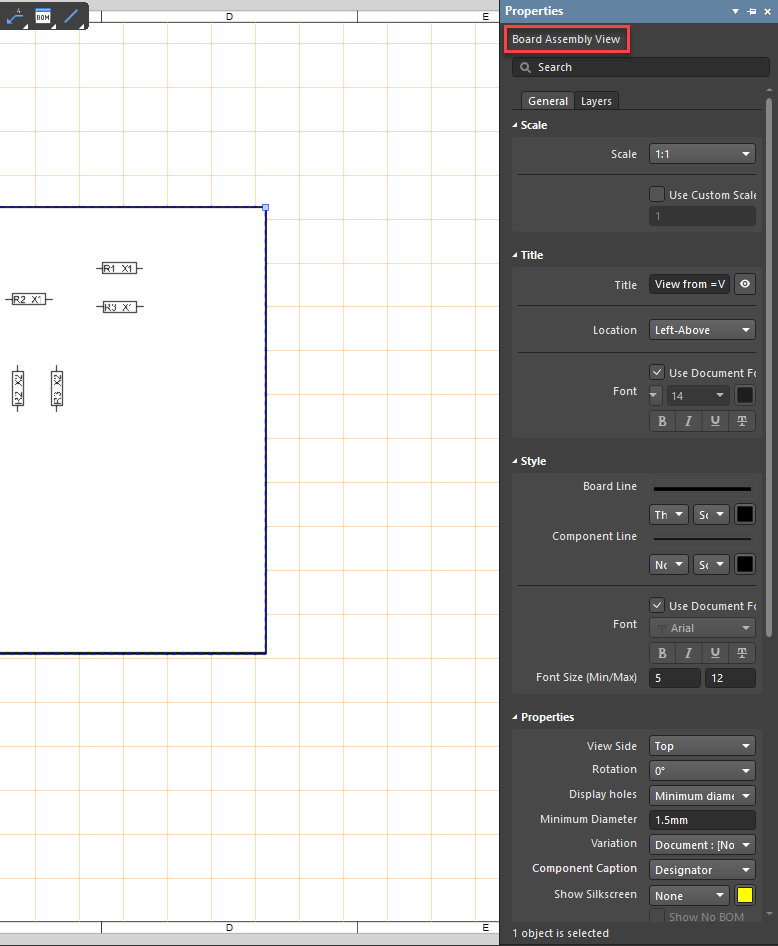
Select the Assembly View to open the Properties panel.
Properties panel.png

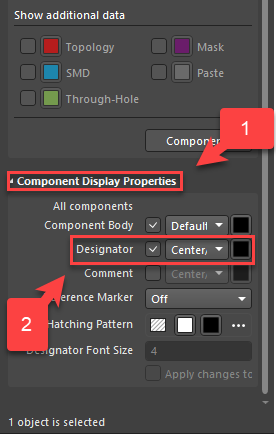
At the bottom of the Properties panel, under the Component Display Properties section, uncheck Designator.
Designator.png

NOTE: The selection for Component Caption is further up and can display either Designator or BOM item Position. The location to change visibility is located further down the panel, so it is not immediately evident.
Component Caption.png

AI-LocalizedAI で翻訳
問題が見つかった場合、文字/画像を選択し、Ctrl + Enter キーを押してフィードバックをお送りください。