
TRANSLATE: KB: FIPSが有効な場合のバックアップ
Updated: 2月 25, 2025
 Altium On-Prem Enterprise Server
私たちは、Concord Proサーバーのインストールを新しいサーバーに移行しようとしていますが、その新しいサーバーにはFIPSモードの要件があります。FIPSモードが有効になっていると、このサーバーで夜間バックアップを実行したり、復元を行ったりすることができませんし、無効にすることもできません。バックアップを実行すると、「この実装はWindows Platform FIPS検証済み暗号アルゴリズムの一部ではありません」と表示されます。
Solution Details
This is a bug that should be resolved in a later version. For the time being, you can Backup and Restore by:
Edit "avbackup.exe.config" file with notepad, which located in C:\Program Files (x86)\Altium\Altium Concord Pro\Tools\BackupTool of the Altium Concord Pro server by adding the following line:
<runtime>
<enforceFIPSPolicy enabled="false"/>
</runtime>
In the between the <configuration> </configuration> tags.
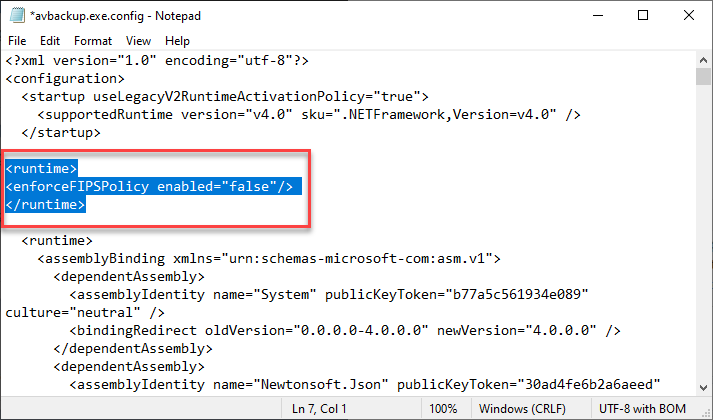
Once this line is added to the config file the backup should work.