PCB Movement Tools
PCB board design is a highly-detailed and precise process. Objects are carefully placed to fulfill their mechanical and electronic requirements. To help with this, the PCB and PCB library editors includes a variety of movement commands and behaviors. Unless it is locked, any object can be moved by clicking and dragging. To move multiple objects, they must be selected first so the software knows which objects need to be moved.
Use the movement tools to ensure that the objects placed on the PCB and PCB library are positioned correctly.
All object movement is constrained to the current Snap Grid. Refer to the Grids and Units page for more information on setting and working with the Snap Grid.
- From the PCB editor, use Tools | Arrange | Move.

- From the PCB library editor, use Tools | Arrange | Move.

Interactive Behavior while Moving Objects
The following commands are available when one or more objects are being moved:
- Press Tab to open the object's Inspector panel (if only one object is being moved).
- Press Spacebar to rotate the object(s) counterclockwise around the movement reference point, or Shift+Spacebar for clockwise rotation. The default rotation increment is 90 degrees. The Rotation Step size can be changed on the PCB Editor - General page of the System Preferences.
- Press the X or Y key to flip the object(s) along the X or Y axis respectively.
- If the object being moved is a component, press L to flip it to the other side of the board. Do not use X or Y to flip components because the primitive objects within the component will not swap to appropriate bottom-side layers.
- Press Esc to abort the current movement action.
Summary of the Movement Commands
| Command |
Behavior |
| Move Object |
Move the chosen object. After launching the command, the Status bar will prompt Move any Object. Click to choose the object then move it to the required location. Note that this command does not consider the selection state of objects, it simply moves the chosen object. |
| Drag |
Move the chosen object and drag the attached objects with it. After launching the command the Status bar will prompt Move any Object. Click to choose the object then move it to the required location. Connected track segments will remain attached; the end on the moving object will move with the object and the other end of the segment(s) will remain where it was. Note that tracks connected to a component will only drag if the Comp Drag option is set to Connected Tracks (on the PCB Editor - General page of the System Preferences). This option is discussed in more detail below. |
| Component |
Move the chosen component. After launching the command, the Status bar will prompt Moving Component. Click to open the Choose Component dialog in which you can choose which component to jump to. How the connected tracks behave depends on the setting of the Comp Drag option on the PCB Editor - General page of the System Preferences. This is discussed in more detail below. |
| Re-Route |
Re-route the chosen track segment. After launching the command, the Status bar prompts to Choose a Track. When you click on a track segment, you effectively break that segment into two. Move the cursor to position the new vertex where these two segments join. After placing the vertex, you will be positioning another vertex to fix the ends of two more segments, and so on. Right-click (or Esc) to stop rerouting this route; do this a second time to drop out of the command. |
| Break Track |
Break an existing segment into two segments. This command behaves the same as the Re-route command except it does not repeat. After launching the command, the Status bar prompts to Choose a Track. When you click on a track segment, a vertex is added at the click location; move the mouse to position the vertex. Those segments will be released and the cross-hair cursor remains, indicating that you are still in Break Track mode. Continue to break other tracks or right-click (or Esc) to terminate the command. Note that this behavior can also be achieved interactively in the design space without launching this command by clicking once to select a track segment, then click and hold on the center vertex to break the track. Position as required. |
| Drag Track End |
Move an existing vertex (track end) to a new location. After launching the command, the Status bar prompts to Move any Object. Click anywhere on a track segment; the cursor will jump to the nearest end of that segment, which will then move with the cursor. Position the cursor in the required location and click to place. |
| Move / Resize Tracks |
Freely move the end of a track segment. After launching the command, the Status bar prompts to Choose Track End Point. Click anywhere on a track segment; the cursor will jump to the nearest end of that segment, attaching it to the cursor. Move the cursor to move that endpoint and click to place. This behavior, where you can freely move the end of a single track segment, can also be achieved by clicking once to select a segment, then clicking and holding on an end vertex to freely move it. |
| Move Selection |
Move selected objects. After launching this command, the Status bar will prompt to Move Selection. Click anywhere within the design space to hold the selection set at that point then move the mouse to move the selection set to a new location. Note that the click that defines the hold point for the selection set will automatically be on-grid unless you hover the mouse so that it snaps to an object hotspot (reference point), such as the center of a pad. |
| Move Selection by X, Y |
Move the selected objects by a user-defined offset. After launching this command, the Get X /Y Offsets dialog will open. Enter the required offset values then click OK to move the selection set by that amount. |
| Rotate Selection |
Rotate the selected objects by a user-defined rotation angle. After launching this command, the Rotation Angle dialog will open. Enter the required rotation in degrees then click OK. The Status bar will prompt to Select Reference Point; the selection set will rotate around the point where you click. |
| Flip Selection |
Flip the selection set from the current side of the board to the other side. The selection set will be flipped along the X-axis as if it were a single object with the overall bounding rectangle of the set remaining in the same X, Y location in the workspace. Each object that is on a layer with a logical pair will be flipped and moved to the paired layer. For example, Top Layer objects flip to Bottom Layer, Top Solder to Bottom Solder, and the same for mechanical layers that have been defined as layer pairs. |
| Move Polygon Vertices |
Interactively move the vertices of a polygon. After launching the command, the Status bar will first prompt to Choose a Polygon. After clicking on a polygon to choose it, the Status bar will then prompt to click to select a Handle (vertex) or an Edge. Note that this editing state can also be achieved by clicking once to select a polygon. There is more information about editing a polygonal-shaped object below. |
| Region Vertices |
Interactively move the vertices of a solid region. After launching the command, the Status bar will first prompt you to Choose a Region. After clicking on a region to choose it, the Status bar will then prompt to click to select a Handle (vertex) or an Edge. Note that this editing state can also be achieved by clicking once to select a region. There is more information about editing a polygonal-shaped object below. |
Tips
- Click and hold the mouse button to move a single object. The object will be held either by:
- its reference point for a single reference point object such as a pad, via or component, or
- a vertex for a track or polygonal-shaped object.
- Single objects are moved on the current snap grid. For multiple objects, the location where the selection set is held will be on the current snap grid.
- Click and hold requires the mouse button to be held down. Holding the mouse button down is not required if you use a Move menu command. The advantage of using a Move command is that arrow keys can be used to accurately move the object(s) in single grid increments. You can then hold Shift to step in 10 x grid increments.
- A set of selected objects can also be moved using the click and hold technique depending on which kind of object in the selection set is clicked. When multiple objects are moved using click and hold, the cursor will jump to the nearest grid point and then begin to move the selection set. Note that this held point may not be an object reference point. If positioning is critical, it is better to use the Move Selection command described below because you can move the cursor around until it snaps to an object reference point, such as the center of a pad, which then becomes the point by which the set of objects is held. In fact, it can help to place a temporary pad or via to help with the precise relocation of a set of selected objects.
- A set of selected tracks cannot be moved using the click and hold technique. In this situation, the Move Selection command must be used (unless there is a non-track object in the selection set to click and hold on).
- If multiple objects are moved, their position relative to each other is maintained.
The default behavior is to snap to the object's reference point whenever you click and hold to move an object. This can be disabled by turning off the Snap To Center option on the PCB Editor - General page of the System Preferences.
Moving Components
Like any object, a component can be moved by clicking and holding. Alternatively, use the Component command from the Move menu.
How the Component is Held
Component footprints are typically designed with their origin (reference point) either at the geometric center of the component or the center of pad 1. During the component placement phase of the board design, it may be preferable to position the component based on pad 1 or perhaps a different pad. To enable this behavior, enable the Smart Component Snap option on the PCB Editor - General page of the System Preferences. When this option is enabled, instead of jumping to the reference point, the software will include pad centers as potential holding points and jump to the nearest point (reference point or pad center) when you click and hold. Position the cursor close to the pad by which you want to hold then click and hold.
How Connected Tracks Behave
The default behavior for tracks that are connected to a component is to not move the track ends when a component is moved. It is possible to drag the track ends with the moving component by setting the Comp Drag option to Connected Tracks (on the PCB Editor - General page of the System Preferences). Since dragging is not the default behavior when moving, to move a component and drag the connected track ends, you need to use either the Drag or the Component command from the Move menu.
Note that the software does not attempt to maintain 90/45 degree placement of track objects or prevent potential design rule violations while moving a component and dragging tracks. The PCB editor includes excellent track sliding features. Use these to either tidy unorganized track segments or move the component without dragging and use the same sliding capabilities to modify the track segments after the component has been moved.
 To tidy dragged tracks, click once to select the segment then click and hold the segment and slide it. The software will restore the 90/45 placement to the tracks.
Moving Track/Line Segments
Routing is traditionally placed so that all track segments are vertical, horizontal, or at 45 degrees. This is done to allow the most efficient use of space on the board. The PCB Editor includes sophisticated algorithms for moving track segments on the board so that the arrangement of the routing can be maintained.
This sliding of track segments can be invoked interactively either by clicking to first select the track segment then clicking and holding when the special cursor appears to slide the segment (as shown in the animation below) or by clicking and holding on a track segment and sliding it. This sliding behavior can be configured using the Dragging options in the PCB Editor - Interactive Routing page of System Preferences. These options allow you to assign the Move action to a track, which is useful if you want to be able to freely move an individual track segment.
As well as supporting moving the segments in an individual net, the built-in push and shove algorithm allows multiple routes to be neatly moved in a single operation as shown in the animation below. Press the Shift+R shortcuts to cycle through the different interactive sliding modes: Push Obstacles, HugNPush Obstacles, and Ignore Obstacles. The current mode is reported on the Status bar during sliding.
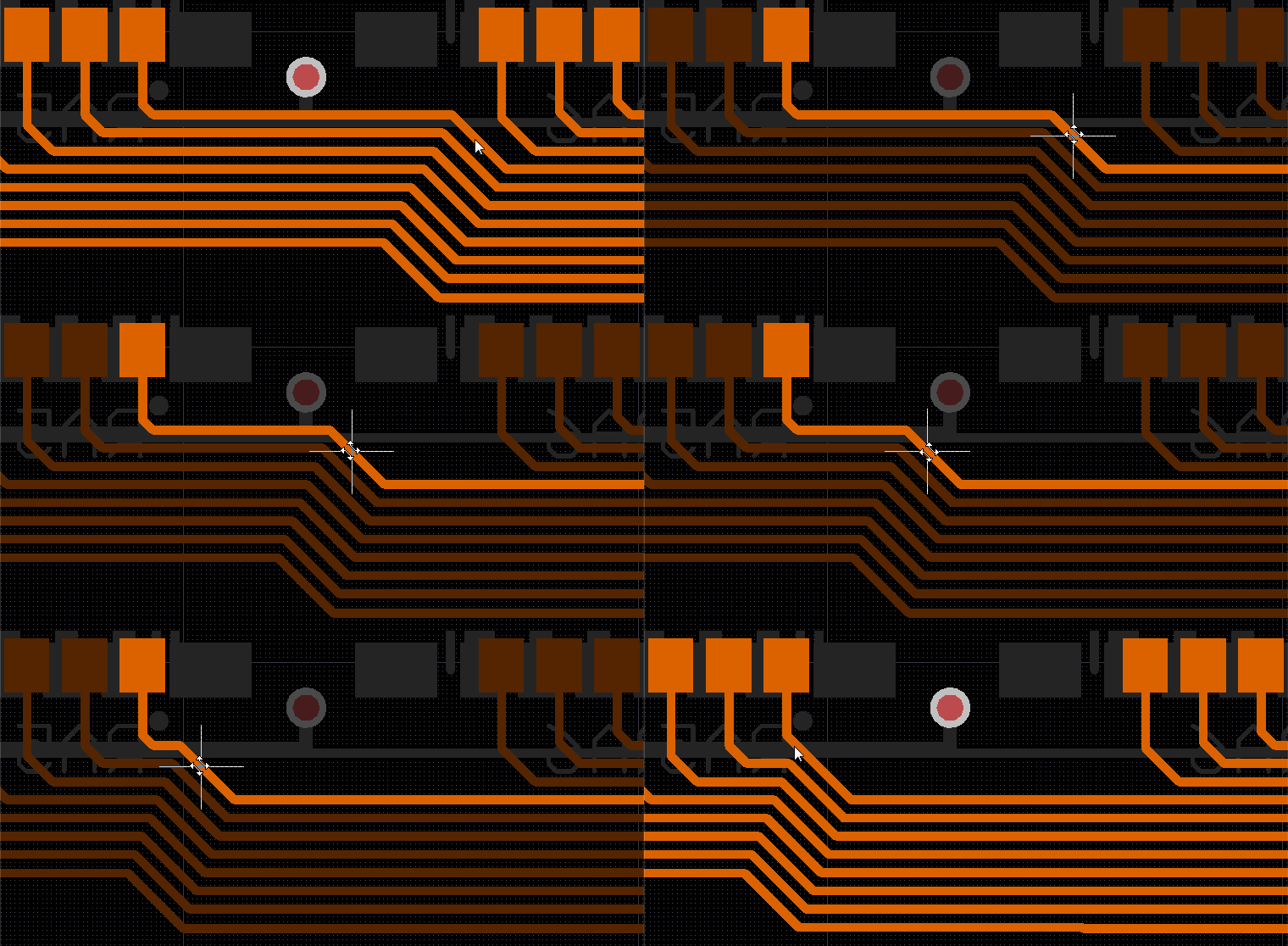
Reshaping an Existing Track Segment
Working in harmony with the segment sliding feature, you can also break, or more correctly, reshape an existing segment. To do this, click once to select the segment then hover the mouse over the center vertex. A special cursor will appear, indicating that this segment can be reshaped. Click and hold; as you move the mouse, the software will automatically add new reshape segments, as shown in the images below.
 Hover the mouse over the center vertex to show the reshape cursor,
 Click and hold, then drag to reshape the segment,
 Release to complete the reshaping process.
Moving Polygonal Object Vertices
There are some differences between the various polygonal objects. Refer to the Polygon object for more information on reshaping a polygonal object.
