Fills are available for placement in the PCB editor by choosing choose Home | Place | Fill.

After launching the command, the cursor will change to a cross-hair and you will enter fill placement mode. Placement is made by performing the following sequence of actions:
- Click or press Enter to anchor the first corner of the fill.
- Move the cursor to adjust the size of the fill then click or press Enter to anchor the diagonally-opposite corner and complete placement of the fill.
- Continue placing further fills or right-click or press Esc to exit placement mode.
A fill will 'adopt' a net name if it touches an object that has a net name.
Additional actions that can be performed during placement are:
- Press the Tab key to pause the placement and access the Fill mode of the Inspector panel in which its properties can be changed on the fly. Click the design space pause button overlay (
 ) to resume placement.
- Press the L key to flip the fill to the other side of the board. Note that this is only possible prior to anchoring the fill's first corner.
- Press the + and - keys (on the numeric keypad) to cycle forward and backward through all visible layers in the design to change the placement layer quickly.
- Press the Alt key to constrain the direction of movement to the horizontal or vertical axis depending on the initial direction of movement.
Graphical Editing
This method of editing allows you to select a placed fill object directly in the design space and change its size, shape or location graphically.
When a fill object is selected, the following editing handles are available:
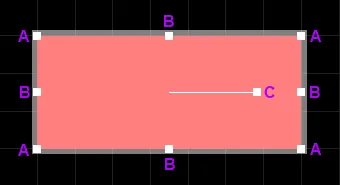
A selected Fill
- Click and drag A to resize the fill in the vertical and horizontal directions simultaneously.
- Click and drag B to resize the fill in the vertical and horizontal directions separately.
- Click and drag C to rotate the fill about its center point.
- Click anywhere on the fill away from editing handles and drag to reposition it. While dragging, the fill can be rotated or mirrored:
- Press the Spacebar to rotate the fill counterclockwise or Shift+Spacebar for clockwise rotation. Rotation is in accordance with the value for the Rotation Step defined on the PCB Editor – General page of the System Preferences.
- Press the X or Y keys to mirror the fill along the X-axis or Y-axis.
To clear the selection of (or de-select) the object, use the Esc key.
Non-Graphical Editing
This method of editing uses the Inspector panel to modify the properties of a Fill object.

During placement, the Fill mode of the Inspector panel can be accessed by pressing the Tab key. Once the Fill is placed, all options appear.
After placement, the Fill mode of the Inspector panel can be accessed in one of the following ways:
- If the Inspector panel is already open, select the Fill object.
- With the fill selected, choose View | Schematic | Inspector from the main ribbons.
Press Ctrl+Q to toggle the units of measurement currently used in the panel between metric (mm) and imperial (mil). This only affects the display of measurements in the panel; it does not change the measurement unit specified for the board, which is configured in the Units setting in the Inspector panel when there are no objects selected in the editing design space.
Editing Multiple Objects
The Inspector panel supports multiple object editing, where the property settings that are identical in all currently selected objects may be modified. When multiples of the same object type are selected manually, an Inspector panel field entry that is not shown as an asterisk (*) may be edited for all selected objects.
