KB: PCB 및 회로도 편집기 창에 스크롤 바를 다시 가져오기
 Altium Designer
Solution Details
Later versions of Altium Designer do not have the scroll bars at the side and bottom of the PCB and Schematic editor windows.
You can drag the schematic or board around with the right mouse button. And you can zoom in by pressing the mouse scroll wheel down and dragging up or down.
You can also use the keyboard "Z" key to bring up the Zoom menu which will show you more options. Some engineers like to use the Page up and Page down keys.
Here are keystrokes that you might like:
"V" then "D" for View » Fit Document
"V" then "F" for View » Fit Board in PCB (View » Fit All Objects in the Schematic)
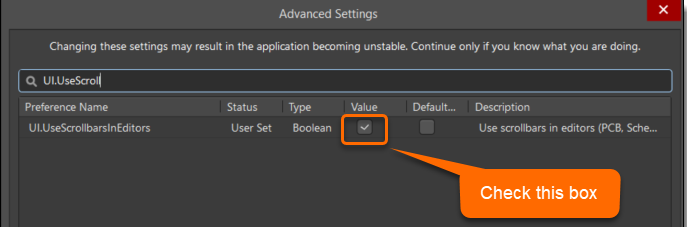
Here's how you can bring back the scroll bars if you'd rather:
Preferences » System » General » Advanced button at the lower right corner, then use the search bar for "UI.UseScroll". You will need to restart Altium Designer to see the change.