
포트 교차 참조 디스플레이 변경
 Altium Designer
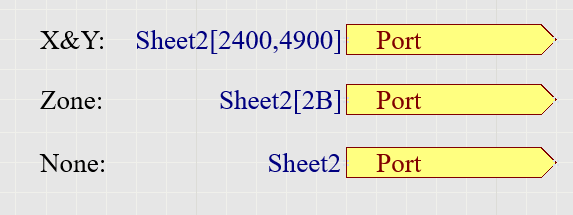
스키마틱에 포트 참조를 추가하고 싶지만, 공간을 절약하기 위해 영역이나 그리드 참조는 포함시키고 싶지 않습니다.
Solution Details
The port cross reference details added to ports in your schematic by the command.
Reports » Port Cross Reference » Add to Project
The format is set in the Port Cross References section in the preferences here:
Preferences » Schematic » General » Port Cross References
To remove the Zone or X and Y Coordinates, set the Location Style pull-down choice list to "None". Additional settings are available for the Sheet Style, including Name, Number, or None.
Once you select OK in the preferences, run the following command to see the changes:
Reports » Port Cross Reference » Update on Project
Further reading is available in our documentation:
Port Cross References
Update: With AD21.6 the Port Cross Reference Add and Remove commands were removed from the Reports menu and are replaced with the new Automatic Cross References Settings command. Selecting this command will open the Options tab of the Project Options dialog where you can toggle the feature on/off. This change is more thoroughly explained in this document:
Improved Schematic Cross References