
KB: Q shortcut is not working in schematic
Updated: October 30, 2024
 Altium Designer
How to use the Q shortcut for the Schematic editor like how it works for the PCB document.
Solution Details
Solution Details
In general, to switch between the units in the schematic, we can use the command View » Toggle units in the schematic editor. We can also use the keyboard shortcuts V and U for this command.
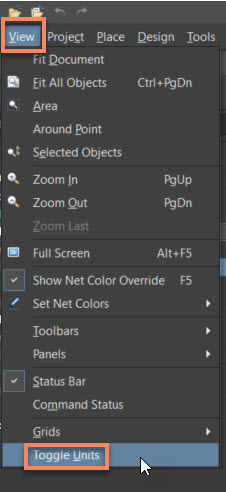
But If you want to use "Q" as a shortcut, we can customize the Command. Follow the below steps.
- Go to View Menu » Toolbars » Customize » Click on "All" » Search for "Toggle units" » Enter the value "Q" for the "primary" field » Save.
- Then go to View » Toggle units menu. You should see the "Q" shortcut near the command.
Please take a look at the short video and screenshot below.

Please take a look at the link below for more details about customizing the shortcuts and toolbars.
Configuration & Customization