
KB: Remove a line item from BOM for a component not subject to procurement
Updated: November 11, 2024
 Altium Designer
Those components not subject to procurement such as testpoints can be made to not show up as a line item in BOM, ActiveBOM or Draftsman, in the first place.
Solution Details
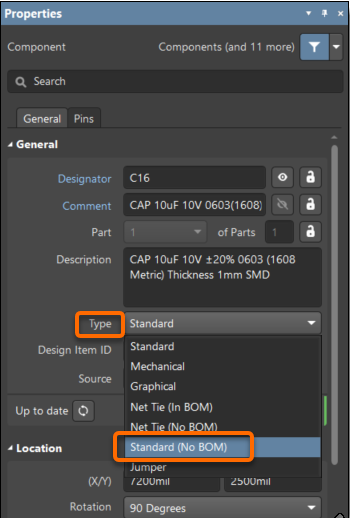
As BOM, ActiveBOM or Draftsman, has to be synchronized with components in a design, a component line item cannot be removed on the fly directly, but the line can be made to not show up in the first place by changing the type of the corresponding component to "Graphical", "Standard (NoBOM)", or "Net TIe (No BOM)".
You can select the component and change the type from the Properties panel.
Further details on component types can be found in our manual under Part Properties