KB: Remove Managed Servers from Environment
Updated: December 14, 2022
 Altium Designer
Starting in version: 18
Up to Current
How to remove previously connected managed servers from Altium? Even when signed out, the managed servers that were previously connected to would appear in the account drop down menu.
Solution Details
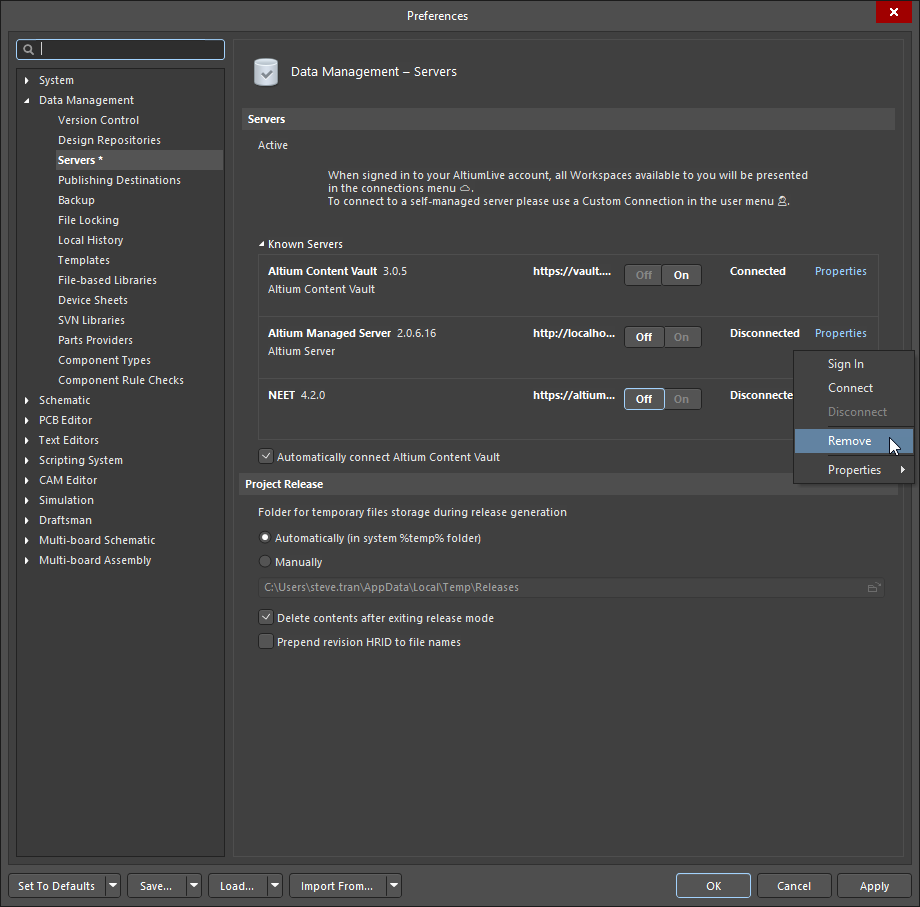
To remove a previously connected managed server (such as Concord Pro / Nexus / Vault), you would need to:
1. Select Preferences (gear icon)
2. Go to Data Management » Servers
3. Make sure the server that is going to be removed is disabled (off)
4. Expand the Known Servers section
5. Right-click the server that you want to delete
6. Select Remove