
KB: Remove Off Sheet Schematic Component
Updated: September 06, 2025
 Altium Designer
There's a component outside of my sheet area and I cannot select or delete it. How to remove the component or get it back onto the sheet?
Solution Details
You can use the SCH List panel to delete or alter the location of any component on the schematic.
Steps how to do this:
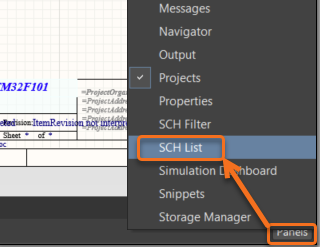
- Open the SCH List panel from View » Panels » SCH List.

- Or from the Panels button in the lower right corner of the program window
- Configure the header to be set to: Edit all objects from current document include only Parts.
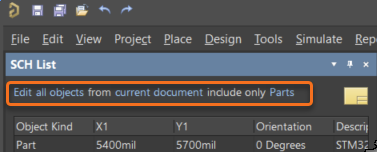
- With the list showing all of the parts, sort the list (e.g. X1 or Y1) to find the part that is placed outside the sheet area.
- You can alter the location by entering appropriate x-y-coordinates or delete the part by Right-click on the part and select » Zoom Selected.
- This will select the part and zoom to it.
- To remove the part select Edit » Delete.