KB: Configure Parameters Visibility on Add shows only Name and Comment
Updated: мая 05, 2026
 Altium Designer
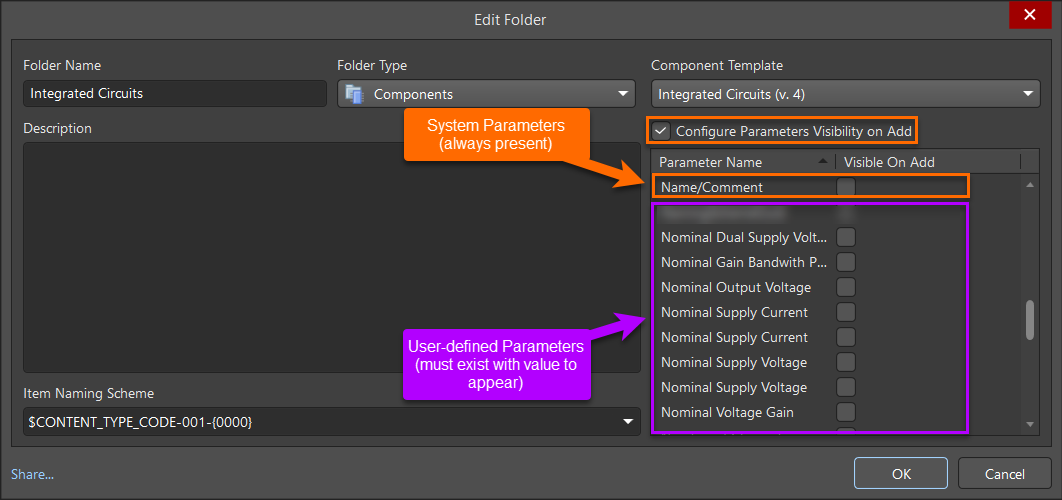
When using the Configure Parameters Visibility on Add feature for managed components, only the default Name and Comment parameters may be available for selection. This typically occurs in newly created Workspaces or library organizations where component templates are already defined and linked to component folders, but no components have yet been created or populated. The visibility configuration is driven by parameters that already exist on components stored in the selected folder. As a result, parameters defined only in component templates, or parameters that have not been assigned values on at least one component, are not listed. To expose additional parameters, the component folder must contain at least one component with those parameters populated.
Solution Details
Only default parameters appear initially
When opening Configure Parameters Visibility on Add for a component folder, the available parameter list may show only Name and Comment, even though the associated component templates define additional parameters.
Visibility depends on existing component data
The visibility configuration evaluates parameters that already exist on components stored in the selected folder. Name and Comment always appear because they are inherent system parameters present on every component by default. User-defined parameters are listed only if they already exist on at least one component in the folder and have at least one assigned value. Parameters that exist only in component templates, or in folders that contain no components, do not provide sufficient data for additional parameters to appear.
Ensure parameters are populated before configuration
- Add at least one component to the target component folder.
- Populate the user-defined parameters that should be configurable on add.
Create a component to expose parameters
- Create or add a component in the appropriate component folder.
- Populate the parameters that should be configurable on add.
- Return to the folder properties.
- Enable Configure Parameters Visibility on Add.
- Verify that the populated user-defined parameters are now available for selection.