
New in CoDesigner
Altium's MCAD CoDesigner technology connects the mechanical and electrical design domains, allowing the mechanical and electronic engineers to pass the loaded PCB back and forth between the two domains.
In your Altium design software, this is achieved through an extension that loads and extracts board and component data from the PCB editor, the MCAD CoDesigner extension. In the MCAD software the Altium CoDesigner Add-in performs the same function, loading and extracting board and component data from the MCAD software.
The ECAD and the MCAD software pass design changes through an Altium Workspace, which can be hosted in the cloud on Altium 365, or on your company network using an Altium On-Prem Enterprise Server. The Workspace acts as a bridge, with both the ECAD and MCAD software connecting to it. The Workspace holds the board and component data, allowing the ECAD and MCAD engineers to continue to work autonomously, Pulling and Pushing their changes when they are ready.
Supported Versions
CoDesigner is under continuous development, this page outlines the changes made in each version. Because the CoDesigner extension and Add-ins can be updated separately from the update cycle of your Altium design software, this page also includes information about supported versions of Altium software, as well as the supported versions of MCAD software.
ECAD-MCAD VERSION COMPATIBILITY MATRIX
This matrix provides a summary of the ECAD/MCAD version compatibility. The first column lists the releases of MCAD CoDesigner, and the minimum version of Altium ECAD software required for that version of CoDesigner. For the MCAD columns, the first line in each cell details the supported MCAD product version number(s). Following this is the preferred Extension/Add-in to use with that version of Altium Designer or your MCAD product. Note that some of the MCAD tools require a different CoDesigner installer to be used for different versions of the MCAD software. This information is also detailed in the Supported Versions section of the New In information for each release of Altium MCAD CoDesigner.
CoD extension / Altium Designer |
Autodesk Fusion®/ MCAD Add-in |
Autodesk Inventor®/ MCAD Add-in |
Dassault Systemes SOLIDWORKS®/ MCAD Add-in |
PTC Creo Parametric®/ MCAD Add-in |
Siemens® NX™/ MCAD Add-in# |
|---|---|---|---|---|---|
CoD 3.15.0.2498 Altium Designer Altium Designer Develop Altium Designer Agile |
Fusion 3.15.0.5 |
2025, 2026, 2027 |
2023, 2024, 2025, 2026 3.15.0.4 |
9.X, 10.X, 11.X, 12.X 3.15.0.5 |
(2312 < 2512)3.15.0.4 (2212 < 2312)3.15.0.4 (2206 < 2212)3.15.0.4 |
CoD 3.14.0.2469 Altium Designer Altium Designer Develop Altium Designer Agile |
Fusion 3.14.0.2 |
2024 2025, 2026 |
2023, 2024, 2025, 2026 3.14.0.4 |
9.X, 10.X, 11.X, 12.X 3.14.0.2 |
(2312 < 2506)3.14.0.4 (2212 < 2312)3.14.0.4 (2206 < 2212)3.14.0.4 |
CoD 3.13.0.2437 Altium Designer Altium Designer Develop Altium Designer Agile |
Fusion 3.13.0.2 |
2024 2025, 2026 |
2022, 2023, 2024, 2025 3.13.0.2 |
9.X, 10.X, 11.X, 12.X 3.13.0.2 |
(2312 < 2506) 3.13.0.2 (2212 < 2312) 3.13.0.2 (2206 < 2212) 3.13.0.2 |
CoD 3.12.0.2414 Altium Designer |
Fusion 3.12.0.3 |
2024 2025 |
2022, 2023, 2024, 2025 3.12.0.11 |
8.X, 9.X, 10.X, 11.X 3.12.0.11 |
(2312 - 2412) 3.12.0.12 (2212 < 2312) 3.12.0.9 (2206 < 2212) 3.12.0.15 |
CoD 3.11.0.2380 Altium Designer |
Fusion 3.11.0.9 |
2024 2025 |
2022, 2023, 2024, 2025 3.11.0.10 |
8.X, 9.X, 10.X, 11.X 3.11.0.8 |
(2312 - 2412) 3.11.0.14 (2212 < 2312) 3.11.0.13 (2206 < 2212) 3.11.0.13 |
CoD 3.10.0.2312 Altium Designer |
Fusion 3.10.0.7 |
2024 2025 |
2021, 2022, 2023, 2024, 2025 3.10.0.6 |
8.X, 9.X, 10.X, 11.X 3.10.0.5 |
(2312) 3.10.0.4 (2212 < 2312) 3.10.0.4 (2206 < 2212) 3.10.0.4 |
CoD 3.9.0.2208 Altium Designer |
Fusion 3.9.0.12 |
2024 2025 |
2021, 2022, 2023, 2024 3.9.0.9 |
8.X, 9.X, 10.X, 11.X 3.9.0.9 |
(2312) 3.9.0.16 (2212 < 2312) 3.9.0.17 (1953 < 2212) 3.9.0.15 |
CoD 3.8.0.2085 Altium Designer |
Fusion 3.8.0.16 |
2023, 2024 3.8.0.12 |
2021, 2022, 2023, 2024 3.8.0.21 |
7.X, 8.X, 9.X, 10.X 3.8.0.16 |
(2312) 3.8.0.14 (2212 < 2312) 3.8.0.14 (1953 < 2212) 3.8.0.14 |
CoD 3.7.0.2033 Altium Designer |
Fusion 3.7.0.7 |
2023, 2024 3.7.0.6 |
2021, 2022, 2023, 2024 3.7.0.9 |
7.X, 8.X, 9.X, 10.X 3.7.0.12 |
1953 - 2312 3.7.0.22 |
CoD 3.6.0.1976 Altium Designer |
Fusion 360 3.6.0.16 |
2023, 2024 3.6.0.15 |
2021, 2022, 2023, 2024 3.6.0.34 |
7.X, 8.X, 9.X, 10.X 3.6.0.26 |
1953 - 2306 3.6.0.19 |
CoD 3.5.0.1900 Altium Designer |
Fusion 360 3.5.0.17 |
2023, 2024 3.5.0.14 |
2020, 2021, 2022, 2023 3.5.0.24 |
7.X, 8.X, 9.X, 10.X 3.5.0.21 |
1953 - 2212 3.5.0.12 |
CoD 3.4.0.1780 Altium Designer |
Fusion 360 3.4.0.4 |
2022, 2023 3.4.0.3 |
2020, 2021, 2022, 2023 3.4.0.7 |
7.X, 8.X, 9.X 3.4.0.3 |
1953 - 2212 3.4.0.9 |
CoD 3.3.0.1753 Altium Designer |
Fusion 360 3.3.0.6 |
2022, 2023 3.3.0.6 |
2020, 2021, 2022, 2023 3.3.0.9 |
7.X, 8.X, 9.X 3.3.0.6 |
1953 - 1996 3.3.0.8 |
CoD 3.2.0.1730 Altium Designer |
Fusion 360 3.2.0.7 |
2022, 2023 3.2.0.8 |
2020, 2021, 2022, 2023 3.2.0.11 |
7.X, 8.X, 9.X 3.2.0.8 |
1953 - 1996 3.2.0.8 |
CoD 3.1.0.1709 Altium Designer |
Fusion 360 3.1.0.9 |
2022, 2023 3.1.0.11 |
2020, 2021, 2022, 2023 3.1.0.35 |
7.X, 8.X 3.1.0.28 |
1953 - 1996 3.1.0.9 |
CoD 3.0.0.1610 Altium Designer |
Fusion 360 3.0.0.14 |
2022, 2023 3.0.0.14 |
2020, 2021, 2022 3.0.0.13 |
7.X, 8.X 3.0.0.13 |
1953 - 1996 3.0.0.13 |
 ).
). ).
).New in CoDesigner 3.15.0
Released: 30 April 2026 – Version 3.15.0 Hot Fix (MCAD CoDesigner extension change to version 3.15.0.2498)
Released: 9 April 2026 – Version 3.15.0
There are no new features included in this release.
Versions Supported by CoDesigner 3.15.0
-
Altium Designer 24.8 (or higher) with MCAD CoDesigner extension version 3.15.0.2498
-
CoDesigner 3.3 is the latest version available for Altium NEXUS Client.
-
CoDesigner 2.10 is the latest version available for Altium CircuitMaker.
This update has been tested on the following MCAD platforms and Add-in versions:
| MCAD Version | MCAD Add-In Version |
|---|---|
| Autodesk Fusion® (Note 1) | 3.15.0.5 |
| Autodesk Inventor Professional® - versions 2025, 2026, 2027 | 3.15.0.4 |
| Dassault Systemes SOLIDWORKS® - versions 2023, 2024, 2025, 2026 | 3.15.0.4 |
| PTC Creo Parametric® - 9.X, 10.X, 11.X, 12.X | 3.15.0.5 |
| Siemens NX® - version 2206<2212 (Note 2) | 3.15.0.4 |
| Siemens NX® - version 2212<2312 (Note 2) | 3.15.0.4 |
| Siemens NX® - version 2312-2512 (Note 2) | 3.15.0.4 |
Notes:
-
Altium CircuitMaker only supports Autodesk Fusion.
-
Siemens NX is only available to designers as part of an Altium Enterprise Solution. From MCAD CoDesigner 3.8 onwards, there are multiple versions of the installer for MCAD CoDesigner for Siemens NX, to suit different versions of the Siemens NX software. These installers all install identical versions of MCAD CoDesigner, they differ only in their detection of the currently installed version of Siemens NX. For MCAD CoDesigner 3.7 and older there is a single installer, and after installation of MCAD CoDesigner Siemens NX may show a warning when launched that the difference between the current version and the signed version is too great. This warning can be ignored, your installation of MCAD CoDesigner will function correctly. Alternatively, the Show Warning when Loading option in the Customer Defaults dialog in Siemens NX, can be disabled (
 ).
).
Release Note for CoDesigner 3.15.0 Hot Fix (MCAD CoDesigner extension change to version 3.15.0.2498)
| MCAD-5685 | Fixed an error that appeared on pushing a harness project from ECAD after modifying the wiring. Previously, changes such as replacing connectors, updating wire pinning, or changing designators could result in incomplete component data being collected during push, leading to "wire not fully connected" errors. Now the harness data is collected properly. Note: This fix is published as a hotfix to Altium Designer's MCAD CoDesigner extension and going to affect manual pushes first. Altium 365 Workspaces are going to be updated soon after the release of the hotfix, so the automatic pushes on saving a project to an Altium 365 Workspace will still fail for some time. |
Release Notes for CoDesigner 3.15.0
| MCAD-5356 | Siemens NX: Fixed a bug where board cutouts stopped at the board bottom offset when copper collaboration was disabled; standard cutouts now always remove material through the full board thickness. |
MCAD-5525 |
PTC Creo: Removed overly strict character sanitization for Creo component model symbols, so hyphens are no longer unnecessarily replaced (improving recognition/naming consistency). |
| MCAD-5549 | Autodesk Inventor: Attempting to create a Weldment Assembly while CoDesigner is active no longer causes a crash in v.2026. |
| MCAD-5683 | Altium 365: Automatic MCAD model generation now only occurs after the first Pull into MCAD. |
| MCAD-5687 | PTC Creo: Resolved a performance issue where repeated Pull operations caused unnecessary board analysis due to parameter updates, which could exhaust resources and cause Creo to crash. |
| MCAD-5689 | Autodesk Fusion: Fixed an issue where, if the current document was not an assembly, pulling a project could fail with an exception. The initial pull now always opens a new assembly document. |
| MCAD-5691 | Improved reliability of pushing complex PCB designs with many vias from ECAD to MCAD. |
| MCAD-5697 | PTC Creo: The Cabling module in Creo 12.4.3 and higher is not yet supported by CoDesigner, so the corresponding warning is now shown on when attempting to pull an Altium Harness project in those versions. Support for this cabling module will be added soon. |
| MCAD-5704 | Siemens NX 2512 is now supported. |
| MCAD-5706 | Not-fitted mechanical variant components no longer trigger a false alternate‑part warning when pulling boards via CoDesigner in MCAD. |
| MCAD-5710 | Siemens NX: support for synchronizing rigid-flex PCBs has been switched from Beta to Production. |
| MCAD-5735 | Autodesk Inventor 2027 is now supported. |
New in CoDesigner 3.14.0
Released: 17 December 2025 – Version 3.14.0
Feature Highlights
Automatic Harness Push when you Save to Server
When you perform a Push from ECAD in the CoDesigner panel, you are not pushing the ECAD project to the Altium Workspace, you are pushing a special ECAD-to-MCAD data package. For a harness project this package includes: the connectors, splices, connectivity ("from-to" data), and harness topology.
Saving the ECAD project to the Workspace is performed independently from a Push to MCAD. This separation of MCAD Pushing and Saving to Server can be a source of confusion, where an ECAD engineer might think that the Save to Server they performed at the end of the day meant that everyone else who needs access to that design data, is now up-to-date and ready-to-go.
To simplify the process of keeping files in sync, the first time the harness project is Pulled from the Workspace into MCAD, that project is flagged as an MCAD CoDesigner project. From then on, whenever the project is Saved to Server in ECAD, it is also automatically Pushed to the Workspace, ready to be Pulled into MCAD. Auto-Push removes the burden of remembering to perform a manual CoDesigner Push after each save in ECAD. When the MCAD engineer performs a Pull, they are alerted if the last MCAD Push was automatic.
 An MCAD auto-push is now performed automatically when the project is Saved to the Server.
 ).
).Learn more about Automatic CoDesigner Push when you Save to Server in ECAD.
Support for SOLIDWORKS 2026
Support for SOLIDWORKS 2026 has been added in the 3.14 update to Altium MCAD CoDesigner.
 Altium MCAD CoDesigner now supports SOLIDWORKS 2026 (image courtesy of Dassault Systemes)
Versions Supported
-
Altium Designer 24.8 (or higher) with MCAD CoDesigner extension version 3.14.0.2469
-
CoDesigner 3.3 is the latest version available for Altium NEXUS Client.
-
CoDesigner 2.10 is the latest version available for Altium CircuitMaker.
This update has been tested on the following MCAD platforms and Add-in versions:
| MCAD Version | MCAD Add-In Version |
|---|---|
| Autodesk Fusion® (Note 1) | 3.14.0.2 |
| Autodesk Inventor Professional® - version 2024 | 3.14.0.2 |
| Autodesk Inventor Professional® - versions 2025, 2026 | 3.14.0.2 |
| Dassault Systemes SOLIDWORKS® - versions 2023, 2024, 2025, 2026 | 3.14.0.4 |
| PTC Creo Parametric® - 9.X, 10.X, 11.X, 12.X | 3.14.0.2 |
| Siemens NX® - version 2206<2212 (Note 2) | 3.14.0.4 |
| Siemens NX® - version 2212<2312 (Note 2) | 3.14.0.4 |
| Siemens NX® - version 2312-2506 (Note 2) | 3.14.0.4 |
Notes:
-
Altium CircuitMaker only supports Autodesk Fusion.
-
Siemens NX is only available to designers as part of an Altium Enterprise Solution. From MCAD CoDesigner 3.8 onwards, there are multiple versions of the installer for MCAD CoDesigner for Siemens NX, to suit different versions of the Siemens NX software. These installers all install identical versions of MCAD CoDesigner, they differ only in their detection of the currently installed version of Siemens NX. For MCAD CoDesigner 3.7 and older there is a single installer, and after installation of MCAD CoDesigner Siemens NX may show a warning when launched that the difference between the current version and the signed version is too great. This warning can be ignored, your installation of MCAD CoDesigner will function correctly. Alternatively, the Show Warning when Loading option in the Customer Defaults dialog in Siemens NX, can be disabled (
).
Release Notes for CoDesigner 3.14.0
| MCAD-4354 | Harness sync: CoDesigner now allows you to pull an ECAD Harness project from Altium 365 even when that project has not previously been pushed from ECAD. Once such a project is chosen in the MCAD "Select project for pulling" dialog, it will be pushed automatically from Altium 365. Note: This capability was previously only enabled for PCB and Multi-board projects, with the key purpose of allowing beginners to start working with MCAD CoDesigner quickly. |
| MCAD-5516 | SOLIDWORKS: on pulling changes, CoDesigner wrongly detected the need for updating the component models without changes to the ECAD revision in many cases, throwing the "Model ABC can't be imported into <path+model_name>" error. Now such changes are disabled in the table (with the tooltip explaining the case). |
| MCAD-5576 | SOLIDWORKS 2026 is now supported. |
| MCAD-5624 | Autodesk Inventor: the bounding boxes representing the component movement preview were mistakenly saved as extrudes into the board part. Fixed. |
| MCAD-5629 | SOLIDWORKS: CoDesigner now detects non-standard orientation of Z axis and datum planes and warns the user about that. |
| MCAD-5633 | SOLIDWORKS and PTC Creo: harness design, wire and cable length was missing on subsequent pulls into MCAD, resulting in an exception. Fixed. |
| MCAD-5659 | PTC Creo: the component property changes are now shown as rejected (unchecked) by default, in order to avoid problems that often appeared on applying those changes (due to restricted symbols in the property names, restricted writing permissions, etc). Enable those changes that are required. |
New in CoDesigner 3.13.0
Released: 5 September 2025 – Version 3.13.0
Feature Highlights
Support for Harness Cables which include Twisted Pairs
In ECAD, a twisted pair is considered to be a cable, which can then be included with other twisted pairs within a larger cable. Because some MCAD tools do not support this type of cable-in-cable structure, MCAD CoDesigner now transfers the wires in a twisted pair as individual wires. Each wire has the twist properties applied, ensuring that their length is correct.
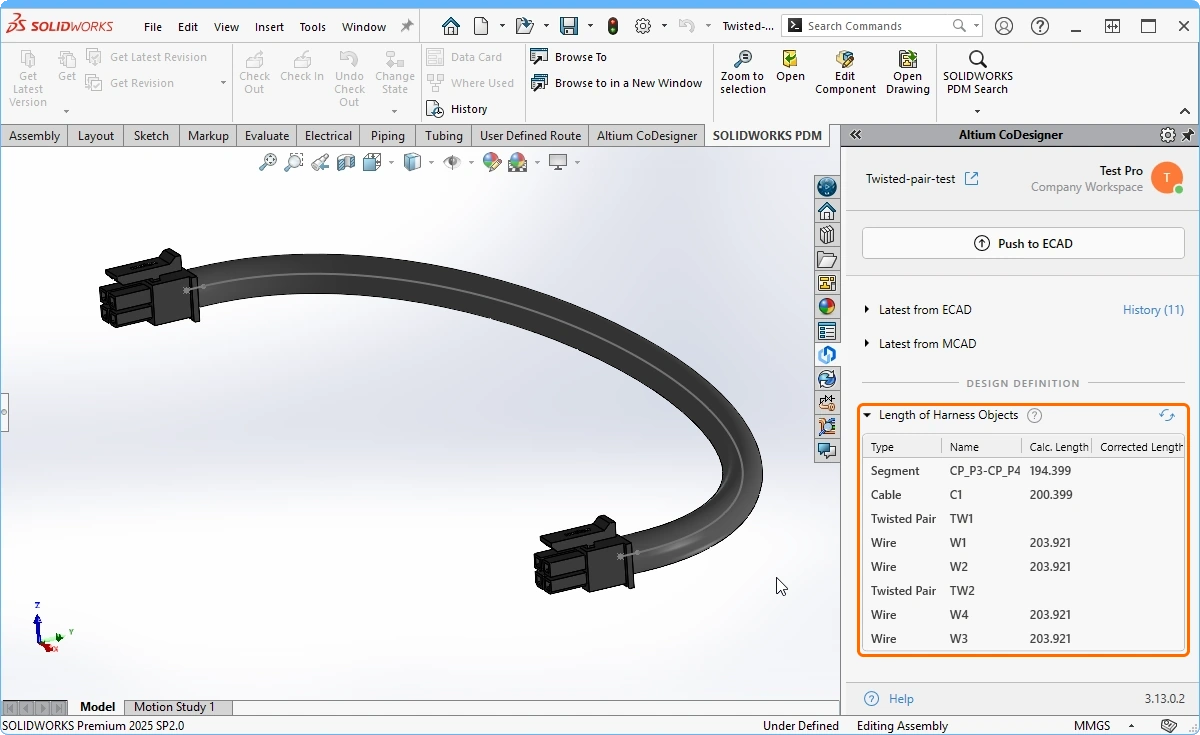 Twisted pairs are supported by transferring the pair as individual wires, with the twist properties applied.
Option to exclude the PCB Route Tool Path in MCAD
While the route tool path is essential for fabrication it is often not required during MCAD design, when the mechanical engineer needs to focus on fitting the board into the product enclosure. To support this, the Altium CoDesigner Settings dialog now includes the Build Route Tool Path checkbox, configure this as required. Note the Route Tool Path is always pushed from ECAD, this option controls if it is pulled into MCAD.
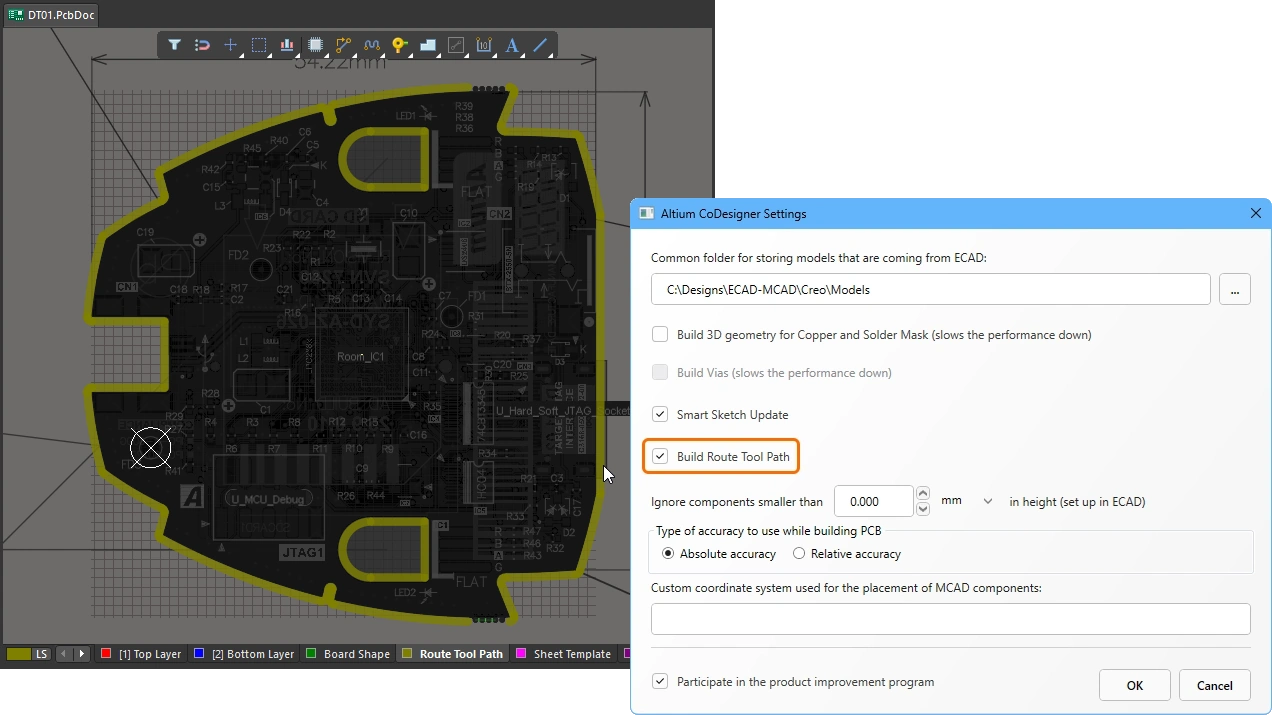 Choose if the Route Tool Path is to be included in the pull into MCAD.
Support for PTC Creo v12
Support for PTC Creo v12 has been added in the 3.13 update to Altium MCAD CoDesigner.
 Altium MCAD CoDesigner now supports PTC Creo V12 (image courtesy of PTC).
Support for Autodesk Inventor 2026
Support for Autodesk Inventor 2026 has been added in the 3.13 update to Altium MCAD CoDesigner.
 Altium MCAD CoDesigner now supports Autodesk Inventor 2026 (image courtesy of Autodesk).
Support for Siemens NX 2506
Support for Siemens NX 2506 has been added in the 3.13 update to Altium MCAD CoDesigner.
Versions Supported
-
Altium Designer 24.8 (or higher) with MCAD CoDesigner extension version 3.13.0.2437
-
CoDesigner 3.3 is the latest version available for Altium NEXUS Client.
-
CoDesigner 2.10 is the latest version available for Altium CircuitMaker.
This update has been tested on the following MCAD platforms and Add-in versions:
| MCAD Version | MCAD Add-In Version |
|---|---|
| Autodesk Fusion® (Note 1) | 3.13.0.2 |
| Autodesk Inventor Professional® - version 2024 | 3.13.0.2 |
| Autodesk Inventor Professional® - versions 2025, 2026 | 3.13.0.2 |
| Dassault Systemes SOLIDWORKS® - versions 2022, 2023, 2024, 2025 | 3.13.0.2 |
| PTC Creo Parametric® - 9.X, 10.X, 11.X, 12.X | 3.13.0.2 |
| Siemens NX® - version 2206<2212 (Note 2) | 3.13.0.2 |
| Siemens NX® - version 2212<2312 (Note 2) | 3.13.0.2 |
| Siemens NX® - version 2312-2506 (Note 2) | 3.13.0.2 |
Notes:
-
Altium CircuitMaker only supports Autodesk Fusion.
-
Siemens NX is only available to designers as part of an Altium Enterprise Solution. From MCAD CoDesigner 3.8 onwards, there are multiple versions of the installer for MCAD CoDesigner for Siemens NX, to suit different versions of the Siemens NX software. These installers all install identical versions of MCAD CoDesigner, they differ only in their detection of the currently installed version of Siemens NX. For MCAD CoDesigner 3.7 and older there is a single installer, and after installation of MCAD CoDesigner Siemens NX may show a warning when launched that the difference between the current version and the signed version is too great. This warning can be ignored, your installation of MCAD CoDesigner will function correctly. Alternatively, the Show Warning when Loading option in the Customer Defaults dialog in Siemens NX, can be disabled (
).
Release Notes for CoDesigner 3.13.0
| MCAD-5166 | On push from MCAD, CoDesigner now saves the MCAD parts defined as being part of the PCB enclosure, to avoid getting an outdated (unsaved) revision of the enclosure in ECAD. |
| MCAD-5334 | Building the PCB Route Tool Path entities in MCAD in now optional, controlled by the corresponding option in the MCAD CoDesigner settings. Note: The default state is ON (to maintain compatibility with previous versions), however it is recommended to turn the option OFF to avoid the Route Tool Path entities potentially corrupting the edges of the PCB. |
| MCAD-5426 | Harness sync: CoDesigner now synchronizes Cables which include Twisted Pairs. The wires from a twisted pair are now transferred as individual wires while respecting their twist properties. |
| MCAD-5460 | PTC Creo v. 12.4 is now supported. |
| MCAD-5463 | Autodesk Inventor 2026 is now supported. |
| MCAD-5510 | Harness sync: The default distance between wires in splices in MCAD has been decreased from 2.5 mm to 1 mm, so that the wires do not look physically "disconnected" anymore. |
| MCAD-5515 | PTC Creo: If a PCB assembly was marked as Inseparable by the user, CoDesigner showed many warning messages about its inability to work with such an assembly. Because those multiple messages were inconvenient for the user, that messaging is now disabled (note that Inseparable assemblies are still not supported). |
| MCAD-5517 | CoDesigner Installer for PTC Creo: the list of Creo versions was outdated and not scrollable. Fixed. |
| MCAD-5578 | Harness sync: In ECAD, on pulling changes from MCAD, CoDesigner did not set up the physical length for newly created wires (if the length was not set up before pulling). Fixed. Note: this problem appeared in CoDesigner v. 3.12 only. |
| MCAD-5589 | Siemens NX 2506 in now supported. |
New in CoDesigner 3.12.0
Released: 11 June 2025 – Version 3.12.0 Hot Fix for Siemens NX (MCAD Add-ins version change)
Released: 26 May 2025 – Version 3.12.0
Feature Highlights
Warning when performing a fresh Pull of a Project
To help the mechanical engineer avoid inadvertently pulling a fresh copy of a project from ECAD, CoDesigner's Select Project dialog now displays a warning icon, alerting the engineer that the project has already been pulled. Note that the engineer is free to Pull a new copy of the project, if they wish.
 The Select Project dialog now includes a warning icon if the selected project has already been Pulled into MCAD.
Separate CoDesigner panel for Siemens NX
In previous versions of Altium MCAD CoDesigner for Siemens NX, the Altium CoDesigner panel presented as a tab in the Siemens NX panel. This meant that the panel had to respect all existing Siemens NX shortcut keys, which could result in unexpected behavior when a user would type in a username, password, or comment into the CoDesigner panel. To resolve this, the panel has been removed from the default NX panel and now presents as a separate floating panel.
 The Altium CoDesigner panel now presents as a separate floating panel in Siemens NX, ensuring that keystrokes entered into it are not interpreted as NX shortcut keys.
Versions Supported
-
Altium Designer 24.8 (or higher) with MCAD CoDesigner extension version 3.12.0.2414
-
CoDesigner 3.3 is the latest version available for Altium NEXUS Client.
-
CoDesigner 2.10 is the latest version available for Altium CircuitMaker.
This update has been tested on the following MCAD platforms and Add-in versions:
| MCAD Version | MCAD Add-In Version |
|---|---|
| Autodesk Fusion® (Note 1) | 3.12.0.3 |
| Autodesk Inventor Professional® - version 2024 | 3.12.0.4 |
| Autodesk Inventor Professional® - version 2025 | 3.12.0.5 |
| Dassault Systemes SOLIDWORKS® - versions 2022, 2023, 2024, 2025 | 3.12.0.11 |
| PTC Creo Parametric® - 8.X, 9.X, 10.X, 11.X | 3.12.0.11 |
| Siemens NX® - version 2206<2212 (Note 2) | 3.12.0.15 |
| Siemens NX® - version 2212<2312 (Note 2) | 3.12.0.9 |
| Siemens NX® - version 2312-2412 (Note 2) | 3.12.0.12 |
Notes:
-
Altium CircuitMaker only supports Autodesk Fusion.
-
Siemens NX is only available to designers as part of an Altium Enterprise Solution. From MCAD CoDesigner 3.8 onwards, there are multiple versions of the installer for MCAD CoDesigner for Siemens NX, to suit different versions of the Siemens NX software. These installers all install identical versions of MCAD CoDesigner, they differ only in their detection of the currently installed version of Siemens NX. For MCAD CoDesigner 3.7 and older there is a single installer, and after installation of MCAD CoDesigner Siemens NX may show a warning when launched that the difference between the current version and the signed version is too great. This warning can be ignored, your installation of MCAD CoDesigner will function correctly. Alternatively, the Show Warning when Loading option in the Customer Defaults dialog in Siemens NX, can be disabled (
).
Release Notes for CoDesigner 3.12.0
| MCAD-4388 | Siemens NX: CoDesigner now appears as a floating panel (previously, it was built into the native UI in NX). This has been done to solve the problem with entering reserved characters into the panel fields in NX v.2306 and newer. |
| MCAD-4983 | Harness Sync: CoDesigner now transfers the "Mass Per Unit Length" property for wires/cables from ECAD to MCAD (allowing the calculation of the mass of a wire harness). Note: Mass Units can be specified in one of the following ways: a) As a separate "Mass Units" (MASS_UNITS) param. In this case, it should be just mass units, not mass/length units, b) As a suffix in the value of "Mass Per Unit Length". In this case, it should be specified to suit the requirements of the MCAD being used. For example, for Creo, it should be the mass units, whereas for SOLIDWORKS it should be mass/length units. If both are specified, the units in the value of "Mass Per Unit Length" have priority. |
| MCAD-5180 | CoDesigner now informs the Mechanical Engineer if the project selected for the initial pull has been pulled previously (the notification appears as an icon with the corresponding tooltip in the sidebar with the project properties). This helps prevent duplications/conflicts in MCAD storage. |
| MCAD-5255 | PTC Creo: CoDesigner plug-in was not digitally signed, which caused security alerts. Fixed. |
| MCAD-5268 | Harness sync: CoDesigner now respects the model naming rules (set up in the Altium Workspace) when assigning the name to the connector models. Note 1: Previously, the models were named according to the footprint name only. Note 2: With the new naming mechanism, the previously created models will be kept in MCAD as they are, however the new models with the new name will be used on a fresh pull for new projects. Note 3: The newly created model will not have the physical pins, so the MCAD user will need to do one of the following: a) Create the physical pins again, b) Use the native ECAD-to-MCAD placement for referring the previously created model, c) Clone the previously created model, with the name of the newly created model. |
| MCAD-5282 | Harness sync: Native ECAD-to-MCAD model placement is now supported for harness connectors for SOLIDWORKS & SW PDM, allowing legacy connector libs to be re-used by CoDesigner. Note: unlike the PCB components, the harness connectors should be mapped in ECAD to refer to the value of "CompName" property from "components.xml" on the MCAD side. |
| MCAD-5342 | Siemens NX integrated with Teamcenter: The behavior with saving PCB components has changed: now, if the "Common folder for storing component models" in CoDesigner settings is pointing to a local folder, the components are not registered in Teamcenter, they are only stored in that local folder. Note 1: The PCB Assembly and PCB Part are still saved in Teamcenter. Note 2: The purpose of this change is to allow for faster pulling of new PCBs and to skip registering PCB components into Teamcenter when it is not necessary. |
| MCAD-5372 | Harness sync: For connectors defined in a local lib in ECAD, after making changes to them in ECAD, CoDesigner recreated their models in SOLIDWORKS instead of creating the new files (which caused the loss of physical pins created on the previously transferred connectors). Fixed. |
| MCAD-5379 | Siemens NX: Rooms were added instead of keepouts if CoDesigner was configured to use imperial units. Fixed. |
| MCAD-5399 | PTC Creo: For components that include parameters with long string values, CoDesigner tried to update those parameters on each pull into MCAD, affecting the performance and causing user confusion. CoDesigner now ignores those parameters. |
| MCAD-5402 | SOLIDWORKS: Crashed on attempt to create a keepout or room on a rigid-flex 2.0 design. Fixed. |
| MCAD-5410 | PTC Creo: For components that included parameters using names reserved by Creo, CoDesigner tried to add those parameters on each pull in MCAD, affecting the performance and causing user confusion. CoDesigner now ignores those parameters and shows corresponding warnings. |
| MCAD-5470 | Harness sync for SOLIDWORKS: CoDesigner no longer applies the "Part Number" property to wires and cables in SOLIDWORKS. Note 1: the assignment was introduced in CoDesigner 3.8. Note 2: The reason for removal is that duplicated Part Numbers caused side effects as SOLIDWORKS uses that property as an internal wire/cable identifier which is in conflict with how CoDesigner identifies wires and cables. |
New in CoDesigner 3.11.0
Released: 11 March 2025 – Version 3.11.0
Feature Highlights
Rigid-Flex Support for Siemens NX
This release of MCAD CoDesigner adds support for transferring rigid-flex designs between Altium Designer and Siemens NX. Altium Designer offers two modes of rigid-flex design, CoDesigner for Siemens NX supports the Advanced Rigid-Flex (or RF2) mode.
Key features include:
-
Any number of rigid and flex regions.
-
Flex regions with different thicknesses.
-
Separate flexible regions that overlap each other.
-
Representation of the copper and silkscreen on the rigid regions in MCAD.
-
A local bend (a bend that is localized to a flex region that is within a cutout in a larger flex region).
Learn more about rigid-flex CoDesign with Siemens NX.
 A rigid-flex design can now be Pushed back and forth between Siemens NX and Altium Designer.
Structure of an Advanced Rigid-Flex (RF2) Board in MCAD
Below is a summary of the Siemens NX structure of an Advanced Rigid-Flex board:
-
Each rigid region of an RF2 design is represented by an Assembly, which includes that rigid part (region) of the board, and components mounted on that region (very similar to how a rigid PCB is modeled in Siemens NX).
-
Each flex region of the board is represented by a sheet metal part. Within this part, each ECAD Bend Line is defined as a Sketched Bend. Note that a bend that can be Pushed from ECAD might not be formed correctly in Siemens NX, due to the bend requirements. Also, note that components on flex regions are not yet supported.
-
For cutouts that extend through multiple board regions, separate cut extrudes are created in MCAD. If the mechanical engineer wants to change the shape of such a cutout in Siemens NX, they will need to change all of those extrudes.
Notes on Working with an Advanced Rigid Flex Board
-
When designing an RF2 board in ECAD, each rigid and flex region of the board is drawn as a separate object, which then has a substack assigned to it (whereas in an RF1 board you define a single overall board shape, and then place Split Lines to divide the shape into the required board regions). Gaps between adjacent regions in an RF2 design are not permitted, they must exactly touch, or overlap. If two regions overlap, the software assumes that the shared zone belongs to the region with the greater number of layers. Using this knowledge, it can be easier to extend a flexible region into the adjacent rigid region if it is difficult to align their edges. Learn more about Planning Rigid & Flex Regions - Advanced Mode.
-
The ECAD PCB editor includes a number of tools to help create regions from existing line/arc objects, learn more about Creating Board Regions from Selected Objects.
-
In ECAD, each unique set of layers (substack) must be defined, either by copying existing layers to create the new substack or by adding layers to define a unique substack. Learn more about Adding and Editing a New Substack.
-
RF2 mode supports flexible regions that overlap each other in the 3-dimensional space. To support this, when a Bend Line is placed in Board Planning Mode in ECAD the designer must define which flexible Stack Region that the Bend is applied to (
 ). If this is not done, an unaffected region warning will be displayed when the design is Pushed from ECAD to MCAD (
 ).
).
-
The structure of the ECAD PCB assembly in RF2 mode differs from the structure of the assembly in RF1, so if the mode is switched from RF1 to RF2it is recommended to do a fresh Pull of the board in MCAD.
-
When editing the geometry of the PCB in MCAD, keep in mind that there is no associativity between the geometry of the neighboring regions. If the geometry of one region is modified, you must also adjust the geometry of the neighboring region to suit.
-
If you make significant changes to the geometry, for example, change the set of edges, the constraints in MCAD may be broken. This is normal, they will be restored on the next MCAD-ECAD-MCAD synchronization.
-
After making changes to a bend, an MCAD Rebuild operation will be required in most cases.
-
At this stage, the creation of new regions and bends in MCAD is not supported.
-
In MCAD, defining Keep Out Areas (ECAD Keepouts), Text Note Rooms (ECAD Rooms) and building 3D copper, are not currently supported for rigid-flex boards.
-
Building 3D copper and specifying the enclosure in the PCB definition in MCAD (and sending the enclosure to ECAD), are not currently supported for rigid-flex boards.
-
If your designs are stored in Altium 365, the automatic push that happens after you Save the project to the server in ECAD will not process your rigid-flex board changes (because the server-side automatic push feature does not support ECAD RF2 changes yet). After saving a rigid-flex project to the server in ECAD, you must also manually Push your PCB in the MCAD CoDesigner panel.
-
The flexible regions of your PCB design are modeled in Siemens NX as sheet metal. Siemens NX has its own set of tests that it applies to verify that a bend can be formed in the sheet metal, taking into consideration the:
-
Board thickness
-
Bend Radius
-
Bending angle
-
Distance between bending area and region border
-
Multi-board Synchronization with Autodesk Inventor
The process of assembling the PCBs into the enclosure is best performed in MCAD. But the PCBs will be designed in ECAD, and the ECAD engineer may also need to perform electro-mechanical checks like component-to-enclosure clearances, as well as checking the access to the human interface elements, such as indicators and displays, buttons, and connectors. There are numerous advantages to being able to synchronize the entire device assembly between the MCAD and ECAD domains, so that the current state of the assembled device can be quickly verified by both the mechanical and electronic design teams.
This release of Altium MCAD CoDesigner brings support for synchronizing a multi-board assembly between Autodesk Inventor and Altium Designer.
|
The PCBs have been positioned and the enclosure placed in Autodesk Inventor, these changes are ready to Push to ECAD. The ECAD engineer receives a message that the assembly has been modified in MCAD, there are changes ready to apply. The board location changes and the enclosure parts are Pulled into ECAD. |


Learn more about Synchronizing a Multi-board Assembly.
MCAD Support for Embedded Component Cavities
The ever-increasing demand for smaller and more integrated electronic products, combined with the higher frequency signals within these devices, drives the ongoing research into better ways to fabricate and assemble a circuit. One technique that delivers both higher density and improved support for higher signal frequencies, is to embed components within the layers of the printed circuit board structure.
This update to MCAD CoDesigner sees the introduction of support for transferring board designs that include embedded components, along with their associated cavities, from ECAD to MCAD.
In ECAD, the region object that defines the shape of the cavity includes a Cavity Height property, this defines the height of the cutout required in the dielectric layer. The ECAD PCB editor then automatically extends this height through the dielectric layer that the cavity is being created in, up to the next copper layer in the layer stack, to give the actual Total Cavity Height.
In MCAD, the cavity shape is defined as an extruded sketch on the board part, with the extruded height set to the Total Cavity Height. Note that embedded component location changes are synchronized from MCAD to ECAD, but cavity edits are not. If an embedded component is relocated in MCAD, there is no need to relocate the cavity. Positional changes to the cavity are automatically resolved when the affected component's location is synchronized from MCAD-to-ECAD-to-MCAD.
|
Each cavity is formed as an extruded sketch on the board part. A cavity can create an opening in the board surface, or be completely internal. In ECAD the cavity is defined from the layer the component is placed on, through to the next copper layer. |


Learn more about Designing a PCB with Embedded Components.
Versions Supported
-
Altium Designer 24.8 (or higher) with MCAD CoDesigner extension version 3.11.0.2380
-
CoDesigner 3.3 is the latest version available for Altium NEXUS Client.
-
CoDesigner 2.10 is the latest version available for Altium CircuitMaker.
This update has been tested on the following MCAD platforms and Add-in versions:
| MCAD Version | MCAD Add-In Version |
|---|---|
| Autodesk Fusion® (Note 1) | 3.11.0.9 |
| Autodesk Inventor Professional® - version 2024 | 3.11.0.13 |
| Autodesk Inventor Professional® - version 2025 | 3.11.0.12 |
| Dassault Systemes SOLIDWORKS® - versions 2022, 2023, 2024, 2025 | 3.11.0.10 |
| PTC Creo Parametric® - 8.X, 9.X, 10.X, 11.X | 3.11.0.8 |
| Siemens NX® - version 2206<2212 (Note 2) | 3.11.0.13 |
| Siemens NX® - version 2212<2312 (Note 2) | 3.11.0.13 |
| Siemens NX® - version 2312-2412 (Note 2) | 3.11.0.14 |
Notes:
-
Altium CircuitMaker only supports Autodesk Fusion.
-
Siemens NX is only available to designers as part of an Altium Enterprise Solution. From MCAD CoDesigner 3.8 onwards, there are multiple versions of the installer for MCAD CoDesigner for Siemens NX, to suit different versions of the Siemens NX software. These installers all install identical versions of MCAD CoDesigner, they differ only in their detection of the currently installed version of Siemens NX. For MCAD CoDesigner 3.7 and older there is a single installer, and after installation of MCAD CoDesigner Siemens NX may show a warning when launched that the difference between the current version and the signed version is too great. This warning can be ignored, your installation of MCAD CoDesigner will function correctly. Alternatively, the Show Warning when Loading option in the Customer Defaults dialog in Siemens NX, can be disabled (
).
Release Notes for CoDesigner 3.11.0
| MCAD-1545 | CoDesigner now supports building 3D Cavities for Embedded Components in MCAD. |
| MCAD-3286 | Autodesk Inventor: CoDesigner now supports synchronizing Multiboard assemblies with Autodesk Inventor. |
| MCAD-3749 | Using Single Sign On, CoDesigner now saves the email address for future use. |
| MCAD-5030 | Siemens NX: Previewing changes during Multiboard synchronization is now supported. |
| MCAD-5047 | Inventor 2025: When working with an on-prem server, CoDesigner did not allow dropping a session already started on another PC. Fixed. |
| MCAD-5064 | Siemens NX: CoDesigner now supports the synchronization of rigid-flex PCBs. Note: This capability is currently available in Beta mode. The key limitation of this Beta release is that some changes made to the PCB shape in MCAD may not be synchronized correctly back to ECAD, it is recommended to check the sync results in ECAD. |
| MCAD-5068 | PTC Creo: In some cases, CoDesigner could not use the custom templates when creating PCB components in Creo. The mechanism has been improved. |
| MCAD-5119 | After recent changes in ECAD, it was no longer possible to copy the text of warning messages from the ECAD error/warning dialog. Fixed. |
| MCAD-5130 | PTC Creo: During start up, CoDesigner now detects if Creo has been updated to a newer version, and if so warns the user (CoDesigner should be re-installed in this situation). |
| MCAD-5143 | Siemens NX: When using the "Build 3D Copper" option in combination with the "Imperial units" system in the CoDesigner settings, holes in the Interlayer were not drilled. Fixed. |
| MCAD-5165 | The "Make available online" button in the MCAD CoDesigner panel was not active for a local Harness project. Fixed. |
| MCAD-5225 | Autodesk Inventor: Reference designators are now shown for components in the model tree (they are added to the name of component instance). |
| MCAD-5226 | PTC Creo: Harness synchronization, a missing "CS0" coordinate system in the model of the harness connector caused Creo to crash. Fixed. |
| MCAD-5267 | SOLIDWORKS: During harness synchronization, the default C-Points for connectors are now created at the point with 0,0,0 coordinates. Previously, they were created with 100 mil offset from X and Y (100,100,0). |
| MCAD-5278 | When MCAD-to-ECAD component recognition is enabled in the Altium Workspace and some of the components could not be found in the ECAD library, CoDesigner was not correctly reporting which components were not located. The warning has been disabled. |
| MCAD-5298 | CoDesigner was not able to recognize 3D fillets and chamfers created on the board cutout corners in Creo (and to suggest transforming them to 2D features accordingly). Fixed. |
| MCAD-5300 | CoDesigner was not able to recognize 3D fillets and chamfers created in Creo when the user selected multiple edges and then applied the feature to all of them. Fixed. |
| MCAD-5333 | Harness sync: CoDesigner was not able to properly process cables which included wires with "no-connect" points at their ends. Fixed. |
New in CoDesigner 3.10.0
Released: 4 December 2024 – Version 3.10.0 Hot Fix for SOLIDWORKS
Released: 6 November 2024 – Version 3.10.0
Feature Highlights
Support for Single Layer PCBs
Despite their relative simplicity, single layer, or single-sided PCBs continue to be one of the most commonly used circuit boards, due to their simplicity and lower cost. Previously, single layer pcbs were not fully supported in ECAD, and could not be pushed to MCAD. Single-layer PCBs are now fully supported in ECAD and can also be pushed to MCAD. This support extends to rigid-flex designs that only use a single copper layer.
 CoDesigner can now transfer single copper layer PCBs between ECAD and MCAD.
Multi-board Support for Siemens NX
The process of assembling the PCBs into the enclosure is best performed in MCAD. But the PCBs will be designed in ECAD, and the ECAD engineer may also need to perform electro-mechanical checks like component-to-enclosure clearances, as well as checking the access to the human interface elements, such as indicators and displays, buttons, and connectors. There are numerous advantages to being able to synchronize the entire device assembly between the MCAD and ECAD domains, so that the current state of the assembled device can be quickly verified by both the mechanical and electronic design teams.
This release of Altium MCAD CoDesigner brings support for synchronizing a multi-board assembly between Siemens NX and Altium Designer.
|
The boards and enclosure are assembled in MCAD. The assembly is linked to the ECAD multi-board assembly. And then the entire assembly is pushed to ECAD. The changes are Pulled into the ECAD multi-board assembly. To show the complete assembly in ECAD. |


Learn more about Synchronizing a Multi-board Assembly.
Harness Design Improvements
MCAD CoDesigner's support for ECAD-MCAD harness synchronization continues to improve, with the following updates:
-
Flexibility with how the units are specified – On push from ECAD, CoDesigner now checks for and recognizes basic units that have been included with the dimensional values of the wire and cable properties, and sets the corresponding values in MCAD. Previously, the only way to specify the units was to include an additional Units parameter, and exclude the units from the dimensional value. Now both ways are supported, the designer is free to continue to separate the value and unit type, or to include the unit type with the parameter value.
 Units can now be included with the value.
-
Support for connector pins that do not include a numeric identifier – CoDesigner now supports the use of non-numeric identifiers for connector pins in a harness design.
Learn more about Synchronizing a Harness Design Project.
Support for SOLIDWORKS 2025
Support for SOLIDWORKS 2025 has been added in the Hot Fix to the 3.10 update to Altium MCAD CoDesigner.
Versions Supported
-
Altium Designer 24.8 (or higher) with MCAD CoDesigner extension version 3.10.0.2312
-
CoDesigner 3.3 is the latest version available for Altium NEXUS Client.
-
CoDesigner 2.10 is the latest version available for Altium CircuitMaker.
This update has been tested on the following MCAD platforms and Add-in versions:
| MCAD Version | MCAD Add-In Version |
|---|---|
| Autodesk Fusion® (Note 1) | 3.10.0.7 |
| Autodesk Inventor Professional® - version 2024 | 3.10.0.4 |
| Autodesk Inventor Professional® - version 2025 | 3.10.0.4 |
| Dassault Systemes SOLIDWORKS® - versions 2021, 2022, 2023, 2024, 2025 | 3.10.0.6 |
| PTC Creo Parametric® - 8.X, 9.X, 10.X, 11.X | 3.10.0.5 |
| Siemens NX® - version 2206<2212 (Note 2) | 3.10.0.4 |
| Siemens NX® - version 2212<2312 (Note 2) | 3.10.0.4 |
| Siemens NX® - version 2312 (Note 2) | 3.10.0.4 |
Notes:
-
Altium CircuitMaker only supports Autodesk Fusion.
-
Siemens NX is only available to designers as part of an Altium Enterprise Solution. From MCAD CoDesigner 3.8 onwards, there are multiple versions of the installer for MCAD CoDesigner for Siemens NX, to suit different versions of the Siemens NX software. These installers all install identical versions of MCAD CoDesigner, they differ only in their detection of the currently installed version of Siemens NX. For MCAD CoDesigner 3.7 and older there is a single installer, and after installation of MCAD CoDesigner Siemens NX may show a warning when launched that the difference between the current version and the signed version is too great. This warning can be ignored, your installation of MCAD CoDesigner will function correctly. Alternatively, the Show Warning when Loading option in the Customer Defaults dialog in Siemens NX, can be disabled (
).
Release Notes for CoDesigner 3.10.0 Hot Fix for SOLIDWORKS 2025
| MCAD-5207 | SOLIDWORKS 2025 is now supported. |
Release Notes for CoDesigner 3.10.0
| MCAD-3287 | Siemens NX: synchronization of Multiboard projects is now supported. |
| MCAD-4533 | CoDesigner now supports synchronizing a single-layer PCB. |
| MCAD-4751 | Harness sync: CoDesigner now supports the use of non-numeric identifiers for connector pins. |
| MCAD-4976 | On Altium 365, an ECAD push now occurs automatically when a Save to Server is performed on a Multiboard project (in the same way it does for PCB projects). |
| MCAD-5008 | Autodesk Fusion: CoDesigner now detects if the (recently introduced) Fusion setting "First component grounded to parent" is ON and warns the user about this, to prevent the wrong placement of components. |
| MCAD-5015 | PTC Creo: the logic used for calculating the harness segment length has been improved, which will decrease the number of cases where the length can not be calculated. |
| MCAD-5076 | Harness sync: In SOLIDWORKS, if SOLIDWORKS PDM was used and the harness elements were not checked out before pulling changes from ECAD, CoDesigner showed a common error and failed to pull the design. Fixed (CoDesigner now warns the user). |
| MCAD-5091 | Harness sync: Redundant empty MCAD models were created for ECAD's "No Connect" entities if there were no wires connected to them (for example, when "No Connect" entities were attached directly to the connector pins). Fixed. |
| MCAD-5103 | Harness sync: On push from ECAD, CoDesigner now recognizes basic units which are put in the values of the wire and cable properties and sets the corresponding values in MCAD. Note 1: the units which are now recognized: "mm", "in", "mil". Note 2: Previously, the only way to set up units was to put the param values without units and create an additional "Units" param. Now, both ways are supported. |
| MCAD-5108 | 3D Copper for Vias was incorrectly built in PTC Creo, Autodesk Inventor and Siemens NX. Fixed. |
New in CoDesigner 3.9.0
Released: 21 August 2024 – Version 3.9.0 Hot Fix (MCAD CoDesigner extension change to version 3.9.0.2208)
Released: 8 August 2024 – Version 3.9.0 Hot Fix for Autodesk Inventor
Released: 24 July 2024 – Version 3.9.0
Feature Highlights
Support for MCAD Fillets and Chamfers
A common approach for a mechanical engineer is to apply chamfers and fillets to shape the corners of the board. If these are defined in MCAD as a 3D entities, CoDesigner cannot transfer them to ECAD because the ECAD PCB editor defines the board shape as a 2D object (with a thickness). To help with this, when the 3.9 update of CoDesigner detects such an entity, it offers to convert them to 2D entities and embed them into the board sketch. Previously, CoDesigner warned the mechanical engineer about the existence of such entities, but they were ignored.
 3D MCAD fillets and chamfers applied to a z-axis edge can be transformed to 2D by CoDesigner, and pushed to ECAD.
Fillet and chamfer support:
-
Regular (circular) fillets with a constant radius are supported. (
 )
)
-
Chamfers defined by equal distances from the edge (symmetric distance-distance) are supported. (
 )
)
-
Chamfers defined as an angle-distance (
 ), or non-symmetric distance-distance, are not supported.
-
Fillets and chamfers defined on non-straight side edges, as well as on other fillets and chamfers, are not supported.
-
Fillets and chamfers defined on a rigid-flex design are not supported.
The Fillet and Chamfer Transformation Process
-
When you click Push to ECAD in the Altium CoDesigner panel and 3D entities are detected, the following dialog is displayed.

-
If you click Yes - the 3D entities are transformed into 2D entities and applied to the board sketch. Note that CoDesigner has not performed the Push yet. The following dialog will appear, instructing you to Push again to transfer the design to ECAD. Visually confirm that the transformation has been performed correctly, then click Push to ECAD in the Altium CoDesigner panel to continue the collaborative design process.

-
If you click No - the 3D entities are not transformed and the following dialog is displayed, listing all 3D entities that will not be transferred to ECAD. This dialog is also displayed when there are 3D entities that CoDesigner cannot transform to 2D.

Smart Sketch Changes in MCAD
Consider the situation where the ECAD engineer needs to modify the board shape, and that shape has dimensions and constraints applied in MCAD. Previously, the dimensions and constraints in MCAD's sketch would be lost when the board was Pulled back into MCAD. The 3.9 update to CoDesigner greatly improves this. During a Pull, CoDesigner now redraws only the elements of a sketch which were changed in ECAD, so that the dimensions and constraints related to non-changed elements are kept as they were.
Note that in some cases, for example where there are complex mechanical constraints, this behavior may lead to unexpected changes in the geometry. In such cases, it may be more efficient to disable this new smart sketch support feature and Pull again, then recreate the dimensions and constraints (as was required in earlier versions of CoDesigner). That can be achieved by disabling the Smart Sketch Change option in the MCAD Altium CoDesigner Settings dialog.
Smart dimensions that are not impacted by design changes, are retained during a Pull from ECAD.
Pull a Previous Revision of the PCB into MCAD
The mechanical engineer sometimes needs to open a previous release or revision of a PCB design. Previously, that meant they had to ask the ECAD engineer to restore a previous revision temporarily and push that revision to MCAD. The 3.9 update to Altium CoDesigner resolves that, with the introduction of support for Pulling any of the previous Pushes performed in ECAD.
Pulling into an empty MCAD assembly, the mechanical engineer can now select which revision to Pull from a list of previous Pushes. If the ECAD commits have been tagged, then they can quickly filter the list by enabling the Only show tagged commits option in the Select Push dialog.
 Use the Select Push dialog to select a previous revision, from all revisions Pushed in ECAD.
Support for PTC Creo 11
Support for PTC Creo Version 11 has been added in the 3.9 update to Altium MCAD CoDesigner.
 Altium MCAD CoDesigner now supports PTC Creo V11 (image courtesy of PTC).
Support for Autodesk Inventor 2025
Support for Autodesk Inventor 2025 has been added in the Hot Fix to the 3.9 update to Altium MCAD CoDesigner.
 Altium MCAD CoDesigner now supports Autodesk Inventor 2025 (image courtesy of Autodesk).
Versions Supported
-
Altium Designer 24.7 (or higher) with MCAD CoDesigner extension version 3.9.0.2208
-
CoDesigner 3.3 is the latest version available for Altium NEXUS Client.
-
CoDesigner 2.10 is the latest version available for Altium CircuitMaker.
This update has been tested on the following MCAD platforms and Add-in versions:
| MCAD Version | MCAD Add-In Version |
|---|---|
| Autodesk Fusion® (Note 1) | 3.9.0.12 |
| Autodesk Inventor Professional® - version 2024 | 3.9.0.8 |
| Autodesk Inventor Professional® - version 2025 | 3.9.1.7 |
| Dassault Systemes SOLIDWORKS® - versions 2021, 2022, 2023, 2024 | 3.9.0.9 |
| PTC Creo Parametric® - 8.X, 9.X, 10.X, 11.X | 3.9.0.9 |
| Siemens NX® - version 1953<2212 (Note 2) | 3.9.0.15 |
| Siemens NX® - version 2212<2312 (Note 2) | 3.9.0.17 |
| Siemens NX® - version 2312 (Note 2) | 3.9.0.16 |
Notes:
-
Altium CircuitMaker only supports Autodesk Fusion.
-
Siemens NX is only available to designers as part of an Altium Enterprise Solution. From MCAD CoDesigner 3.8 onwards, there are multiple versions of the installer for MCAD CoDesigner for Siemens NX, to suit different versions of the Siemens NX software. These installers all install identical versions of MCAD CoDesigner, they differ only in their detection of the currently installed version of Siemens NX. For MCAD CoDesigner 3.7 and older there is a single installer, and after installation of MCAD CoDesigner Siemens NX may show a warning when launched that the difference between the current version and the signed version is too great. This warning can be ignored, your installation of MCAD CoDesigner will function correctly. Alternatively, the Show Warning when Loading option in the Customer Defaults dialog in Siemens NX, can be disabled (
).
Release Notes for CoDesigner 3.9.0 Hot Fix (MCAD CoDesigner extension change to version 3.9.0.2208)
Internal updates only.
Release Notes for CoDesigner 3.9.0 Hot Fix for Autodesk Inventor 2025
| MCAD-4832 | Autodesk Inventor 2025 is now supported. |
Release Notes for CoDesigner 3.9.0
| MCAD-4599 | On applying changes to the board sketch in MCAD, CoDesigner now retains the elements of the board sketch that were not changed in ECAD. This means the mechanical engineer no longer needs to restore the corresponding mechanical dimensions and constraints when the board shape was changed in ECAD. Note: In some cases (eg with complex mechanical constraints), this behavior may lead to unexpected changes in the geometry. In such cases, it may be more efficient to disable this behavior and to redraw the sketch completely (as it happened before). For that purpose, the "Smart Sketch Change" option can be turned OFF in CoDesigner's settings. |
| MCAD-4600 | In MCAD, CoDesigner now transforms typical 3D fillets and chamfers created by the ME on the vertical edges of the PCB (edges along the Z-axis), to the corresponding elements of the board sketch. Note 1: Previously, CoDesigner just warned ME about such entities. Note 2: For fillets, only regular fillets with a constant radius are supported. For chamfers, only chamfers defined by equal distances from the edge are supported. Fillets and chamfers defined on non-straight side edges as well as on other fillets and chamfers are not supported. As before, CoDesigner will warn the ME about unsupported fillets and chamfers. |
| MCAD-4683 | Siemens NX: Resolved incorrect Free 3D Body transfers from MCAD to ECAD, when the Free 3D Body geometry is based on geometry that is outside of the Free 3D Body. |
| MCAD-4804 | Autodesk Fusion: CoDesigner now respects custom construction geometry in the board sketch. It is not considered to be part of the board outline, and not modified when the board sketch is updated. |
| MCAD-4835 | PTC Creo 11 is now supported. |
| MCAD-4848 | In MCAD, CoDesigner now supports Pulling any of the previous Pushes performed in ECAD. Note 1: The policy for Automatic Pushes from ECAD has changed. Starting May 2024, Auto-Pushes are only performed on a project that has been Pulled into MCAD at least once. Note 2: The feature is not available under a Standard subscription. |
| MCAD-4925 | Siemens NX: a configuration setting has been added to ignore components that cannot be obtained from Teamcenter during a Pull into MCAD. To enable the setting, edit the file \Program Files\Siemens\NXXXX\ALTIUM_CODESIGNER\template_parameters_mapping.xml. In the ComponentPart section, set IgnoreComponentsMissingInDMS to 1 (or yes or true): <ComponentPart IgnoreComponentsMissingInDMS="yes" …> |
| MCAD-4955 | Support for synchronizing Harness projects is now out of beta. Note 1: Currently supports SOLIDWORKS and PTC Creo, support for other MCADs planned for the mid-term future. Note 2: The feature is available under a PRO / Advanced CoDesigner license. |
New in CoDesigner 3.8.0
Released: 18 April 2024 – Version 3.8.0
Feature Highlights
In the 3.8 update for Altium MCAD CoDesigner, support for ECAD to MCAD harness synchronization moves to Open Beta, making it available to PTC Creo and SOLIDWORKS engineers with a suitable Altium Designer subscription.
Synchronizing a Harness Design with MCAD CoDesigner
In the 3.8 update to Altium MCAD CoDesigner, support for MCAD-ECAD Harness Synchronization moves from Focused Beta to Open Beta. A harness is a common assembly in many electronic products, and with this update, designers who work in PTC Creo and SOLIDWORKS can now transfer the harness design from ECAD to MCAD, where the harness can be routed and the wire lengths defined. The routed harness can then be transferred back to ECAD, ready for the detailed Draftsman fabrication documentation to be completed.
► Learn more about Synchronizing a Harness Design Project with MCAD CoDesigner
 An ECAD harness design, ready to be pushed to MCAD.
Update Harness Wire Lengths in MCAD
As the harness is routed in MCAD, the wire lengths are automatically calculated. These lengths may need to be adjusted by the mechanical engineer - this ability has been added to MCAD CoDesigner in the 3.8 update.
When the MCAD assembly is a harness design, the Altium CoDesigner panel now includes a Length of Harness Objects section, as shown below. The MCAD software determines the Calculated Length based on the routing of the harness. If required, a Corrected Length can be entered and Pushed back to ECAD.
 Corrected wire length values are pushed to ECAD in place of the calculated length values.
 )
)SOLIDWORKS - Store all Design Files in the same Folder
Many mechanical designers prefer to store all of the MCAD Part and Assembly files that make up a single assembly, in the same storage folder. This can now be achieved by enabling the Flat Folder Structure option in the Altium CoDesigner Settings dialog.
 The MCAD design files can be stored using a flat folder structure, if required.
Automatic Removal of Intermediate Files
In MCAD, after successful Pull of the design from ECAD, CoDesigner now deletes the intermediate Parasolid files, pictures and checksum files, leaving only the MCAD files. Note that CoDesigner does not delete the \Orig and \Expt subfolders (even if they are empty), as internal logic relies on their presence.
Versions Supported
-
Altium Designer 24.0 (or higher) with MCAD CoDesigner extension version 3.8.0.2085
-
CoDesigner 3.3 is the latest version available for Altium NEXUS Client.
-
CoDesigner 2.10 is the latest version available for Altium CircuitMaker.
This update has been tested on the following MCAD platforms and Add-in versions:
| MCAD Version | MCAD Add-In Version |
|---|---|
| Autodesk Fusion® (Note 1) | 3.8.0.16 |
| Autodesk Inventor Professional® - versions 2022, 2023, 2024 | 3.8.0.12 |
| Dassault Systemes SOLIDWORKS® - versions 2021, 2022, 2023, 2024 | 3.8.0.21 |
| PTC Creo Parametric® - 7.X, 8.X, 9.X, 10.X | 3.8.0.16 |
| Siemens NX® - version 1953<2212 (Note 2) | 3.8.0.14 |
| Siemens NX® - version 2212<2312 (Note 2) | 3.8.0.14 |
| Siemens NX® - version 2312 (Note 2) | 3.8.0.14 |
Notes:
-
Altium CircuitMaker only supports Autodesk Fusion.
-
Siemens NX is only available to designers as part of an Altium Enterprise Solution. From MCAD CoDesigner 3.8 onwards, there are multiple versions of the installer for MCAD CoDesigner for Siemens NX, to suit different versions of the Siemens NX software. These installers all install identical versions of MCAD CoDesigner, they differ only in their detection of the currently installed version of Siemens NX. For MCAD CoDesigner 3.7 and older there is a single installer, and after installation of MCAD CoDesigner Siemens NX may show a warning when launched that the difference between the current version and the signed version is too great. This warning can be ignored, your installation of MCAD CoDesigner will function correctly. Alternatively, the Show Warning when Loading option in the Customer Defaults dialog in Siemens NX, can be disabled (
).
CoDesigner 3.8.0 Release Notes
| MCAD-1601 | SOLIDWORKS, CoDesigner now supports storing all of the subassembly and part files in the same folder where the PCB Assembly is stored. Enable the new "Flat folder structure" option in the CoDesigner settings dialog to achieve this. |
| MCAD-2690 | PTC Creo, on the initial pull of a PCB, CoDesigner now checks the definition of base datum planes defined in the Creo Templates and warns the user if that definition does not correspond to the requirements (as described in the documentation). Note: previously in this situation, CoDesigner would build the PCB assembly incorrectly. |
| MCAD-2736 | PTC Creo, when Windchill is being used, CoDesigner no longer duplicates files in the local Creo Working Folder. |
| MCAD-3717 | In MCAD, after successful Pull of the design from ECAD, CoDesigner now deletes the intermediate Parasolid files, pictures and "checksum" files, leaving only the MCAD files. Note that CoDesigner does not delete the \Orig and \Expt subfolders (even if they are empty), as internal logic relies on their presence. |
| MCAD-3797 | Multiboard sync, on building the multiboard assembly in ECAD, CoDesigner now brings all of the PCBs referenced in the Multiboard Schematic. Previously, if there were several PCBs in a PCB project, CoDesigner simply brought in the first PCB. |
| MCAD-4524 | Harness sync, before sending the design from MCAD to ECAD, CoDesigner now supports overwriting (correcting) the physical length of wires/cables calculated in the MCAD model. |
| MCAD-4548 | The policy for the automatic pushing of PCBs on the Altium 365 server has been changed: Now a PCB is only pushed from the server after choosing it in the "Select project for pull" dialog in MCAD (previously, all the PCBs were pushed automatically on "Save to server" from ECAD, regardless if they were required to be built in MCAD or not). Note that once a PCB has been chosen in this way, in future, that PCB will be pushed automatically on each "Save to server" from ECAD. |
| MCAD-4571 | Rigid-Flex, for a fully flex PCB with Stiffeners, CoDesigner now builds the subassemblies for the regions with Stiffeners on the MCAD side in the same way as the rigid regions are built. Note: previously, it was not possible to build such PCBs in MCAD without declaring the Stiffeners as rigid regions in ECAD. |
| MCAD-4575 | CoDesigner now allows the user to terminate a session started by that same user on a PC with a different IP address. |
| MCAD-4588 | Harness sync, twisted pair designators are now supported. |
| MCAD-4593 | Harness sync, CoDesigner now assigns the "Part Number" property for wires/cables in SOLIWORKS (ECAD's parameter name: "PART_NUMBER"). |
| MCAD-4596 | Siemens NX, it is now possible to install CoDesigner into a custom folder by using the installer command line option /DIR="<some_path>". |
| MCAD-4611 | PTC Creo, for rigid-flex PCBs, CoDesigner named the subassemblies and parts according to the initial PCB project name, not to the name of PCB assembly entered by MCAD user on pulling a PCB. Fixed. |
| MCAD-4628 | PTC Creo, the Flow Analysis ribbon became inactive after installing CoDesigner. Fixed. |
| MCAD-4637 | With "3D Copper" turned ON, CoDesigner named the copper subassemblies and parts according to the initial PCB project name, not the name of the PCB assembly entered by the MCAD user on pulling a PCB. Fixed. |
| MCAD-4638 | Autodesk Fusion, after the second and subsequent Pulls into MCAD the color of the PCB was incorrectly changed. Fixed. |
| MCAD-4641 | Siemens NX, if a PCB was created on the MCAD side and the PCB outline moved to the negative coordinates, natively placed MCAD components would be incorrectly positioned in ECAD. Fixed. |
| MCAD-4659 | Siemens NX, CoDesigner now scans all the .pax files in the template folder in order to find templates to be used (previously, CoDesigner only looked into ugs_model_templates.pax) |
| MCAD-4669 | Siemens NX, the installer now includes options to select the specific version of Siemens NX, and the user must make the corresponding choice during the installation process. |
| MCAD-4689 | Autodesk Inventor, the decal images were not scaled correctly on larger PCBs. Fixed |
| MCAD-4695 | Harness sync for PTC Creo and SOLIDWORKS moves from Focused Beta to Open Beta. |
| MCAD-4721 | Creo, CoDesigner calculated the length of harness segments incorrectly in some cases, when Creo cable bundles were used. Fixed. |
| MCAD-4722 | Creo, on switching between a harness project and a multiboard project in the CoDesigner panel, the "multiboard/harness definition" section of the panel was not updated in some cases. Fixed. |
| MCAD-4723 | Changes in ECAD to the "UNITS" property for wires were not shown in the "Changes" table on Pull into MCAD (although the changes themselves were applied). Fixed. |
| MCAD-4724 | SOLIDWORKS, a warning is now shown when the CoDesigner "Common folder for models" setting is not defined. A Common folder for models is recommended to: share models between engineers, avoid duplication between projects, and avoid errors caused by the same model name being used for different models in different assemblies. |
| MCAD-4732 | Harness sync, on pushing a project from ECAD, if there were properties assigned to a connection point in the layout drawing, an error appeared. Fixed. |
| MCAD-4765 | Autodesk Fusion, crashed on opening a Fusion Electronics Sample design. Fixed. |
New in CoDesigner 3.7.0
Released: 7 February 2024 – Version 3.7.0 Hot Fix for Autodesk Fusion
Released: 26 January 2024 – Version 3.7.0 Hot Fix (MCAD CoDesigner extension change to version 3.7.0.2033)
Released: 17 January 2024 – Version 3.7.0
Feature Highlights
The 3.7 update to MCAD CoDesigner brings support for transferring countersink and counterbore definitions between ECAD and MCAD. It also sees the introduction of support for transferring the ECAD Route Tool Path to MCAD, where it becomes an extruded cut. The transfer of project parameters has also been improved, as well as the support for harness definitions. There are also a number of ECAD-MCAD component-linking improvements for MCAD engineers working with Siemens NX.
Transfer Project and Variant Parameters from ECAD to MCAD
In ECAD, user-defined parameters allow the designer to include critical information precisely where it is needed. This update to CoDesigner brings support for transferring:
- ECAD project-level parameters to the MCAD PCB assembly
- ECAD variant-level parameters to the specific MCAD PCB variant assembly 1
- ECAD multi-board assembly parameters to the MCAD device assembly 2
- ECAD harness project parameters to the MCAD harness assembly
1 Not supported by Autodesk Inventor
2 Multi-board assemblies are currently supported in CoDesigner for SOLIDWORKS and PTC Creo.
 ECAD parameters are now transferred to MCAD properties, for the board, variants, harnesses, and Multi-board assemblies.
Transfer CounterSink and Counterbore Holes to MCAD
CoDesigner now synchronizes Countersink and Counterbore holes between ECAD and MCAD, in both directions. If the 3D Copper option is enabled in MCAD, the precise geometry of copper is built for these holes (note that CoDesigner for Autodesk Fusion does not support building 3D Copper at this stage).
 Countersink and counterbore holes can be transferred between ECAD and MCAD.
Transfer the ECAD Route Tool Path to MCAD
A popular technique for removing each board from its fabrication panel is to mechanically route a cutout around the edge of the PCB. In Altium Designer, this is defined as a Route Tool Path, created as a continuous path of tracks and arcs on the mechanical Route Tool Path layer. CoDesigner now supports transferring the ECAD Route Tool Path entity to MCAD, where it is represented as an extruded cut. If that entity is changed in MCAD, it is transferred back to ECAD as a board cutout.
 The ECAD route tool path becomes a series of extruded cuts in MCAD.
Siemens NX - Improved Component Linking
Component Linking allows the MCAD and ECAD engineers to each use native component models on their instance of the board design, by mapping references to each other's models in the Altium Workspace. Learn more about Linking MCAD and ECAD Design Components.
MCAD to ECAD Linking
MCAD model to ECAD footprint linking is defined by mapping an MCAD model property to an ECAD component parameter in your Altium Workspace. Previously, CoDesigner could only map ECAD parameters to a single Category of NX model Properties, limiting the options for component linking. With this release, CoDesigner now supports defining both the Teamcenter Category and the Property in the MCAD model property used for mapping and recognition field in the Workspace.
The format is: <CategoryName>::<PropertyName>
 The linking Teamcenter Category and Property are mapped in the Workspace settings, using the syntax <CategoryName>::<PropertyName>.
ECAD to MCAD Linking
During pull into MCAD, CoDesigner can be configured to search the MCAD data management system for an MCAD model of that name. If native ECAD-to-MCAD component linkage is used in Siemens NX, the MCAD component reference must be defined in the ECAD component parameter so that it includes the Teamcenter path, with the parameter value in the form:
:root_TC_folder:subfolder1:subfolder12:model_name
The 3.7 update to CoDesigner improves this, adding support for mapping to the Teamcenter Part Identifier. If the ECAD component parameter value does not start with the : character, CoDesigner assumes that the parameter value is the Teamcenter Part Identifier, and will search Teamcenter for a part with that identifier.
 The ECAD component parameter can now be configured to search for the Teamcenter Part Identifier.
Siemens NX - Support for Custom Template Configuration and Attributes
CoDesigner now supports custom configurations for templates with Siemens NX, which can include mandatory parameters with (or without) project properties. This is done through the template_parameters_mapping.xml configuration XML file. This feature works for assembly or part creation where a template is used.
► Learn more about the XML configuration file
Support for Twisted Pairs in Harness Design
When you use CoDesigner to synchronize a Harness project between ECAD and MCAD, CoDesigner now synchronizes Twisted Pairs with MCAD as Cables, and calculates the physical length of wires considering the Twists per Unit Length and Thickness properties defined in the ECAD Twist object.
 The Twists per Unit Length and Thickness are defined as parameters of the ECAD harness Twist object.
The untwisted length of wire is calculated as:

Wire Length (untwisted) = Turn Length x Number of Turns
where:
-
Number of Turns = Twists per Unit Length * Cable Length-
Twists per Unit Length = number of twists per unit length of cable, defined as a parameter of the ECAD Twist object
-
-
Turn Length = sqrt((Twist Pitch)^2 + (pi*Thickness)^2)-
Twist Pitch = 1 / Twists per Unit Length -
Thickness = outer diameter of the twisted pair, defined as a parameter of the ECAD Twist object
-
► Learn more about Synchronizing a Harness Design Project (available for PTC Creo and SOLIDWORKS)
Versions Supported
-
Altium Designer 24.0 (or higher) with MCAD CoDesigner extension version 3.7.0.2033
-
CoDesigner 3.4 (and higher) is not available for Altium NEXUS Client, CoDesigner 3.3.0 is the latest version.
-
CoDesigner 3.x is not available for Altium CircuitMaker; CoDesigner 2.10 is the latest version.
This update has been tested on the following MCAD platforms and Add-in versions:
| MCAD Version | MCAD Add-In Version |
|---|---|
| Autodesk Fusion® (Note 1) | 3.7.0.7 |
| Autodesk Inventor Professional® - versions 2022, 2023, 2024 | 3.7.0.6 |
| Dassault Systemes SOLIDWORKS® - versions 2020, 2021, 2022, 2023, 2024 | 3.7.0.9 |
| PTC Creo Parametric® - 7.X, 8.X, 9.X, 10.X | 3.7.0.12 |
| Siemens NX® - version 1953 - 2312 (Note 2) | 3.7.0.22 |
Notes:
-
Altium CircuitMaker only supports Autodesk Fusion.
-
Siemens NX is only available to designers as part of an Altium Enterprise Solution. Note that newer versions of Siemens NX may show a warning that the difference between the current version and the signed version is too great. Siemens NX has been tested up to v.2312, this warning can be ignored. Alternatively, the Show Warning when Loading option in the Customer Defaults dialog in Siemens NX, can be disabled (
).
Release Notes for CoDesigner 3.7.0 Hot Fix for Autodesk Fusion
| MCAD-4629 | The geometry of copper and silkscreen was placed incorrectly because of the changes made in Autodesk Fusion v.2.0.18220 (released on Jan 29, 2024). Fixed. |
Release Notes for CoDesigner 3.7.0 Hot Fix
| MCAD-4610 | On ECAD side, on pulling a harness project, CoDesigner was not able to read the length of cables transferred from MCAD. Fixed. |
CoDesigner 3.7.0 Release Notes
| MCAD-3772 | Autodesk Fusion, CoDesigner was unable to build the bounding box for a "broken model". Fixed. |
| MCAD-3773 | Autodesk Fusion, on Push from MCAD, CoDesigner did not read the location of mounting holes correctly when those holes were placed without reference to the geometry (this happens on transferring holes from ECAD) and the overall size of the board would be changed. Fixed. |
| MCAD-3868 | CoDesigner now transfers user-defined parameters from the Project (including Variants) from ECAD to MCAD, and assigns them as properties of the PCB/Harness/Multiboard assembly accordingly. |
| MCAD-4072 | On synchronizing Multiboard projects, CoDesigner now supports multiple levels of hierarchy in the project (previously, it only worked with one level of hierarchy). |
| MCAD-4185 | The ECAD Route Tool Path entity is now supported. In MCAD, it is represented as an extruded cut. If that entity is changed in MCAD, it is transferred back to ECAD as a board cutout. |
| MCAD-4290 | Siemens NX, CoDesigner now supports assigning custom properties to items in Siemens Teamcenter, and mapping those properties to the ECAD project/variant properties. |
| MCAD-4347 | CoDesigner now synchronizes Countersink/Counterbore holes between ECAD and MCAD, in both directions. If the "3D Copper" option is ON in MCAD, the precise geometry of copper is built for these holes (except for Autodesk Fusion, where building 3D Copper is not yet supported). |
| MCAD-4375 | On Pull into MCAD, CoDesigner's "Changes" table listed the components using their default names, any name customization was ignored. Fixed. |
| MCAD-4390 | Siemens NX and Teamcenter, CoDesigner now supports using Teamcenter's Part Identifier as a mapping property for native ECAD-to-MCAD component linkage. |
| MCAD-4416 | Within Harness projects, CoDesigner now synchronizes Twisted Pairs with MCAD as Cables, and calculates the physical length of wires considering the "twist per unit length" and "wire thickness" properties set up in ECAD. |
| MCAD-4440 | CoDesigner settings now supports system decimal separators other than the "." (dot) character. |
| MCAD-4461 | Detection of multiple contours within one MCAD keepout sketch was not showing the correct error message. Fixed. |
| MCAD-4463 | Autodesk Inventor 2023, the CoDesigner panel was hidden during Pull from ECAD, so it was not possible to see the progress of Pull. Fixed. |
| MCAD-4473 | CoDesigner no longer validates rigid-flex bends during Push to MCAD, as it resulted in false "manually created bend" errors in some cases. |
| MCAD-4481 | Siemens NX, CoDesigner incorrectly worked with the board outline sketch if the sketch included construction geometry. Fixed. |
| MCAD-4484 | PTC Creo, on building wire Harnesses, CoDesigner now passes the wires through the Connection Points in the same way as they are done with manual passing. Previously, the wires were intersecting each other, requiring them to be manually re-routed. |
| MCAD-4535 | Siemens NX and Teamcenter, added category support for MCAD CCID mapping in NX. |
| MCAD-4543 | Siemens NX version 2312 is now supported. |
| MCAD-4545 | Siemens NX, pulling changes from the context of the device assembly is temporarily disabled because it did not work correctly in many cases. The issues are going to be fixed in the next update. |
New in CoDesigner 3.6.0
Released: 2 November 2023 – Version 3.6.0
Feature Highlights
Building on CoDesigner's support for Multi-board assemblies in SOLIDWORKS, the 3.6 update of MCAD CoDesigner adds support for synchronizing the harness, which can then be included as part of the Multi-board assembly. Support for SOLIDWORKS 2024 has also been added. Support for previewing changes in a Multi-board assembly is also added in this release of CoDesigner, and all supported MCADs now have improved support for rigid-flex board edge detection.
Synchronizing a Harness Design Project in SOLIDWORKS (Beta)
Wiring harnesses are commonly found in many assemblies, electrically connecting the various PCBs in the device, as well as wiring in the various buttons, displays and controls that the user interacts with. Building on the SOLIDWORKS support for Multi-board assemblies, Harness synchronization supports transferring the Harness elements from ECAD to MCAD (connectors, wires, splices, connectivity (from-to data) and harness topology, as well as the MCAD to ECAD transfer of the physical lengths of wires, cables, and harness segments.
The 3D model of the Harness can also be sent to ECAD during Multiboard Assembly synchronization, along with the mechanical enclosure parts.
► Learn more about Synchronizing a Harness Design Project in Altium MCAD CoDesigner.
 Using CoDesigner, you can collaboratively design the harness in SOLIDWORKS and Altium Designer.
Support for SOLIDWORKS 2024
Support for SOLIDWORKS 2024 has been added in the 3.6 updates to Altium MCAD CoDesigner.
 Altium MCAD CoDesigner now supports SOLIDWORKS 2024 (image courtesy of Dassault Systemes)
Preview of Changes in a Multi-board Assembly
Multiboard projects, CoDesigner now shows the preview of synchronization changes in both ECAD and MCAD.
 Examine the impact of each change in the Multi-board assembly, before Applying.
Support for Nested Projects
CoDesigner now synchronizes changes in nested multi-board projects. Previously, each of the nested Multi-board projects had to be synchronized separately.
Improved Rigid-Flex Board-Edge detection
The algorithm for detecting the board contours on Push from ECAD has been improved. Cases where a board region includes very sharp angles, such as tangential curves, are no longer considered an error. They are now flagged as a warning during Push, and may be accepted during Pull into MCAD.
 Support for Pushing rigid-flex board regions that include sharp angles has been improved.
Improved Support for Rigid-Flex Bends in SOLIDWORKS
Previously, CoDesigner for SOLIDWORKS did not process bends in a flex region correctly if there was a large number of bends within that region. This limitation has been removed.
Versions Supported
- Altium Designer 23.9.1 (or higher) with MCAD CoDesigner extension version 3.6.0.1976
- CoDesigner 3.6 is not available for Altium NEXUS Client, CoDesigner 3.3.0 is the latest version.
- CoDesigner 3.x is not available for Altium CircuitMaker; CoDesigner 2.10 is the latest version.
This update has been tested on the following MCAD platforms and Add-in versions:
| MCAD Version | MCAD Add-In Version |
|---|---|
| Autodesk Fusion 360® (Note 1) | 3.6.0.16 |
| Autodesk Inventor Professional® - versions 2022, 2023, 2024 | 3.6.0.15 |
| Dassault Systemes SOLIDWORKS® - versions 2021, 2022, 2023, 2024 | 3.6.0.34 |
| PTC Creo Parametric® - 7.X, 8.X, 9.X, 10.X | 3.6.0.26 |
| Siemens NX® - version 1953 - 2306 (Note 2) | 3.6.0.19 |
Notes:
-
Altium CircuitMaker only supports Autodesk Fusion 360.
-
Siemens NX is only available to designers as part of an Altium Enterprise Solution. Note that newer versions of Siemens NX may show a warning that the difference between the current version and the signed version is too great. Siemens NX has been tested up to v.2306, this warning can be ignored. Alternatively, the Show Warning when Loading option in the Customer Defaults dialog in Siemens NX, can be disabled (
).
CoDesigner 3.6.0 Release Notes
| MCAD-4104 | Multiboard projects, CoDesigner now shows the preview of synchronization changes in both ECAD and MCAD. |
| MCAD-4105 | Multiboard projects, CoDesigner now synchronizes changes in the nested projects. Previously, it only worked on one level at a time. |
| MCAD-4109 | SOLIDWORKS 2024 is now supported. |
| MCAD-4114 | Multiboard projects, CoDesigner was not able to sync parts of an enclosure that were already declared as an enclosure in a child project. Fixed. |
| MCAD-4117 | Multiboard projects, on sync to ECAD, the "MoveBoard" operation was not taken into consideration, which caused those PCBs to shift in the Multiboard Assembly in ECAD. Fixed. |
| MCAD-4123 | Siemens NX, on push from MCAD, CoDesigner now warns the user if non-supported features have been used, as done when pushing from other MCADs. |
| MCAD-4149 | In the MCAD "Select Project for Pull" dialog, the server-side folders are now shown at the top of the list. |
| MCAD-4154 | CoDesigner now supports synchronizing Harness Projects between Altium Designer and SOLIDWORKS. CoDesigner sends the following information from the ECAD Harness Layout Drawing document to MCAD: Connectors, Splices, Connectivity ("from-to" data), Harness Topology (connection points with the sets of wires and cables going through those points). From MCAD, CoDesigner sends the following results of 3D routing back to the Harness Layout Drawing: the physical length of wires, cables and harness segments. |
| MCAD-4179 | PTC Creo, CoDesigner now builds the physical routing for Cables (previously, it was possible only for the wires inside of a cable). |
| MCAD-4256 | SOLIDWORKS, CoDesigner was not able to process a relatively large number of bends on one flex region of a rigid-flex board. Fixed. |
| MCAD-4257 | SOLIDWORKS, the decal pictures representing copper, silkscreen and soldermask are now embedded into the parts representing the corresponding rigid regions of rigid-flex boards. |
| MCAD-4335 | The algorithm for detecting errors in the board contours on push from ECAD has been improved. Cases with very sharp angles (typically, the tangency cases) are no longer considered as push blockers and are now flagged as a warning. |
| MCAD-4358 | SOLIDWORKS , CoDesigner failed to build a PCB in MCAD if the "Create sketch on new part" option was enabled in the SOLIDWORKS settings. Fixed. |
New in CoDesigner 3.5.0
Released: 17 August 2023 – Version 3.5.0 – Hot Fix (no change to Altium Designer CoD extension)
Released: 27 July 2023 – Version 3.5.0
Feature Highlights
The 3.5 release of Altium MCAD CoDesigner brings Multi-board assembly support to PTC Creo, as well as the introduction of a new capability, the ability to synchronize a Harness design between ECAD and MCAD (Creo-only for the initial Beta release). Harness synchronization supports pushing the harness defined on the ECAD Multi-board assembly to PTC Creo, where the mechanical engineer can define the cable routing through the enclosure, and the connections to the printed circuit boards. The Harness definition can then be pushed from MCAD back to ECAD as part of the multi-board assembly.
Synchronizing a Harness Design Project (Beta)
An element found in many assemblies is one or more wiring harnesses. Harnesses are used to electrically connect the various PCBs in the device, as well as wiring in the various buttons, displays and controls that the user interacts with. Building on the support for Multi-board assemblies in PTC Creo (see the following feature highlight), Harness synchronization supports the transfer of the Harness elements from ECAD to MCAD (connectors, wires, splices, connectivity (from-to data) and harness topology, and the MCAD to ECAD transfer of the physical lengths of wires, cables and harness segments.
The 3D model of the Harness can also be sent to ECAD during Multiboard Assembly synchronization, along with the mechanical enclosure parts.
► Learn more about Synchronizing a Harness Design Project in Altium MCAD CoDesigner.
 Use CoDesigner's support for Harnesses to work collaboratively on the harness design.
Support for Multi-board Assemblies in PTC Creo
Many electronic devices are built as an assembly of multiple circuit boards, cleverly shaped and arranged within a mechanical enclosure to deliver an aesthetic and useful product. Altium's electronic design (ECAD) software supports this, where multiple PCBs can be bought together to create an assembly of PCBs, called a Multi-Board Assembly. This assembly can also include the enclosure and other mechanical elements that make up the product.
 A multi-board assembly open in Altium's Multi-board Assembly editor.
The process of assembling the PCBs into the enclosure is best performed in MCAD. But the PCBs will be designed in ECAD, and the ECAD engineer may also need to perform electro-mechanical checks, such as component-to-component and component-to-enclosure clearances, as well as checking the access to the human interface elements, such as indicators and displays, buttons, and connectors. There are numerous advantages to being able to synchronize the entire device assembly between the MCAD and ECAD domains, so that the current state of the assembled device can be quickly verified by both the mechanical and electronic design teams.
In Altium CoDesigner 3.5, Multi-board Assembly support moves out of beta. As well as supporting Multi-board Assembly synchronization from SOLIDWORKS, Multi-board Assembly synchronization is now also supported from PTC Creo.
► Learn more about Synchronizing a Multi-board Assembly in Altium MCAD CoDesigner.

Support for Workspace Folders during Pull to MCAD
Altium Workspace folders are now represented in the Select Project from <Workspace> dialog when you Pull a new PCB into MCAD. The dialog can either show all projects across all folders or display projects within their folders. Click the  button at the top of the dialog to toggle the display mode, then drill down through folders using the standard Windows techniques.
 Project storage folders are now supported in the Select Project <from Workspace> dialog when you click to Pull from MCAD.
Support for PTC Creo 10
Support for PTC Creo Version 10 has been added in the 3.5 updates to Altium MCAD CoDesigner.
 Altium MCAD CoDesigner now supports PTC Creo V10 (image courtesy of PTC)
Support for Autodesk Inventor 2024
Support for Autodesk Inventor 2024 has been added in the 3.5 updates to Altium MCAD CoDesigner.

Versions Supported
- Altium Designer 23.5.1 (or higher) with MCAD CoDesigner extension version 3.5.0.1900
- CoDesigner 3.5 is not available for Altium NEXUS Client, CoDesigner 3.3.0 is the latest version.
- CoDesigner 3.x is not available for Altium CircuitMaker; CoDesigner 2.10 is the latest version.
This update has been tested on the following MCAD platforms and Add-in versions:
| MCAD Version | MCAD Add-In Version |
|---|---|
| Autodesk Fusion 360® (Note 1) | 3.5.0.17 |
| Autodesk Inventor Professional® - versions 2022, 2023, 2024 | 3.5.0.14 |
| Dassault Systemes SOLIDWORKS® - versions 2020, 2021, 2022, 2023 | 3.5.0.24 |
| PTC Creo Parametric® - 7.X, 8.X, 9.X, 10.X | 3.5.0.21 |
| Siemens NX® - version 1953 or later (Note 2) | 3.5.0.12 |
Notes:
- Altium CircuitMaker only supports Autodesk Fusion 360.
- Siemens NX is only available to designers as part of an Altium Enterprise Solution.
Release Notes for CoDesigner 3.5.0 Hotfix
| MCAD-4221 | If the number of pushes and pulls is big enough, in MCAD, CoDesigner showed the ECAD's push date/time and comment taken not from the latest push. Fixed. |
CoDesigner 3.5.0 Release Notes
| MCAD-2210 | Altium Workspace folders are now represented in the "Select Project from <Workspace>" dialog in MCAD. |
| MCAD-3892 | CoDesigner now checks if the "Use fully defined sketches" setting is turned ON in SOLIDWORKS and restores that state after the PCB is built (CoDesigner can not create fully defined sketches yet, and that setting was not respected previously). |
| MCAD-3905 | CoDesigner now supports synchronizing Harness Projects between Altium Designer and PTC Creo. CoDesigner sends the following information from the ECAD Harness Layout Drawing document to MCAD: Connectors, Splices, Connectivity ("from-to" data), Harness Topology (connection points with the sets of wires and cables going through those points). From MCAD, CoDesigner sends the following results of 3D routing back to the Harness Layout Drawing: the physical length of wires, cables and harness segments. Note 1: To start synchronization, the Harness Layout Drawing should include at least the Connectors transferred from the Wiring Diagram. Note 2: Native ECAD-to-MCAD component linkage can be used for placing the connectors models from MCAD storage, instead of connectors transferred from ECAD. Note 3: CoDesigner does not build the Harness Topology in ECAD's Layout Drawing after synchronizing back from MCAD, so the Harness Topology should be specified in that document before back synchronization. Note 4: The 3D model of the Harness can be sent to ECAD during Multiboard Assembly synchronization, along with the mechanical enclosure parts. |
| MCAD-4032 | CoDesigner now supports synchronizing Multiboard assemblies with PTC Creo. Note 1: Previously, this capability was only available for SOLIDWORKS. Note 2: This capability is in Beta mode for both PTC Creo and SOLIDWORKS. |
| MCAD-4039 | CoDesigner did not warn the mechanical engineer about the usage of non-supported features, such as 3D fillets/chamfers. Fixed. |
| MCAD-4054 | The flow with sharing a PCB project with a mechanical engineer who is not yet included into the Workspace has changed: now an "add and share" request is automatically sent to all workspace administrators. As soon as it is approved, that external mechanical engineer is automatically added to the workspace and the project is shared with him/her (previously, these steps needed to be done manually). |
| MCAD-4056 | SOLIDWORKS 2023, in some cases, a "broken component model" blocked the entire batch placement of all the models. Fixed (CoDesigner now detects such cases and places the models individually). |
| MCAD-4058 | PTC Creo 10 is now supported. |
| MCAD-4059 | Autodesk Inventor 2024 is now supported. |
| MCAD-4060 | Autodesk Fusion 360, in some cases, the ends of arcs in the board outline sketch were not associated with the ends of the neighboring sketch segments, which made editing the sketch difficult. Fixed. |
| MCAD-4076 | SOLIDWORKS, after turning the 3D Copper ON in CoDesigner's settings and before Pulling changes, the decals were hidden. Fixed, the decals remain visible until the next Pull is performed. |
| MCAD-4083 | CoDesigner would reset the "Enable Snapping" setting when working with a rigid-flex PCB in SOLIDWORKS, and did not restore it. Fixed. |
| MCAD-4084 | CoDesigner now informs the mechanical engineer about how many components are ignored (filtered out) according to the height limit set up in CoDesigner’s settings (to help avoid confusion with seeing / not seeing components). |
| MCAD-4142 | Siemens NX, the error "Unsupported curve type 'SketchVirtualPoint'" was shown if the board sketch was edited after creating a dimension in the sketch. Fixed. |
| MCAD-4147 | PTC Creo, the second pull of a PCB failed if the filtering of components by size was turned ON and the number of filtered components and their properties was large. Fixed. |
New in CoDesigner 3.4.0
Released: 29 May 2023 – Version 3.4.0.1859 – Hot Fix for GovCloud
Released: 10 April 2023 – Version 3.4.0.1792 – Hot Fix
Released: 23 March 2023 – Version 3.4.0
Feature Highlights
CoDesigner's default behavior is to push the PCB components back and forth between MCAD and ECAD as Parasolid models. While this delivers a mechanically accurate model to each design domain, it does not allow that model to fully represent the actual component that is mounted into the final product. For designers that need to work with a fully detailed component in each design domain, CoDesigner supports linking the ECAD and MCAD components, allowing the MCAD engineer to work with the MCAD component, and the ECAD engineer to work with the ECAD component.
Siemens NX - Support for Advanced Copper Geometry
CoDesigner represents the copper in the top and bottom layers as decals, giving a visually accurate impression of the copper on each side of the board. If you need a precise definition of the shapes on every copper layer, this release brings advanced copper geometry support to Siemens NX.

Enable the Build 3D Geometry for Copper and Solder Mask option in the Altium CoDesigner Settings dialog to include the copper detail in each signal and plane layer, enable the Build Vias option to include the detail of the copper that connects between the signal and plane layers.


When the advanced copper geometry options are enabled, each PCB copper layer, soldermask layer, and set of thru-holes is created as an MCAD component in the Assembly Navigator.
Siemens NX - MCAD-to-ECAD Component Placement and Recognition
CoDesigner for Siemens NX now supports linking from the MCAD component to the equivalent ECAD component. Include a parameter in the MCAD component that references the equivalent ECAD component, specify the linking parameter in the MCAD CoDesigner settings of your Altium Workspace, then when you Push the board from MCAD to ECAD the board will load into ECAD with the fully-described ECAD component, placed directly from your Altium Workspace into the ECAD PCB.
► Learn more about Linking from the MCAD Components to the ECAD Components
Siemens NX - ECAD-to-MCAD Component Placement from TeamCenter
With this release, CoDesigner in Siemens NX can now place the MCAD component from TeamCenter when you Push from ECAD to MCAD. Specify which ECAD parameter holds the TeamCenter MCAD component name, and specify this parameter in the MCAD CoDesigner settings of your Altium Workspace, and you're ready to go. When the design is Pushed from ECAD to MCAD, the ECAD component is automatically replaced with the MCAD component, placed directly from TeamCenter.
► Learn more about Linking from the ECAD Components to the MCAD Components
MCAD Data Management System - Specify the MCAD Component as an ECAD Footprint Parameter
If you use the automatic placement of component models from an MCAD Data Management System, CoDesigner now supports taking the name of the MCAD model from an ECAD custom Footprint property, in addition to the custom Component parameter used previously. This feature better supports the many-to-many relationships between the components and footprints.
 As well as being able to specify the MCAD model name as a parameter of the ECAD component, you can also specify it as an ECAD footprint parameter if you prefer,
the Use models from data management system on MCAD side when creating PCB assembly option supports both approaches.
The logic that CoDesigner now follows is, on push from ECAD, CoDesigner:
- Checks if the Use models from data management system on MCAD side when creating PCB assembly option is enabled in your Altium Workspace, and if enabled;
- checks if the parameter name specified in the Workspace option is present as a model name mapping parameter assigned in the footprint, and if it is and not empty;
- sends the parameter and its value to MCAD as part of the Push;
- and then on Pull into MCAD, takes the MCAD model from the MCAD storage according to the value of the footprint parameter. If the footprint parameter is not assigned, or if it is empty, CoDesigner takes the MCAD model name from the Component parameter instead (if it is not empty).
Advanced Rigid-Flex Support Moves Out of Beta
For the MCAD tools that support rigid-flex, this release sees the Public release of support for the Advanced mode of Rigid-Flex design (also referred to as RF2). At this stage, rigid-flex is supported by SOLIDWORKS and PTC Creo.
► Learn more about Synchronizing a Rigid-Flex Board
Versions Supported
- Altium Designer 22.11.1 (or higher) with MCAD CoDesigner extension version 3.4.0.1859
- CoDesigner 3.4 is not available for Altium NEXUS Client, CoDesigner 3.3.0 is the latest version.
- CoDesigner 3.x is not available for Altium CircuitMaker, CoDesigner 2.10 is the latest version.
| MCAD Version | MCAD Add-In Version |
|---|---|
| Autodesk Inventor Professional® - versions 2022, 2023 | 3.4.0.8 |
| Autodesk Fusion 360® (Note 1) | 3.4.0.9 |
| Dassault Systemes SOLIDWORKS® - versions 2020, 2021, 2022, 2023 | 3.4.0.12 |
| PTC Creo Parametric® - 7.X, 8.X, 9.X | 3.4.0.7 |
| Siemens NX® - version 1953 or later (Note 2) | 3.4.0.13 |
Notes:
- Altium CircuitMaker only supports Autodesk Fusion 360.
- Siemens NX is only available to designers as part of an Altium Enterprise Solution.
Release Notes for CoDesigner 3.4.0.1859 (Hot Fix for GovCloud support)
| MCAD-4024 | Support for Altium 365 GovCloud (https://www.altium.com/trust/govcloud) has been added. |
Release Notes for CoDesigner 3.4.0.1792
| MCAD-3951 | In the list of changes in the ECAD Extension, for the cases where the number of changes is big enough, scroll and column resize were broken. Fixed. |
Release Notes for CoDesigner 3.4.0
| MCAD-2958 | On pulling changes into MCAD, if there were changes made to the board outline in ECAD, CoDesigner now highlights the corresponding change in the Changes table, and shows a corresponding tooltip for that change. This may prevent losing dimensions and constraints created by the mechanical engineer (at the next step of sync), or, it can help the mechanical engineer restore dimensions and constraints that have been lost. |
| MCAD-3248 | Siemens NX, the ability to place PCB components in MCAD and recognize them in ECAD, is now supported. |
| MCAD-3249 | Siemens NX, the ability to place the PCB component models automatically from Teamcenter, is now supported. Note: in the ECAD component/footprint property, the MCAD model reference should include the Teamcenter path, for example :root_TC_folder:subfolder1:subfolder12:model_name |
| MCAD-3250 | Siemens NX, the "Advanced Copper Geometry" capability (creating the precise 3D model of copper layers, copper barrels, vias, and soldermasks) is now supported. |
| MCAD-3319 | For the case of automatic placement of component models from an MCAD Data Management System, CoDesigner now supports taking the name of the MCAD model from an ECAD custom Footprint parameter, in addition to the existing support for using a custom Component parameter. This feature better supports the many-to-many relationships between the components and footprints. The logic that CoDesigner now follows is: on Push from ECAD, CoDesigner checks if the Use models from data management system on MCAD side when creating PCB assembly option is enabled in your Altium Workspace, and if enabled; checks if the parameter named in the Workspace is present as a footprint parameter, and if it is not empty; sends the parameter and its value to MCAD; and then on Pull into MCAD takes the MCAD model from the MCAD storage according to the value of the footprint parameter. If the footprint parameter is not assigned, or if it is empty, CoDesigner takes the MCAD model name from the Component parameter instead (if it is not empty). Note that the ability to work with Footprint parameters in Altium Designer is currently in Beta, confirm that the Advanced Option PCB.FootprintParameters is enabled in Altium Designer to use this CoDesigner feature. |
| MCAD-3589 | SOLIDWORKS, when updating a PCB designed in rigid-flex 2.0 mode, CoDesigner now only redraws the regions whose geometry has changed in ECAD. This allows the designers to keep the MCAD's dimensions and constraints which have been created for other regions, alive. |
| MCAD-3753 | Autodesk Fusion 360, when building the board outline CoDesigner now constrains the sequential sketch segments to each other, making it easier for the mechanical engineer to make changes to the sketch. |
| MCAD-3778 | The algorithm for sending the individual Parts of the mechanical enclosure has been improved. Previously, when several parts were saved at the same time in MCAD (for example, in the case of importing them from exchange formats), it would result in errors when pulling them into ECAD. Fixed. |
| MCAD-3783 | Autodesk Fusion 360, on Push CoDesigner now correctly detects the case when the board sketch refers to an external geometry and displays the error message "Invalid feature profile: Board." Note that such sketches cannot be Pushed to ECAD. |
| MCAD-3831 | Siemens NX, support for NX v.2xxx added. |
| MCAD-3857 | Autodesk Fusion 360, the ability to create keepouts and cutouts using CoDesigner tools was broken because the device assembly context was incorrectly detected. Fixed. |
| MCAD-3930 | On pulling changes in SOLIDWORKS, CoDesigner now keeps "Synchronize component properties" change unchecked by default. It helps user to avoid checking the components out of SOLIDWORKS PDM manually. Note: It’s recommended to clarify why the properties in ECAD and in MCAD storages are different. |
New in CoDesigner 3.3.0
Released: 21 December 2022 – Version 3.3.0
There are no new features included in this release.
Versions Supported
- Altium Designer 22.6 (or higher) with MCAD CoDesigner extension version 3.3.0.1753
- Altium NEXUS Client 5.6 to 5.8, with MCAD CoDesigner extension version 3.3.0.497
- CoDesigner 3.x is not available for Altium CircuitMaker; CoDesigner 2.10 is the latest version.
This update has been tested on the following MCAD platforms and Add-in versions:
| MCAD Version | MCAD Add-In Version |
|---|---|
| Autodesk Inventor Professional® - versions 2022, 2023 | 3.3.0.6 |
| Autodesk Fusion 360® (Note 1) | 3.3.0.6 |
| Dassault Systemes SOLIDWORKS® - versions 2020, 2021, 2022, 2023 | 3.3.0.9 |
| PTC Creo Parametric® - 7.X, 8.X, 9.X | 3.3.0.6 |
| Siemens NX® - version 1953 or later (Note 2) | 3.3.0.8 |
Notes:
- Altium CircuitMaker only supports Autodesk Fusion 360.
- Siemens NX is only available to designers as part of an Altium Enterprise Solution.
Release Notes
| MCAD-3587 | SOLIDWORKS and PTC Creo, CoDesigner now supports defining Keepouts and Rooms on rigid segments of rigid-flex boards. |
| MCAD-3650 | The way of checking Altium's license for On-Prem servers has been changed. Previously, all the "Pro" capabilities were available for On-Prem servers by default. Now, CoDesigner checks every single "Pro" capability separately. For working with the recently introduced "Pro" capabilities - Multiboard Sync and Keepout/Room Sync - the "Altium Enterprise Server & CAL" license should be updated. |
| MCAD-3666 | In alignment with Altium's licensing policy, the ability to create Keepouts and Rooms in MCAD is now possible under the "PRO" and "Enterprise" subscriptions only. Note: existing Keepouts and Rooms created previously in MCAD under a "Standard" subscription will not be affected, but any changes made to such entities from now on will no longer be transferred to ECAD. |
| MCAD-3745 | SOLIDWORKS, the way that the board segments in a rigid-flex 2.0 board are mated has been improved, with an additional angle mate being applied to avoid potential microscopic alignment issues. |
| MCAD-3746 | In Siemens NX, CoDesigner now supports setting up the custom Item Type for storing the PCB entities in Siemens Teamcenter. |
| MCAD-3812 | CoDesigner was not able to synchronize Multi-board projects through on-premises servers where Firebird DBMS was used. |
New in CoDesigner 3.2.0
Released: 17 November 2022 – Version 3.2.0
Feature Highlights
Demo Mode for CoDesigner
CoDesigner now includes a demo mode in MCAD. To access the Demo mode, you will need:
- an Altium Account, with a username that is not currently a member of an existing Altium Workspace,
- a supported MCAD solution,
- with the latest version of the Altium MCAD CoDesigner Add-in installed.
If your Account username is not currently a member of an Altium Workspace, then once you have signed into CoDesigner in your MCAD software, the Altium CoDesigner panel will include information on how to access a demo project.
 If you are not currently a member of a Workspace, demo mode will be available after signing in to Altium MCAD CoDesigner.

In Demo mode, the mechanical engineer can:
- Build the model of Demo PCB in the MCAD’s native format, check the structure of the model, and check how to associate/constrain the model with the enclosure.
- Pull a design change and explore the Change control features (CoDesigner simulates ECAD changes to the Demo PCB).
- Build precise 3D geometry of copper (building 3D copper is not yet supported in Autodesk Fusion 360 and Siemens NX).
- Check the mechanical PCB definition, including: changing the board shape, the placement of components, creating mounting holes, and creating keepouts/rooms.
 If you have Pulled the simulated changes into MCAD, you can click on an entry to highlight that change on the board (shown in purple).
Open the PCB in the Altium Web UI from your MCAD Software
In MCAD, you can now open the ECAD version of the PCB/Multiboard project in the Altium Workspace web UI, by clicking the  (Open in Web) button at the top of the Altium CoDesigner panel.
- The default is to display the 3D view of the board. You can also use the tabs at the top to explore the SCH, the PCB (2D version of the board), the Draftsman document and the BOM (ActiveBOM Bill of Materials).
- Use the icons toward the top right of the Web UI graphical area to: Search for components or nets; or click on a component or net in the graphical display area to show details in the Info panel. The object will highlight simultaneously in the Sch, PCB, 3D and BOM tabs.
 Click the Open in Web button in your MCAD software to open the ECAD version of the PCB in your preferred web browser, then use the UI features to explore the design in more detail.
► Learn more about the Browser-based Interface of an Altium Workspace
Easily Fold / Unfold a Rigid-Flex Board
In SOLIDWORKS and PTC Creo, a button has been added to the Altium CoDesigner ribbon to Fold / Unfold a rigid-flex PCB. Previously, the mechanical engineer had to fold/unfold a rigid-flex PCB by manually suppressing / unsuppressing the bend features in the MCAD model tree.
 Use the Fold / Unfold button on the Altium CeoDesigner ribbon to quickly toggle the Suppress state of all bends.
Enhanced Detail about Component Parameter Changes
When a design is passed back and forth between the electrical and mechanical design teams and both teams are using component management systems, conflicts could occur when a difference was detected between an ECAD component and a PDM-controlled MCAD component.
In MCAD, CoDesigner now shows detailed information about proposed changes to component properties during ECAD-to-MCAD sync. Previously component changes were represented by a single record in the list of changes, now that change can be expanded to reveal detailed information about name changes, footprint changes, and edited or modified properties, for each modified component.
This level of detail helps the mechanical engineer quickly investigate when the ECAD and MCAD libraries are no longer synchronized, perhaps due to automatic changes made by MCAD or PDM on the previous sync, and make a decision on the impact on the design.
 Expand the Change entry to examine what component parameter synchronization is required.
Support for PTC Creo 9
Support for PTC Creo Version 9 has been added in the 3.2 updates to Altium MCAD CoDesigner.
 Altium MCAD CoDesigner now supports PTC Creo V9 (image courtesy of PTC)
Versions Supported
- Altium Designer 22.6 (or higher) with MCAD CoDesigner extension version 3.2.0.1730
- Altium NEXUS Client 5.6 to 5.8, with MCAD CoDesigner extension version 3.2.0.490
- CoDesigner 3.x is not available for Altium CircuitMaker; CoDesigner 2.10 is the latest version.
This update has been tested on the following MCAD platforms and Add-in versions:
| MCAD Version | MCAD Add-In Version |
|---|---|
| Autodesk Inventor Professional® - versions 2022, 2023 | 3.2.0.8 |
| Autodesk Fusion 360® (Note 1) | 3.2.0.7 |
| Dassault Systemes SOLIDWORKS® - versions 2020, 2021, 2022, 2023 | 3.2.0.11 |
| PTC Creo Parametric® - 7.X, 8.X, 9.X | 3.2.0.8 |
| Siemens NX® - version 1953 or later (Note 2) | 3.2.0.8 |
Notes:
- Altium CircuitMaker only supports Autodesk Fusion 360.
- Siemens NX is only available to designers as part of an Altium Enterprise Solution.
Release Notes
| MCAD-2932 | In MCAD, CoDesigner now shows detailed information about proposed changes to component properties during ECAD-to-MCAD sync (previously, these changes were represented by a single record in the list of changes). This helps a mechanical engineer investigate the situation when the ECAD and MCAD libraries are not in sync, due to automatic changes made by MCAD or PDM on the previous sync. |
| MCAD-3404 | PTC Creo, the algorithm for building 3D Copper has been improved: the problems with building repeated small elements of copper have been fixed, and the overall performance has been improved. |
| MCAD-3498 | PTC Creo, added support for Creo Version 9. |
| MCAD-3500 | CoDesigner was cropping the decal images for a large PCB (where the decal size was more than 32768 pixels). Fixed. |
| MCAD-3510 | SOLIDWORKS, for building a cutout that covers more than one region, CoDesigner now uses SOLIDWORKS-derived sketches. |
| MCAD-3590 | PTC Creo, after changes have been made to the board outline in ECAD, CoDesigner now rebuilds only the changed regions of a rigid-flex board (previously, the entire board was rebuilt). |
| MCAD-3599 | CoDesigner now includes a "Demo mode" in MCAD, if there are no Workspaces associated with the user. In Demo mode, the mechanical engineer can do the following: a) Build the model of Demo PCB in the MCAD’s native format, check the structure of the model, check how to associate/constraint the model with the enclosure, b) See how to control changes (CoDesigner simulates ECAD changes to the Demo PCB), c) Build the precise 3D geometry of copper (building 3D copper is not yet supported in Autodesk Fusion 360 and Siemens NX), d) Check the mechanical PCB definition, including: changing the board shape, the placement of components, creating mounting holes, and creating keepouts/rooms. |
| MCAD-3647 | SOLIDWORKS and PTC Creo, a button for folding/unfolding a rigid-flex PCB has been added to the CoDesigner ribbon toolbar. Previously, mechanical engineers had to fold/unfold a rigid-flex PCB by manually suppressing/unsuppressing the bend features in the MCAD model tree. |
| MCAD-3686 | In MCAD, you can now open the PCB/Multiboard project in the Altium Workspace web UI by clicking the "Open in Web" button at the top of the Altium CoDesigner panel. |
| MCAD-3718 | SOLIDWORKS, the snapping settings were reset to the default state when a PCB was first pulled, if the "3D Copper" option was turned ON in CoDesigner's settings. Fixed. |
| MCAD-3728 | PCB Project name is now included in the name of parts and subassemblies which represent different regions of a rigid-flex board in SOLIDWORKS, simplifying working with PDM if the control of uniqueness of names is turned ON there. |
New in CoDesigner 3.1.0
Released: 4 October 2022 – Version 3.1.0
Feature Highlights
The focus of this release is the introduction of support for boards designed using the Advanced Rigid-Flex mode in the Altium PCB editor (also known as Rigid-Flex 2, or RF2). In ECAD, the Advanced Rigid-Flex mode brings support for more complex rigid-flex designs, including: designs with overlapping flex regions, bends within an internal PCB cutout, and custom-shaped rigid-flex splits.
Enhanced Rigid-Flex Design (Beta)
Adding support for the Advanced Rigid-Flex mode to CoDesigner brings the following improvements in ECAD-MCAD rigid-flex support:
- Flex regions with different thicknesses
- Separate flexible regions that overlap each other
- Representation of copper and silkscreen on the rigid regions in MCAD in SOLIDWORKS
- A local bend (a bend that is localized to a flex region that is within a cutout in a larger flex region)
 An Advanced Rigid-Flex design with overlapping flex regions of different thicknesses, open in Altium Designer and in PTC Creo.
Structure of an Advanced Rigid-Flex (RF2) Board in MCAD
Below is a summary of the MCAD structure of an Advanced Rigid-Flex board:
-
Each rigid region of an RF2 design is represented by an Assembly, which includes that rigid part (region) of the board, and components mounted on that region (very similar to how a rigid PCB is modeled in MCAD).
-
Each flex region of the board is represented by a sheet metal part. Within this part, each ECAD Bend Line is defined as a Sketched Bend. Note that a bend that can be Pushed from ECAD might not be formed correctly in MCAD, due to the bend requirements of that MCAD tool. Also, note that components on flex regions are not yet supported.
-
For cutouts that extend through multiple board regions, separate cut extrudes are created in MCAD. If the mechanical engineer wants to change the shape of such a cutout in MCAD, they will need to change all of those extrudes.
Notes on Working with Advanced Rigid Flex Boards
-
For an RF2 board in ECAD, each X-Y region of the board is drawn as a separate object, which then has a substack assigned to it (whereas in an RF1 board you define the overall board shape, and then place Split lines to divide it into the required board regions). Gaps between adjacent regions in an RF2 are not permitted, they must exactly touch or overlap. If two regions overlap, the software assumes that the shared zone belongs to the region with the greater number of layers. Using this knowledge, it can be easier to extend a flexible region into the adjacent rigid region if it is difficult to align their edges. Learn more about Planning Rigid & Flex Regions - Advanced Mode.
-
The ECAD PCB editor includes a number of tools to help create regions from existing line/arc objects, learn more about Creating Board Regions from Selected Objects.
-
In ECAD, each unique set of layers (substack) must be defined, either by copying existing layers to create the new substack or by adding layers to define a unique substack. Learn more about Adding and Editing a New Substack.
-
RF2 mode supports flexible regions that overlap each other in 3-dimensional space. To support this, when a Bend Line is placed in Board Planning Mode in ECAD the designer must ensure that the Bend is applied to the correct flexible Stack Region (
). If this is not done, an unaffected region warning will be displayed when the design is Pushed from ECAD to MCAD ().
-
The structure of the PCB assembly in RF2 mode in SOLIDWORKS differs from the structure of the assembly in RF1 mode in SOLIDWORKS, so if the mode is switched from RF1 to RF2 in ECAD, it's recommended to do a fresh Pull of the board in SOLIDWORKS. In Creo, the structure of the PCB assembly is unified for both RF1 and RF2, so you will not see any change in the MCAD feature tree.
-
The decals representing the top/bottom copper, silkscreen, and soldermask are now applied to the rigid regions in RF2 mode in SOLIDWORKS.
-
At this stage, the creation of new regions and bends in MCAD is not supported in boards using the Advanced Rigid-Flex mode.
-
When editing the geometry of the PCB in MCAD, keep in mind that there is no associativity between the geometry of the neighboring regions. If the geometry of one region is modified, please adjust the geometry of the neighboring region to suit.
-
If you make significant changes to the geometry, for example, change the set of edges, the constraints in MCAD may be broken. This is normal, they will be restored on the next MCAD-ECAD-MCAD synchronization.
-
After making changes to bends, an MCAD Rebuild operation will be required in most cases.
-
If your designs are stored in Altium 365, the automatic push that happens after you Save the project to the server will not process your rigid-flex board changes (the RF2 changes have not been added to the ECAD server-side automatic push yet). After saving a rigid-flex project to the server, you must also manually Push your PCB to MCAD in the MCAD CoDesigner panel.
-
Defining Keep Out Areas (ECAD Keepouts), Text Note Rooms (ECAD Rooms), building 3D copper, and specifying the enclosure in the PCB definition in MCAD (and sending the enclosure to ECAD), are not currently supported for rigid-flex boards.
-
The flexible regions of your PCB design are modeled in MCAD as sheet metal. Each MCAD tool has its own set of tests that it applies to verify that a bend can be formed in the sheet metal, taking into consideration the:
-
Board thickness
-
Bend Radius
-
Bending angle
-
Distance between bending area and region border
-
Support for SOLIDWORKS 2023
SOLIDWORKS 2023 is now in Beta, CoDesigner 3.1 has been updated to support it.

Versions Supported
- Altium Designer 22.6 (or higher) with MCAD CoDesigner extension version 3.1.0.1709
- Altium NEXUS Client 5.6 to 5.8, with MCAD CoDesigner extension version 3.1.0.487
- CoDesigner 3.x is not available for Altium CircuitMaker; CoDesigner 2.10 is the latest supported version.
This update has been tested on the following MCAD platforms and Add-in versions:
| MCAD Version | MCAD Add-In Version |
|---|---|
| Autodesk Inventor Professional® - versions 2022, 2023 | 3.1.0.11 |
| Autodesk Fusion 360® (Note 1) | 3.1.0.9 |
| Dassault Systemes SOLIDWORKS® - versions 2020, 2021, 2022, 2023 | 3.1.0.35 (Note 3) |
| PTC Creo Parametric® - 7.X, 8.X | 3.1.0.28 |
| Siemens NX® - version 1953 or later (Note 2) | 3.1.0.9 |
Notes:
- Altium CircuitMaker only supports Autodesk Fusion 360.
- Siemens NX is only available to designers as part of an Altium Enterprise Solution.
- This was 3.1.0.34 at release on 4th October. This later version has been supplied due to Symantec Antivirus having, presumably erroneously, detected the previous version as being a virus. There are no changes in functionality with this later version.
Release Notes
| MCAD-2438 | CoDesigner wasn't able to push a rigid-flex PCB from ECAD if there were two or more layers with the same name defined in the different layer stacks. Fixed. |
| MCAD-3234 | If CoDesigner is connected to a custom server in MCAD, the name of that server is now shown in the plugin ("Custom Server" was shown previously). |
| MCAD-3242 | CoDesigner now shows the Year of change in the history if that change was made in the past year, in order to avoid confusion. |
| MCAD-3466 | CoDesigner now synchronizes PCBs designed in Advanced Rigid-Flex (RF2) mode, with SOLIDWORKS and PTC Creo. Note 1: The structure of the PCB assembly in RF2 mode in SOLIDWORKS differs from the structure of the assembly in RF1 mode, so if the mode is switched from RF1 to RF2 in ECAD, it's recommended to do a fresh pull of the board in SOLIDWORKS. Note2: The decals representing the top/bottom copper, silkscreen and soldermask are now applied to the rigid regions in RF2 mode in SOLIDWORKS. Note 3. Creation of new regions and bends in MCAD is not yet supported, as well as applying decals to the flex regions. |
| MCAD-3528 | Autodesk Inventor 2023, the Choose Project dialog sometimes went to the background and prevented any further work. Fixed. |
| MCAD-3548 | SOLIDWORKS 2023 is now supported. |
| MCAD-3655 | Due to changes made to the security policy on Altium Servers, a regular ECAD user (non-Administrator) can no longer invite an external Mechanical Engineer to the Workspace. In this situation, the behavior of enabling the Share option during a Push in the ECAD CoDesigner extension has changed: CoDesigner now reports to the non-Admin ECAD user that a Workspace Administrator must Invite the external Mechanical Engineer to the Workspace. |
| MCAD-3658 | The CoDesigner button has been added to the default ribbon in Autodesk Inventor. Use this to open the CoDesigner panel, solving the problem where there was no access to the panel in Autodesk Inventor 2023 when no files were open. |
New in CoDesigner 3.0.0
Released: 18 July 2022 – Version 3.0.0
Feature Highlights
Altium CoDesigner 3.0 introduces support for synchronizing an MCAD device assembly with an ECAD Multi-board assembly. This feature is initially being beta-released for SOLIDWORKS, with other MCAD tools to follow in upcoming releases.
Support for Multi-board Assemblies
Building a device from a number of assemblies is the standard approach to developing a product in mechanical CAD software. Altium's electronic design software supports a similar concept, where multiple PCBs can be bought together to create an assembly of PCBs, called a Multi-Board Assembly. This assembly can also include the enclosure.
A multi-board assembly open in Altium's Multi-board Assembly editor.
The process of assembling the PCBs into the enclosure is best performed in MCAD. But the ECAD engineer may also need to perform electro-mechanical checks, such as component-to-component and component-to-enclosure clearances, as well as checking the access to and labeling of the human interface elements, such as indicators and displays, buttons, and connectors. There are numerous advantages to being able to synchronize the entire device assembly between the MCAD and ECAD domains, so that the current state of the assembled device can be quickly verified by both the mechanical and electronic design teams.
The release of Altium CoDesigner 3.0 sees the introduction of support for synchronizing the MCAD device assembly with the ECAD multi-board Assembly. This initial beta release supports SOLIDWORKS, with support for other MCADs to be added in upcoming releases.
► Learn more about Synchronizing a Multi-board Assembly in Altium MCAD CoDesigner.
The slides below show a summary of synchronizing a Multi-board assembly between MCAD and ECAD. This order of steps is not fixed, for example, the slides show a sequence where the individual PCBs have been Pulled from ECAD and assembled into the MCAD enclosure, before deciding to transfer the entire assembly to ECAD.
Push the Individual PCBs from ECADEach PCB must be Pushed from ECAD, Pulled into MCAD, and saved as an assembly. Push the ECAD Multi-board AssemblyInclude the individual PCBs in the ECAD Multi-board assembly (their position can be left undefined) and Push the MBA from ECAD. Create the Device Assembly in MCADInclude the enclosure and one or more of the PCB MCAD assemblies (alternatively, the PCBs can be added later). Recognize the PCBsIf one or more of the PCB assemblies has been added, clicking this button tells CoDesigner that each of the PCBs that it can detect is part of this MCAD device assembly. Link MultiboardIf the PCBs have been recognized, you can link the MCAD device assembly to the ECAD Multi-board Assembly by selecting the Link Multiboard command from the dropdown menu at the top of the Altium CoDesigner panel, as shown above. If the PCBs have not been recognized yet, use the Link Multiboard button on the Altium CoDesigner panel. Define the EnclosureSelect the enclosure in the MCAD feature tree, then click the Enclosure button on the Altium CoDesigner ribbon. CoDesigner now recognizes this part/assembly as the enclosure and will indicate this in the Multiboard Definition section of the Altium CoDesigner panel. Push the Assembly from MCADCoDesigner pushes the location and orientation of each PCB to ECAD, along with the enclosure if it has been defined. Pull the Assembly into ECADPull the finished assembly into ECAD in the MCAD CoDesigner panel in the Multi-board Assembly editor in ECAD. The Completed Assembly in ECADThe engineer can now examine the finished Multi-board Assembly in ECAD. |


► Learn more about Synchronizing a Multi-board Assembly with Altium CoDesigner
Fusion 360 - Support for Working with the Device Assembly
Autodesk Fusion 360 now supports working in the context of the Device Assembly. CoDesigner in Fusion 360 now recognizes the PCB and the enclosure, supporting exchanging the enclosure between MCAD and ECAD (these capabilities are already supported in other MCADs).
 Select the enclosure in the model tree, then click the Enclosure button on the Altium CoDesigner button - check the panel to confirm it has been recognized.
Automatic CoDesigner Push when you Save to Server
When you perform a Push from ECAD in CoDesigner, you are not pushing the PCB file to the Altium Workspace, you are pushing a special ECAD-to-MCAD data package. This package includes: the PCB data, layer geometry, the component 3D models in Parasolid format, and the copper geometry (if that option is available and enabled).
Saving the PCB project to the Workspace is performed independently from a Push to MCAD. This separation of MCAD Pushing and Saving to Server can be a source of confusion, where an electrical engineer might think that the Save to Server they performed at the end of the day meant that everyone else who needs access to that design data, is now up-to-date and ready-to-go.
To simplify the process of keeping files in sync, the Workspace now performs an automatic MCAD Push, whenever a Save to Server is performed on the PCB project in ECAD.
An MCAD Push is now automatically performed when the project is Saved to the Server.
When the MCAD engineer performs a Pull, they are alerted to the fact that the last MCAD Push was automatic, as shown in the slides below. There is no change to how manual MCAD Pushes are flagged in the Altium CoDesigner panel.


Keepouts and Rooms
Keepouts and Rooms created or changed in ECAD are no longer displayed by default in MCAD, removing visual information that is redundant for the mechanical engineer.
CoDesigner for Siemens NX out of beta
With the release of Altium CoDesigner 3.0, CoDesigner for Siemens NX is no longer in beta.
 CoDesigner for Siemens NX is no longer in beta.
Versions Supported
- Altium Designer 22.6 (or higher) with MCAD CoDesigner extension version 3.0.0.1610
- Altium NEXUS Client 5.6 to 5.8, with MCAD CoDesigner extension version 3.0.0.474
- CoDesigner 3.0 is not available for Altium CircuitMaker; CoDesigner 2.10 is the latest version.
This update has been tested on the following MCAD platforms and Add-in versions:
| MCAD Version | MCAD Add-In Version |
|---|---|
| Autodesk Inventor Professional® - versions 2022, 2023 | 3.0.0.14 |
| Autodesk Fusion 360® (Note 1) | 3.0.0.14 |
| Dassault Systemes SOLIDWORKS® - versions 2020, 2021, 2022 | 3.0.0.13 |
| PTC Creo Parametric® - 7.X, 8.X | 3.0.0.13 |
| Siemens NX® - version 1953 or later (Note 2) | 3.0.0.13 |
Notes:
- Altium CircuitMaker only supports Autodesk Fusion 360.
- Siemens NX is only available to designers as part of an Altium Enterprise Solution.
Release Notes
| MCAD-2364 | Autodesk Fusion 360, working in the context of the Device Assembly and Enclosure Exchange are now supported (these capabilities are already supported in other MCADs). Note that after insertion into the device assembly, Autodesk Fusion 360 retains the positions of the PCB components relative to the device assembly. In the situation where the PCB is moved in the device assembly in MCAD and then the components are moved in ECAD, it is recommended to remove the PCB from the device assembly and insert it again, in order to reset those relations and to keep the proper placement of the components in the context of the device assembly. |
| MCAD-2775 | PTC Creo, CoDesigner can now read templates from a PTC Windchill PDM Link. |
| MCAD-3038 | PTC Creo, 3D model of copper for non-circular plated holes was built incorrectly (too rough) with certain Creo Templates. Fixed. |
| MCAD-3154 | For synchronizing Multi-board Projects, the assembly which represents the Device/System in MCAD should be linked with the corresponding ECAD's Multi-board Project through the "Link Multiboard" feature in the CoDesigner panel on the MCAD The functionality allows the synchronization of the placement of PCBs and the mechanical enclosure elements, in 3D space. The child PCBs themselves must be synchronized individually in the regular way. |
| MCAD-3221 | Keepouts and Rooms created or changed in ECAD are no longer shown in MCAD, removing information that is redundant for the mechanical engineer. |
| MCAD-3239 | In SOLIDWORKS, CoDesigner was unable to process the board outline contour if the board sketch included a centerline that intersected the sketch so as to divide it into more than one region. CoDesigner now warns the user about this. |
| MCAD-3294 | PTC Creo, CoDesigner was not able to build the internal copper polygons in some cases. Fixed. |
| MCAD-3297 | PTC Creo, 3D models of small elements of copper were built incorrectly (too rough) with certain Creo Templates. Fixed. |
| MCAD-3303 | In MCAD, CoDesigner now allows the user to work with the last successful push from ECAD, if the latest automatic push from ECAD was not successful for some reason. |
| MCAD-3322 | PTC Creo, in "use models from data management system in MCAD" mode, if there were several ECAD components referring to the same MCAD model, CoDesigner was not able to re-use the existing MCAD models (ECAD models were used instead). Fixed (now the MCAD models are properly re-used). |
| MCAD-3329 | Siemens NX, unhiding small components did not work properly after changing the component height limit. Fixed. |
| MCAD-3335 | PTC Creo, CoDesigner now warns if the Creo template has incompatible orientation of planes. |
| MCAD-3345 | SOLIDWORKS, native component linkage did not work correctly when PCB Variants were used. Fixed. |
| MCAD-3347 | Autodesk Fusion 360, CoDesigner was not able to properly process cutouts, keepouts and rooms with complex shapes that included arcs. Fixed. |
| MCAD-3379 | CoDesigner for Siemens NX has been switched from "Beta" to "Production". |
| MCAD-3391 | CoDesigner now warns ECAD user when a component is placed on a layer where the component placement is not allowed (CoDesigner can not guarantee the correct placement of such components in MCAD). |
| MCAD-3396 | PTC Creo, 3D model of copper was built incorrectly (too rough) on Vias with certain Creo Templates. Fixed. |
| MCAD-3397 | PTC Creo, complex keepouts and rooms (entities with arcs in sketch) defined on the Bottom PCB face were not properly transferred to ECAD. Fixed. |
| MCAD-3398 | SOLIDWORKS, CoDesigner was not able to send parts of the mechanical enclosure if SOLIDWORKS PDM STANDARD was used. Fixed. |
| MCAD-3400 | If the common component folder was used and controlled by a PDM system on the MCAD side, CoDesigner was not able to change the intermediate files with the graphics of layers in the "\Orig" subfolder of that common component folder. Fixed (the "\Orig" subfolder is now stored in the project folder, where it can be easily found and checked for changes). |
| MCAD-3402 | PTC Creo, changes to the component height limit were not processed properly in some cases. Fixed. |
| MCAD-3403 | SOLIDWORKS, components could not be unhidden if the model of the component was changed in ECAD. Fixed. |
New in CoDesigner 2.x
Released: 22 May 2020 (Version 2.0.3) – 25 May 2022 (Version 2.10.0)
Learn more about the updates in the MCAD CoDesigner 2.x releases.