
KB: Unable to Propagate Changes From Master to Follower Requirements
 A365
Solution Details
Propagation Controls Are Not Available
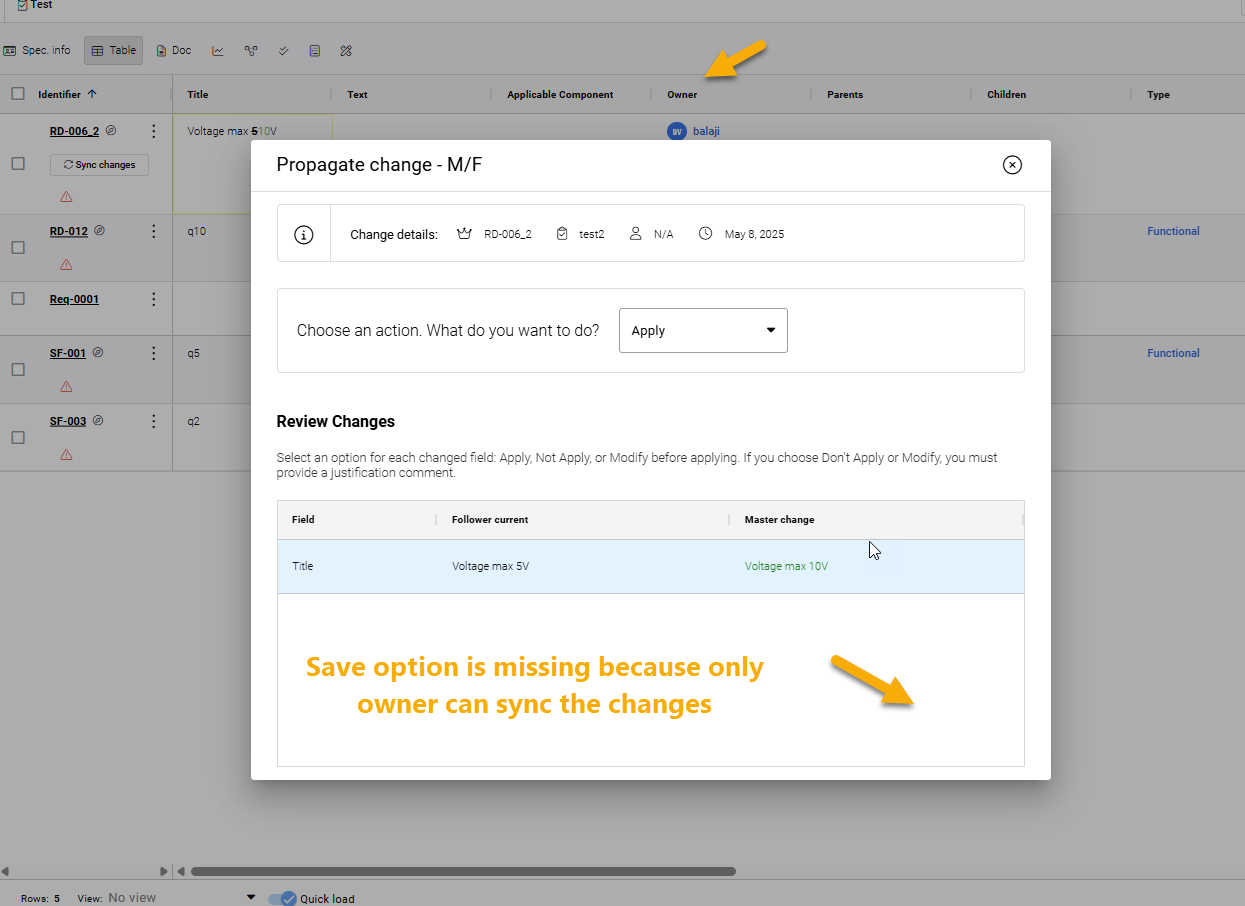
When a Master requirement is changed, the Follower displays a pending propagation indicator and highlights the modified requirement. When reviewing the pending changes, the controls required to apply or save them may be unavailable.
[Insert screenshot: Follower requirement showing the pending propagation indicator and highlighted change]
Ownership Determines Available Propagation Actions
Master-Follower change propagation is unidirectional, from the Master requirement to its Followers.
When an Owner is assigned to the requirement, that owner can propagate pending changes using Apply or Don't Apply. Users with admin rights or manage-level permissions can also propagate changes. If no owner is specified, users with Read & Write access can apply or reject the propagation.
Verify Ownership and User Permissions
- If you are the assigned owner, review and apply or reject the pending changes.
- If another user is the assigned owner, contact that owner to perform the propagation.
- If appropriate, clear the Owner field so users with Read & Write access can apply or reject the propagation.
- Users with admin rights or manage-level permissions can propagate changes even when they are not the assigned owner.
- Changes made directly to a Follower cannot be propagated back to its Master using the Master-Follower propagation mechanism.
Review and Apply the Pending Changes
- Open the requirement in the Requirements Portal.
- Locate the Owner field.
- If an owner is assigned, verify whether you are the listed owner or have admin rights or manage-level permissions.
- If another user is the owner and you do not have the required permissions, contact the assigned owner to propagate the changes.
- Alternatively, if appropriate, edit the requirement and remove the owner assignment to allow users with Read & Write access to handle the propagation.
- Save the requirement.
- Open the Follower requirement and select the pending propagation-change indicator.
- Review the changes and select Apply, Don't Apply, or edit the propagated change as required.
- Save the selection to complete the propagation.
Additional Notes
Master-Follower change propagation operates from Master to Follower only. Pending Master changes can be identified on the Follower by the propagation-change indicator and highlighting of the modified requirement.