
KB: Column Name Error in BOM
 Altium Designer
Solution Details
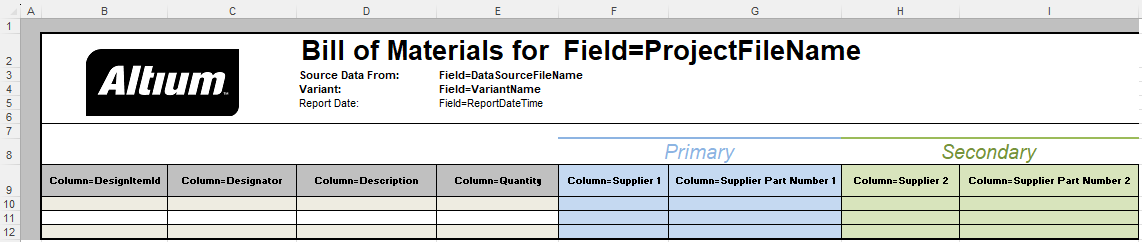
If the export format is Excel, an Excel template can be applied to the exported data when exporting a BOM. If the column name in the column mapping in the template does not match a component property in the Report Manager, a #Column Name Error appears in the exported BOM. So, if you get such an error, please check if the column names match the names of the component properties. It's good practice to make all component properties to be exported visible and to order them in the Report Manager the same as in the Excel template.
Example: An Excel template is set up to export a BOM containing the primary and secondary supplier data. In the Report Manager, you can see only a primary supplier and no component properties for a secondary supplier. As a result, there are #Column Name Errors in the exported BOM.
Excel Template
Report Manager

Exported BOM

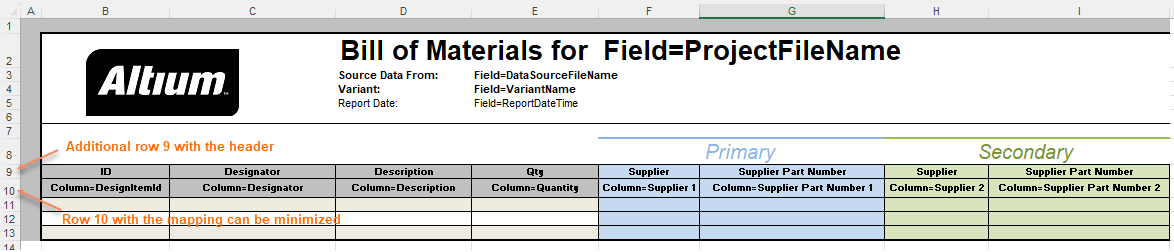
If you use a general template that contains columns for unavailable export data, you can hide errors by adding a row with the column headers to the template and minimizing the height of the column mapping row. This is also useful if you want to name columns in the exported BOM different from the name of a component property.
Changed Excel Template
Please see the documentation for more details about exporting the BOM using an Excel-based templatE:
Exporting the BOM
Mapping Design Data into the BOM
Making an Excel-based BOM Template Available for Use