
KB: Email Notifications not sent when License Seat Limit is reached
Updated: October 24, 2025
 Altium Designer
The admin has enabled the "Notify" and "If Seat Count Reaches" options under License Allocation on the Dashboard License page. However, the email notification does not arrive even after the limit is reached.
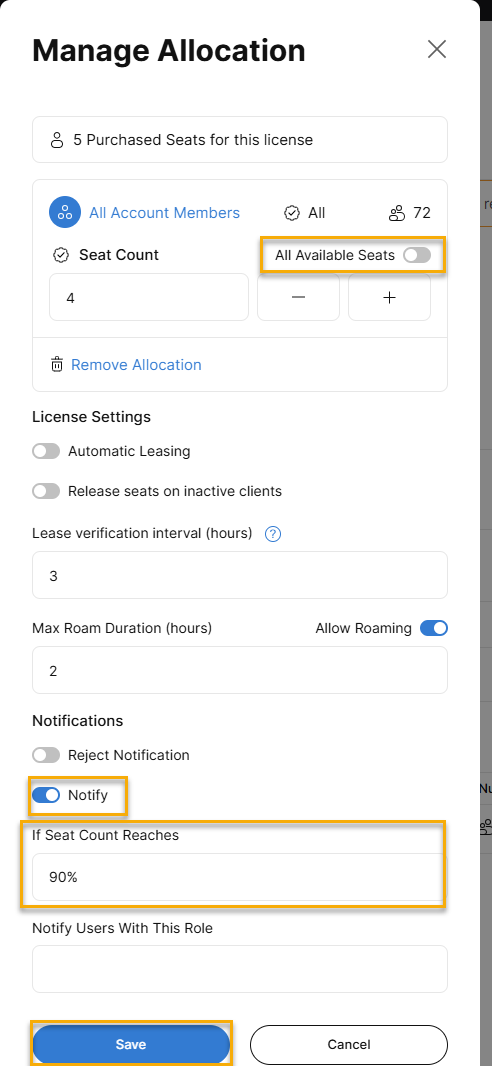
The issue is due to the "All available seats" button being active. For the notification feature to work, this button must be disabled and an actual number entered in the "If Seat Count Reaches" field.
Solution Details
License Notification Not Triggering Despite Reaching Seat Limit
Why the Notification Fails
The issue occurs when the All available seats option is enabled in the License Allocation settings. This setting overrides the specific seat count threshold, preventing the system from recognizing when the limit is reached.
Required Configuration for Notifications
To enable email notifications when the license seat count is reached:
- Disable the All available seats option.
- Enter a specific number in the If Seat Count Reaches field that is less than or equal to the total number of available seats.
Steps to Configure License Seat Notification
- Go to https://dashboard.altium.com/subscriptions_licenses.
- Select the On-Demand license configured for seat count notifications.
- Scroll to the License Allocation section and click Manage.
- In the License Allocation window:
- Disable the All available seats toggle.
- Enter a number (≤ total seats) in the If Seat Count Reaches field.
- Save the changes.
The email notification should be sent within approximately 5 minutes once the specified seat count is reached.
Additional Notes
- This configuration is essential for environments where license usage needs to be closely monitored.
- Notifications help prevent license overuse and ensure timely administrative action.