
KB: Harness Definition Selection Dialog Missing During Multiboard Sync
 Altium Designer
Solution Details
Harness selection dialog not displayed again
During Multiboard to Harness synchronization, the harness definition selection dialog may be missing after the initial import attempt. This is observed when the dialog was previously closed or when a harness definition has already been selected within the same harness project.
Harness definition stored at project level
A harness design project (*.PrjHar) is intended to represent a single physical harness derived from a logical harness defined in a Multiboard schematic. Once a harness definition is selected during the first successful synchronization, it is stored as a project parameter. As a result, Altium Designer does not prompt for harness selection again unless this parameter is modified or removed.
Supported ways to proceed
- Reset the stored harness definition so that the selection dialog appears again.
- Create a separate harness design project for each additional harness defined in the Multiboard schematic.
Resetting the harness definition parameter
- Open the harness design project.
- Select Project » Project Options.
- Open the Parameters tab.
- Locate the HarnessDesignator parameter.
- Change its value or remove the parameter entirely.
- Run the Multiboard to Harness synchronization again.
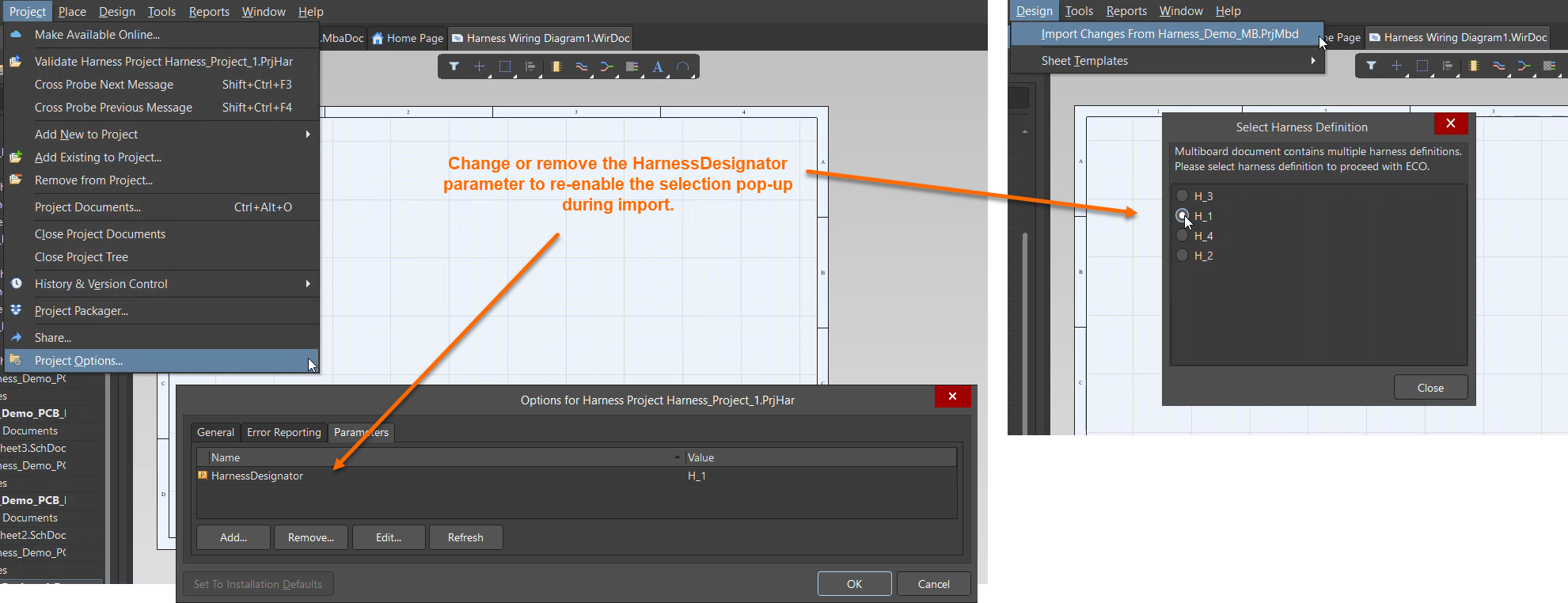 |
| Project options for Harness project and option to either change value or remove parameter to enable pop-up |
Additional Notes
If a Multiboard schematic contains multiple harnesses (for example, an A-to-B harness and a C-to-D harness), each harness must be implemented using its own harness design project. Importing multiple independent Multiboard harnesses into a single harness wiring diagram project is not supported.