
KB: Applying a New Revision Naming Scheme to Released Projects
 Altium Designer
Solution Details
Revision naming schemes for project releases can be defined and configured at the Workspace level. By default, the 2-Level Revision Scheme (e.g., A.1) is used for project release data such as PCB Fabrication and Assembly Data. However, once a project has been released using an existing scheme, you cannot directly change the scheme for that project.
Why You Cannot Directly Change the Revision Naming Scheme
Revision naming schemes are tied to the release history of a project. Once a release is created, the scheme becomes part of the project’s lifecycle data. Changing it would break consistency and traceability across versions, which is why Altium Designer prevents direct changes for projects with existing releases.
Available Options
To apply a new revision naming scheme for an existing project that has already released:
- Delete all previous releases created under the old scheme. After deletion, you must select and apply the new revision naming scheme before creating the next project release.
- Clone the project to apply the new scheme to the copied project while preserving a reference to its origin.
Cloning is generally recommended because it maintains historical context without compromising data integrity.
Steps to Apply a New Naming Scheme (Cloning Option)
- Define and Configure the New Naming Scheme
- In Altium Designer, go to Preferences » Data Management » Servers.
- Under your connected workspace, define and configure the new revision naming scheme for the relevant content type. For full technical details, refer to Altium Documentation: Defining Revision Naming Schemes for a Workspace.
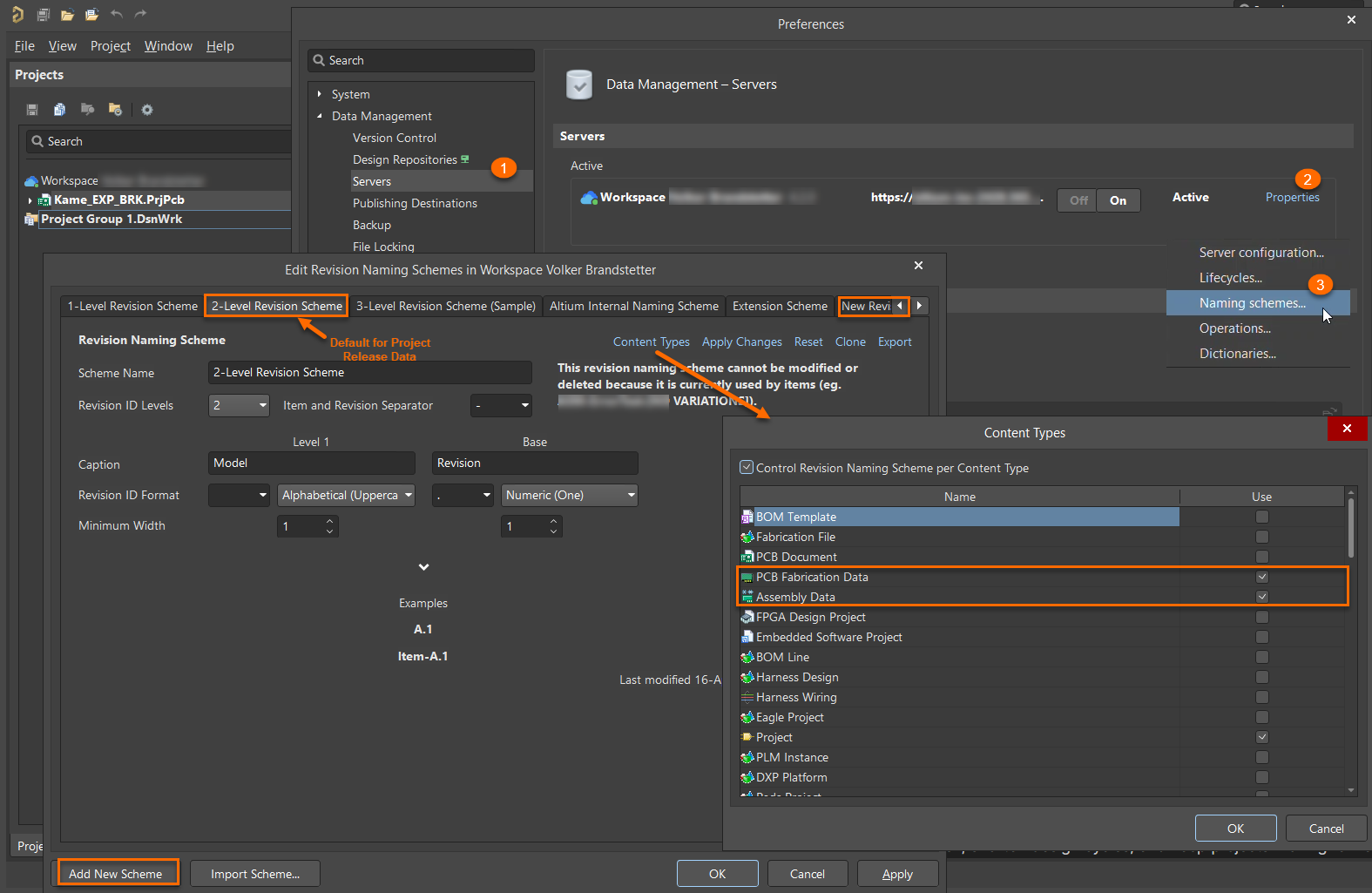
- Clone the Existing Project
- In Altium Designer, open the project.
- Right-click the project and select Make a copy... from the context menu.
- Apply the new naming scheme to the cloned project.
Additional Notes
- Deleting previous releases removes historical data, so use this option only if cloning is not feasible.
- Cloning retains a link to the original project in its history, ensuring traceability.
📢 Using Subscriptions?
If you're still using our previous subscription model (Standard, Professional, or Enterprise), please note that Standard subscriptions have limitations. See Legacy Documentation for details.