
KB: Lifecycle Definition Incompatible with Content Type
 Altium Designer
Solution Details
Release and validation failures caused by incompatibility
During release preparation or system validation, users encounter errors indicating that an item is incompatible with a lifecycle definition. The error may reference lifecycle system states or content types and can block SRC release preparation, project release, or appear as a warning in the Altium On-Prem Enterprise Server Health Monitor.
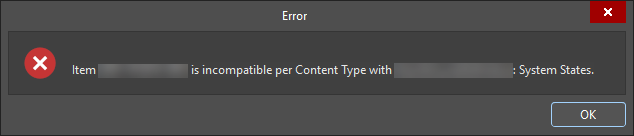
Common Symptoms and Error Scenarios
Users may observe one or more of the following:
- SRC release preparation fails with a lifecycle incompatibility error
- Errors reference lifecycle system states or content types
- Project Releaser reports an error for Source Item or other release items
- Previously released items fail after lifecycle definition changes
- Altium On-Prem Enterprise Server Health Monitor reports lifecycle definition issues
- Users are unable to enable a content type in lifecycle settings
Understanding Release Items and Content Type Mapping
Lifecycle incompatibility issues are often difficult to diagnose because release item names do not always clearly indicate their underlying content types.
-
Project Design represents the SRC item shown as Source Item in Project Releaser.
-
Project does not have a lifecycle assignment and is not validated for lifecycle compatibility.
-
Binary File used for custom release data items in Project Releaser.
If a lifecycle definition does not support these content types, incompatibility errors will occur even though the item names may not explicitly reference SRC or custom data.
Lifecycle Configuration Awareness (Important for New Users)
Lifecycle definitions are typically configured at the administrator level during initial workspace setup. As a result:
- End users may not be aware that lifecycle definitions are restricted by content type
- Users may not know which lifecycle definition applies to which release item
- Lifecycle errors may surface much later during release or validation
- Clear error messages may still be confusing due to missing configuration context
Why This Happens (Root Causes)
Lifecycle incompatibility errors typically occur due to one or more of the following:
- The lifecycle definition does not have the required content type enabled
- An incorrect lifecycle definition is selected for an item
- A new lifecycle definition is created, but previously released items still reference an older lifecycle definition
- Lifecycle control per content type is not enabled, preventing configuration changes
- Content types are enabled incorrectly or incompletely
Configuration Pitfall: Control Lifecycle Definition per Content Type
A common misconfiguration occurs when users attempt to enable content types without first enabling Control lifecycle definition per content type.
- This option is located in the top‑left area of the lifecycle definition editor
- It is easy to miss, especially for new users
- If not enabled, content types cannot be selected or applied
- This often leads to the assumption that lifecycle settings are already correct
Impact on Altium On-Prem Enterprise Server Health Monitor
The Altium On-Prem Enterprise Server Health Monitor uses the same lifecycle validation logic as release processes. Lifecycle warnings reported in the Health Monitor are typically indicators of existing lifecycle–content type incompatibility and are not separate issues. Correcting the lifecycle configuration resolves both release errors and Health Monitor warnings.
What to Do
Ensure that lifecycle definitions are correctly configured to support all required content types, that lifecycle control per content type is enabled, and that all related items reference compatible lifecycle definitions.
How to Do It
- Open the Workspace lifecycle definitions configuration.
- Enable Control lifecycle definition per content type.
- Select the lifecycle definition in use.
- Enable all required content types (for example, Project Design, Binary File).
- Verify lifecycle assignments for both new and previously released items.
- Re-run release preparation or review Health Monitor status.
Additional Notes
- Lifecycle definitions and content type settings can only be modified by Workspace Administrators. Non‑admin users must contact an administrator to adjust these settings.
- Lifecycle definitions are workspace‑wide, and changes affect all items that reference them.
- Previously released items may continue to reference older lifecycle definitions, which can cause incompatibility after configuration changes.
- Lifecycle content type compatibility is independent of lifecycle state transitions and approvals.