
KB: Project Releaser Requires Full Document Set for Release
Updated: October 30, 2025
 Altium Designer
Altium’s Project Releaser requires all output documents to be selected in order to proceed with a release. If any document is deselected during the Data Review stage, the system switches to Review mode, disabling the Release button and preventing completion. This behavior ensures that only complete manufacturing data packages are released. To exclude specific outputs, users must modify the OutJob file prior to initiating the release process.
Solution Details
Release Fails When Documents Are Deselected
Users attempting to deselect certain documents during the release process in Project Releaser encounter the following issue:
- The Prepare & Release button changes to Preview & Explore.
- The release cannot be completed unless all documents are selected.
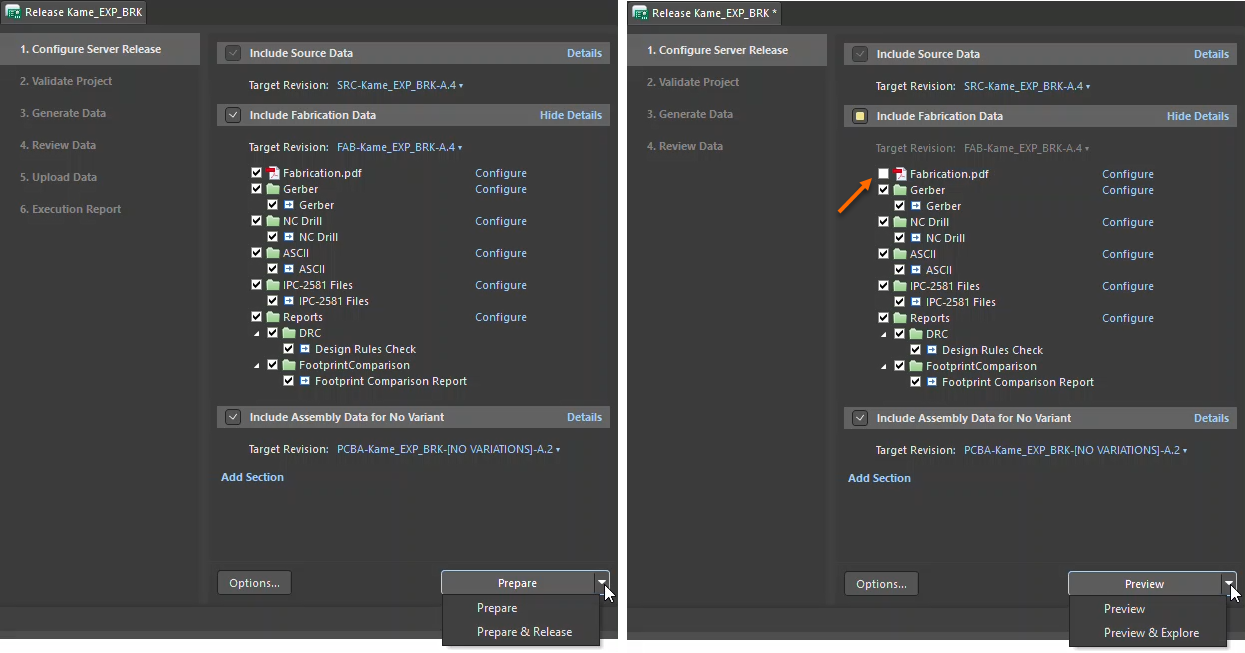
Why the Release Button Disappears
Altium's Project Releaser is designed to generate a complete set of manufacturing data. If any document is deselected during the Data Review stage, the system switches from Release mode to Review mode, preventing the release from proceeding. This ensures consistency and completeness of the manufacturing package.
How to Ensure a Successful Release
To successfully perform a release:
- Ensure all required documents are selected during the release process.
- If certain outputs should be excluded, modify the OutJob file instead of deselecting them during release.
Steps to Modify the OutJob File
- Open the relevant OutJob file for your project.
- Remove or disable the outputs you do not want included in the release.
- Save the OutJob file.
- Launch Project Releaser.
- Proceed with the release using all selected documents.
Additional Notes
- The Review button appearing instead of Release is an indicator that the release package is incomplete.
- Always verify OutJob configurations before initiating a release to avoid unexpected output generation.