KB: Release Fails When ERC Validation Settings Differ from Project Options
 Altium Designer
Solution Details
Release Stops Despite No Report Setting
The Project Releaser fails with an error even though the error reporting mode for the reported violation is set to No Report in the project's error reporting settings. Users may expect the violation to be ignored during release, but the release process still reports an error and does not complete successfully.
ERC Validation Configuration Takes Precedence
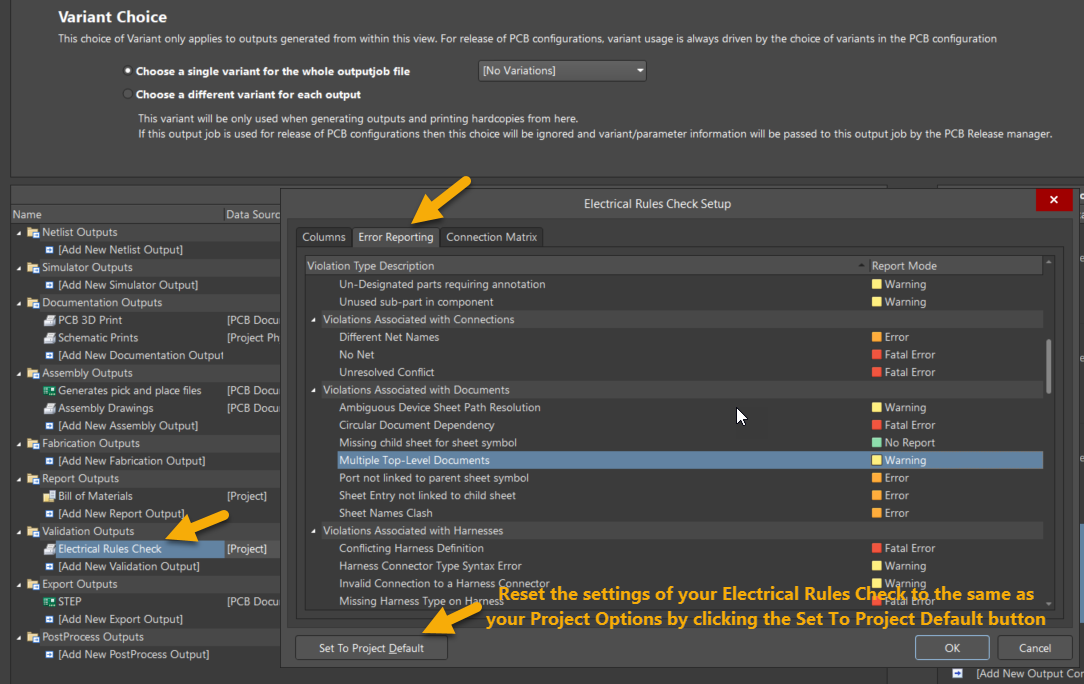
Altium Designer maintains separate error reporting configurations for Project Options and validation reports. The settings used by the Electrical Rule Check Validation report are stored in the Output Job file and are independent of the project-level configuration. During a release, the Project Releaser uses the settings defined in the ERC Validation report. If those settings are stricter than the project settings, the release can fail even when the violation is configured as No Report in Project Options. This behavior is expected.
Align Validation and Project Settings
- Configure the ERC Validation report to use the project default settings.
- Alternatively, manually adjust the ERC Validation report error reporting levels to match your release requirements.
- Review the ERC Validation report configuration whenever error reporting settings are changed in Project Options, as the configurations are maintained separately.
Update the ERC Validation Report
- Open the Validation Output Job file.
- In the Validation Outputs section, locate Electrical Rule Check Validation.
- Right-click the report and select Configure.
- Open the Error Reporting Mode tab.
- Select Set to Project Default.
- Select OK to save the changes.
- Run the Project Releaser again.
- Confirm that the release completes successfully.