
KB: "Scope Belongs to Several Hierarchies" Error in Clearance Matrix
 Altium Designer
Solution Details
Error triggered by overlapping net class membership
While configuring Net Class-to-Class clearances in the Constraint Manager under the Clearances view, the error message Scope <net class name> belongs to several hierarchies with different rules may be displayed. This error is associated with specific nets that are assigned to more than one Net Class and therefore appear in multiple rule hierarchies within the Clearance Matrix.
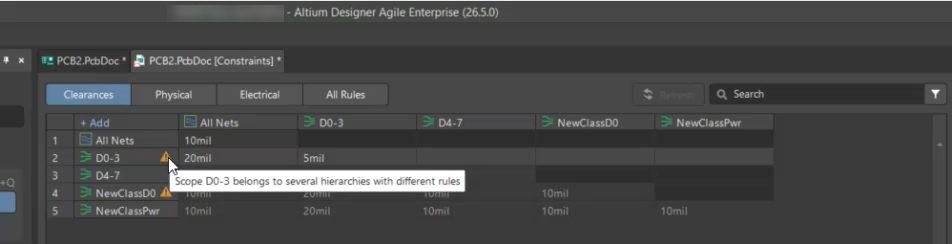
Conflicting rule hierarchies cause ambiguity
In Altium Designer, design rules are applied hierarchically, where more specific scopes override broader ones. Each Net Class defines a logical grouping used to apply constraints such as clearance rules. When a single net belongs to multiple Net Classes, it becomes part of multiple rule scopes that may define conflicting clearance values. This creates ambiguity in rule resolution because the system cannot determine which hierarchy should take precedence. Since the Clearance Matrix defines spacing between Net Classes, each net must belong to a single class to ensure deterministic rule evaluation.
Ensure unique net assignment across classes
- Ensure each net is assigned to only one Net Class
- Remove duplicate net assignments from overlapping classes
- Consolidate Net Classes if they represent the same design intent
- Verify whether Net Classes originate from schematic directives, or Constraint Manager, or imported ECO data
Steps to identify and fix conflicting nets
- Open the Design » Constraint Manager.
- Navigate to the Clearances view (Clearance Matrix).
- Identify the net referenced in the error message.
- Review all Net Classes and locate where the same net is assigned to multiple classes.
- Remove the net from all but one Net Class, or merge redundant Net Classes where appropriate.
- Check whether the Net Class definitions originate from schematic directives (Parameter Sets) or PCB-side definitions.
- Save the changes and revalidate the rules.
- Run a Design Rule Check (DRC) to confirm the issue is resolved.
- If required, perform an ECO update to synchronize schematic and PCB data and remove outdated class definitions.
Additional Notes
- Avoid assigning a single net to multiple Net Classes when defining clearance rules.
- Review Net Class assignments after copying designs, reusing hierarchical sheets, or applying ECO updates.
- Conflicts can originate from reused design blocks or inherited class definitions.
- ECO imports may temporarily clear the error only when Net Class definitions are inconsistent between PCB and schematic; correcting the source definitions is required for a permanent fix.