
Ricalcoli
Updated: February 04, 2025
Nel raro caso in cui i calcoli non vengano propagati nei tuoi progetti, Requirements & Systems Portal consente agli amministratori di eseguire un ricalcolo di tutti i valori all'interno di un progetto utilizzando il pulsante “Run Recalculation”.
To run a recalculation of a project:
Fai clic sull'icona delle impostazioni nell'angolo inferiore sinistro dello schermo (vedi Figura Recalculations). Vai al pulsante “Recalculate” e specifica se desideri eseguire un ricalcolo solo per il progetto corrente o per tutti i progetti all'interno della distribuzione. Puoi anche ricalcolare i grafici di conteggio dei requisiti verificati visualizzati nel modulo di analisi.
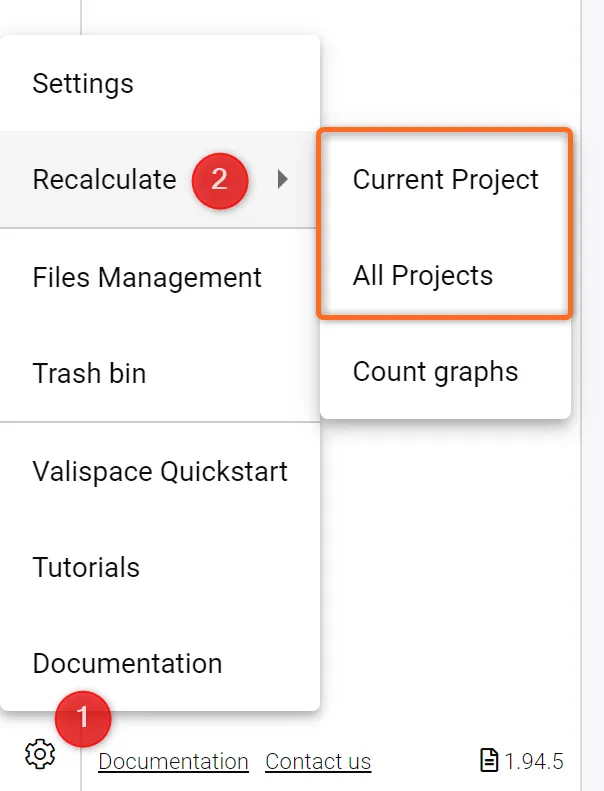 Ricalcoli - Se necessario, è possibile ricalcolare l'intero progetto o tutti i progetti.
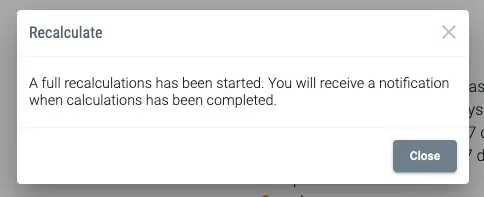
Riceverai quindi una notifica al completamento del calcolo.
 Localizzato tramite A