
KB:プロジェクトの回路図で検証エラーが発生する場合
Updated: 2月 22, 2026
 Altium Designer
プロジェクト内の回路図を検証する際、コンパイラは接続性の問題やルール違反を示すさまざまなメッセージを生成することがあります。これらのメッセージは Electric Rule Check(ERC)の一部であり、Project Options ダイアログの設定によって制御されます。これらのメッセージを理解することは、回路図の検証エラーを解決し、正しいネットリストを確保するうえで不可欠です。本記事では、コンパイラ違反がどのように報告されるか、また詳細な参照情報をどこで確認できるかを概説します。
ソリューションの詳細
コンパイルエラーの包括的な一覧はどこで確認できますか?
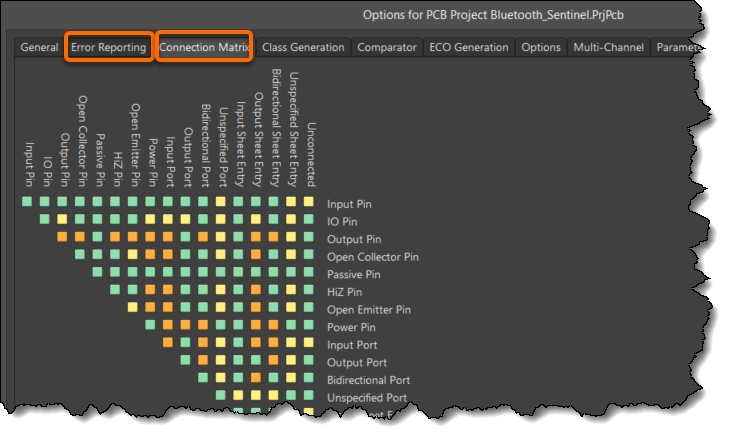
プロジェクトを検証(Validate)すると、ERC(Electrical Rule Check:電気ルールチェック)が実行されます。このチェックでは、「Project » Project Options」の[Error Reporting]タブおよび[Connection Matrix]タブで指定したプロジェクトオプションに基づいて、違反内容がレポートされます。詳細なリファレンスである「Project Compiler Error Reference」には、すべてのコンパイラエラーと、問題を解決するための詳細が記載されています。
注:
Altium Designer 20.0より前のバージョンでは、Unified Data Modelを構築するためにプロジェクトを手動でコンパイルする必要がありました。それ以降は、動的コンパイルにより各ユーザー操作の後に設計データモデルが段階的に更新され、Dynamic Data Model(DDM)と呼ばれるものが作成されます。プロジェクトの手動コンパイルは不要で、すべて自動的に行われます。
検証(Validating)は、プロジェクトに対して有効なネットリストを生成するうえで不可欠です。回路図の接続性(Connectivity)の整合性は、設計プロジェクトオプションで定義されたルールに従ってコンパイル中に確認できます。ルールはそれぞれ、Error Reporting および Connection Matrixタブで定義します。
 AI で翻訳