
KB: RF Track Cross-Layer Clearance in PCB Editor
Updated: 12月 11, 2025
 Altium Designer
This article explains how to create a cross-layer clearance for an RF track in Altium PCB Editor. When routing RF tracks on the top layer, you may need to ensure clearance on adjacent layers to avoid interference or maintain signal integrity. The recommended approach is to use a polygon cutout that matches the RF track geometry. For complex RF routing, you can copy the track to the adjacent layer and convert it into a cutout. Additional clearance can be achieved by adjusting the copied track width before conversion.
Solution Details
Understanding RF Track Clearance Requirements
RF tracks on the outer layer can couple with copper on adjacent layers, affecting performance. To prevent this, clearance must be maintained on the adjacent layer.
Impact of Adjacent Copper on RF Performance
RF signals are sensitive to nearby conductive areas. Without proper clearance, parasitic capacitance and impedance mismatches can occur, degrading signal quality.
Recommended Method for Ensuring Clearance
To create clearance for RF tracks on adjacent layers:
- Use Polygon Cutout to remove copper under the RF track.
- For additional clearance, increase the width of the copied track before converting it to a cutout.
Step-by-Step Instructions to Create Polygon Cutouts
- Select the RF feed line or track on the outer layer (e.g., Top Layer).
- Go to Edit » Copy to copy the track.
- Switch to the adjacent layer (e.g., Second Layer).
- Use Edit » Paste Special » Paste on Current Layer to paste the copied track.
- Select the pasted track.
- If extra clearance is needed:
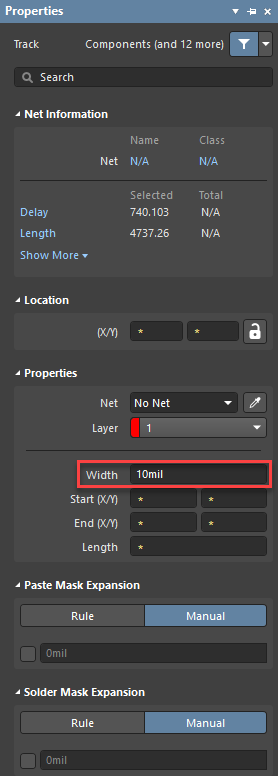
- Open the Properties Panel.
- Change the track width to the desired clearance (e.g., 2W if original width is W).
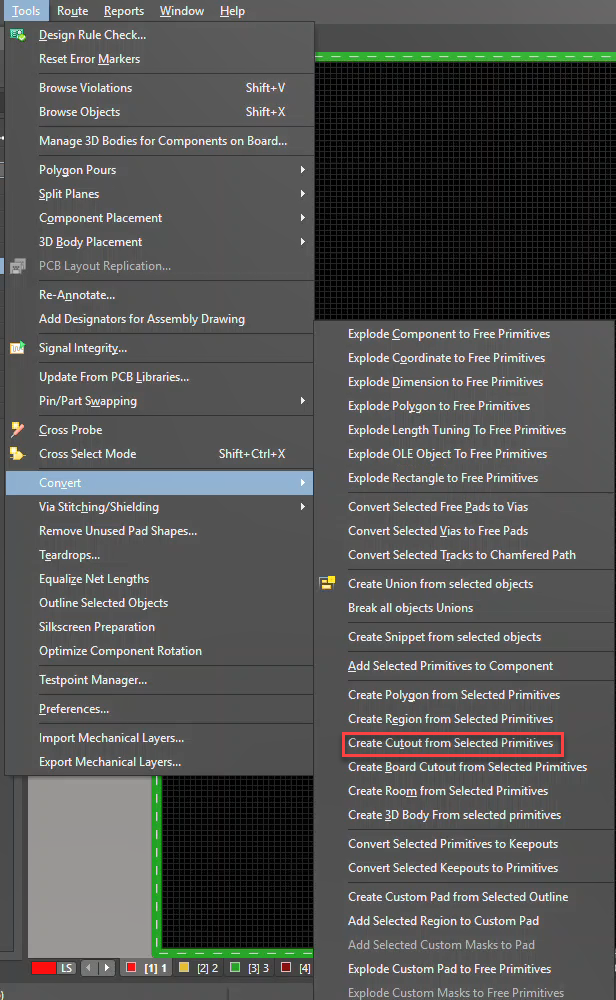
- Go to Tools » Convert » Create Cutout from Selected Objects, then click OK.
- Verify that the polygon cutout matches the RF track geometry or the adjusted width.
Additional Notes
- Ensure that the polygon cutout does not violate other design rules.
- For complex RF routing, repeat the process for all critical tracks.
- Consider using design rule checks to validate clearances.