
라인
 배치된 트랙
PCB에서 line(선)과 track(트랙)은 서로 바꿔 쓸 수 있는 용어입니다. 따라서 선을 배치한다는 것은 트랙을 배치하는 것과 같습니다. 선을 배치할 때는 Track panel의 Inspector mode가 사용됩니다. 비전기 레이어에 배치된 트랙은 line(선)이라고 하며, 이들은 부품 외곽선, 안내 정보, 금지(keepout) 경계 등과 같은 범용 드로잉 요소를 만드는 데 사용됩니다.
트랙 세그먼트는 기본(primitive) 설계 객체로, 지정된 폭을 가진 직선입니다. 트랙을 사용해 PCB 설계 공간에서 직선을 정의할 수 있습니다. 트랙은 신호 레이어에 배치되어 부품 패드 간 전기적 상호연결(배선, routing)을 형성합니다. 트랙은 치수(dimension) 및 좌표(coordinate)와 같은 그룹 설계 객체에서도 사용됩니다.
Line Object
PCB 편집기에서 선은 메인 메뉴에서 Home | Place | Line 을 선택하여 배치할 수 있습니다.

명령을 실행하면 커서가 십자선으로 바뀌고 트랙 배치 모드로 들어갑니다. 배치는 다음 순서로 수행합니다:
- 클릭하거나 Enter를 눌러 첫 번째 트랙 세그먼트의 시작점을 고정합니다. 라우팅 유형의 배치 명령이 실행 중이고 기존 객체 위에서 클릭하여 배치를 시작하면, 트랙은 해당 객체의 넷 이름을 따릅니다.
- 커서를 이동해 트랙 세그먼트를 정의한 다음 클릭하거나 Enter 를 눌러 첫 번째 세그먼트의 끝점을 고정합니다. 이 점은 다음으로 연결될 세그먼트의 시작점이기도 합니다.
- 커서를 계속 위치시키고 클릭하거나 Enter 를 눌러 연결된 트랙 세그먼트들의 연속을 정의하는 일련의 꼭짓점(vertex)들을 고정합니다.
- 마우스 오른쪽 버튼을 클릭하거나 Esc를 눌러 현재 연결된 트랙 세그먼트들의 연속을 종료합니다.
배치 중에 수행할 수 있는 추가 동작으로는 Tab 키를 눌러 배치를 일시 정지하고 Track mode의
Inspector panel 에 접근하여 속성을 즉시 변경하는 것이 있습니다. 배치를 재개하려면 설계 공간의 일시정지 버튼 오버레이( )를 클릭합니다.
배치 모드
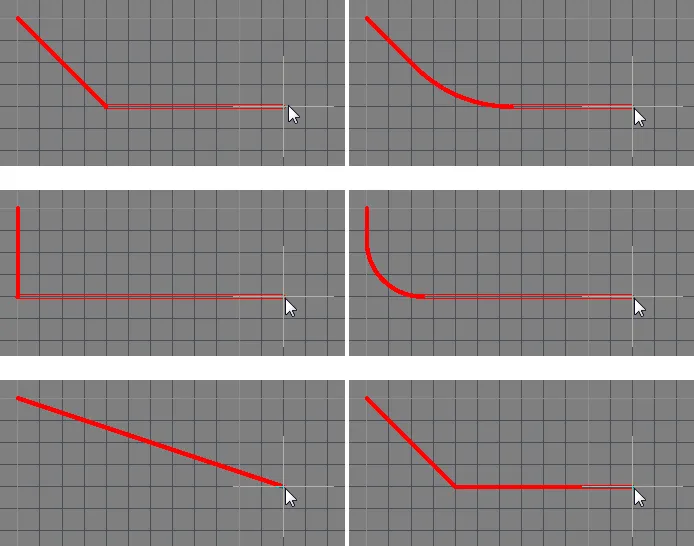
트랙 세그먼트를 배치하는 동안 사용할 수 있는 코너 모드는 5가지이며, 그중 4가지는 코너 방향 하위 모드도 제공합니다. 배치 중에는:
- Shift+Spacebar를 눌러 5가지 코너 모드를 순환합니다.
- Spacebar를 눌러 2가지 코너 방향 하위 모드를 전환합니다.
- 아크(arc) 코너 모드 중 하나일 때 "," 또는 "." 키를 누른 채로 있으면 아크를 줄이거나 키울 수 있습니다. Shift 키를 누른 채로 누르면 아크 크기 조절이 더 빠르게 됩니다.
- 1 단축키를 눌러 클릭당 1개 세그먼트 배치(아래 첫 5개 이미지)와 클릭당 2개 세그먼트 배치(아래 마지막 이미지) 사이를 전환합니다. 첫 번째 모드에서 속이 빈 트랙 세그먼트는 look-ahead 세그먼트라고 합니다.
- Backspace 키를 눌러 마지막 꼭짓점을 제거합니다.
인터랙티브 라우팅과 적용 가능한 설계 규칙
인터랙티브 라우팅 중 기본 동작은 소프트웨어가 적용 가능한 Electrical 및 Routing 설계 규칙에 따라 트랙 세그먼트가 배치되도록 보장하는 것입니다. 즉, 소프트웨어는 다른 넷에 속한 기존 트랙 세그먼트를 위반하는 새 트랙 세그먼트가 배치되는 것을 허용하지 않으며, 대신 설계 규칙을 만족하도록 트랙 세그먼트를 잘라냅니다(clip). 이러한 인터랙티브 라우팅 동작을 Routing Conflict Resolution mode라고 합니다. 기본 모드는 Stop at First Obstacle이며(현재 모드는 상태 표시줄에 표시됨), Shift+R를 눌러 사용 가능한 모드들을 순환할 수 있습니다.
applicable design rules라는 용어는 배치 중인 객체에 적용되는 모든 규칙을 의미합니다. 설계 규칙 엔진은 각 규칙을 정확히 어떤 객체에 적용할지 범위를 지정(scope)하는 시스템으로 동작합니다. 배치 중에는 설계 규칙 엔진이 조회되어 현재 배치 상황에서 적용되는 최우선 규칙이 결정됩니다.
라우팅 폭이 결정되는 방식
규칙 엔진이 비활성화되지 않는 한, 소프트웨어의 우선 동작은 라우팅 폭이 적용 가능한 Routing Width 설계 규칙에서 허용하는 범위 내에 있도록 항상 보장하는 것입니다. 일반적인 접근 방식은 넷에 대해 사용 가능한 폭 범위를 허용하여, 해당 넷의 전류 용량 요구사항을 만족하면서도 배선을 끼워 넣을 수 있는 유연성을 제공하는 것입니다. 이를 지원하기 위해 Routing Width 설계 규칙에는 Min, Preferred, 및 Max 설정이 PCB Rules and Constraints Editor에 있으며, 폭 범위를 허용하도록 구성하거나 특정 폭을 요구하도록 동일한 값으로 설정할 수 있습니다. 또한 폭은 임피던스(impedance)로 구성할 수도 있고, 각 신호 레이어마다 서로 다른 범위를 지정할 수도 있습니다.
라우팅을 시작할 때 가장 적절한 라우팅 폭을 선택하는 데 도움이 되는 옵션은 PCB Editor — Interactive RoutingSystem Preferences의 페이지에서 구성합니다.
라우팅 중 Shift+W 단축키를 사용해 다른 폭을 선택할 수 있는 대화상자에 접근할 수도 있고, Tab를 눌러 Inspector panel 을 열고 새 Width value를 입력할 수도 있습니다. 선택하거나 입력한 값은 적용 가능한 규칙에 정의된 Min 및 Max 설정 사이에 있어야 합니다. 그렇지 않으면 자동으로 가장 가까운 값으로 클리핑됩니다.
인터랙티브 라우팅 단축키
라우팅 중에는 여러 단축키를 사용할 수 있습니다. 예를 들어 Shift+R를 눌러 사용 가능한 충돌 해결 모드를 순환하거나, Backspace를 눌러 마지막으로 배치한 꼭짓점(코너)을 삭제할 수 있습니다. 라우팅 중 단축키 목록을 표시하려면 Shift+F1를 누르십시오. 사용 가능한 인터랙티브 단축키 메뉴가 표시되며, 필요한 단축키를 선택하거나 Esc를 눌러 메뉴를 닫고 단축키 시퀀스를 사용할 수 있습니다.
그래픽 편집
이 편집 방법을 사용하면 설계 공간에서 배치된 선 객체를 직접 선택하고, 크기/형상/위치를 그래픽으로 변경할 수 있습니다.
선 객체를 선택하면 다음 편집 핸들을 사용할 수 있습니다:
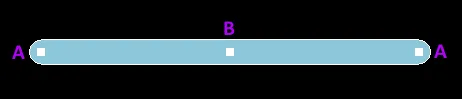
선택된 트랙
- A 을(를) 클릭하고 드래그하여 트랙의 끝점을 재배치합니다.
- B 을(를) 클릭하고 드래그하여 트랙의 형상을 변경합니다.
PCB 편집기에는 보드에서 트랙 세그먼트를 이동할 때 배선의 배치를 유지할 수 있도록 하는 정교한 알고리즘이 포함되어 있습니다. 이러한 트랙 세그먼트 슬라이딩은, 먼저 트랙 세그먼트를 선택한 다음 특수 커서가 나타났을 때 클릭한 채로 세그먼트를 슬라이드하거나, 트랙 세그먼트 위에서 클릭한 채로 슬라이드하는 방식으로 인터랙티브하게 실행할 수 있습니다.
비그래픽 편집
이 편집 방법은 Inspector panel mode를 사용하여 선 객체의 속성을 수정합니다.

배치 중에는 Track mode의 Inspector panel을 Tab 키를 눌러 접근할 수 있습니다. 선이 배치되면 모든 옵션이 표시됩니다.
배치 후에는 Track mode의 Inspector panel을 다음 방법 중 하나로 접근할 수 있습니다:
- Inspector panel이 이미 열려 있다면 트랙 객체를 선택합니다.
- 선택된 트랙을 오른쪽 클릭하고 메뉴에서 Properties 를 선택합니다.
- PCB 편집기에서 트랙이 선택된 상태로 메인 리본에서 View | PCB | Inspector를 선택합니다.
- PCB 라이브러리 편집기에서 트랙이 선택된 상태로 메인 리본에서 View | PCB Library | Inspector를 선택합니다.
Line Properties
설계 공간에서 선을 드래그할 때, 트랙 속성은 Inspector 패널에서 편집할 수 있습니다.

- Line Width - 이 영역을 사용하여 원하는 선 폭을 결정합니다.
- Current Layer - 드롭다운을 사용하여 선을 배치할 레이어를 선택합니다.
설계 공간에서 배치된 선이 선택되어 있을 때, 모든 Track 객체 속성은 Inspector 패널에서 편집할 수 있습니다.
위치
- (X/Y)
- X (첫 번째 필드) - 현재 설계 공간 원점을 기준으로, 트랙 기준점의 현재 X(수평) 좌표입니다. 트랙의 X 위치를 변경하려면 편집합니다. 값은 미터법 또는 야드파운드법(인치) 중 어느 쪽으로도 입력할 수 있으며, 현재 기본 단위가 아닌 단위로 값을 입력할 때는 단위를 함께 포함하세요.
- Y (두 번째 필드) - 현재 원점을 기준으로, 트랙 기준점의 현재 Y(수직) 좌표입니다. 트랙의 Y 위치를 변경하려면 편집합니다. 값은 어느 쪽이든 입력할 수 있습니다. 미터법 또는 야드파운드법(인치) 중 어느 쪽으로도 입력할 수 있으며, 현재 기본 단위가 아닌 단위로 값을 입력할 때는 단위를 함께 포함하세요.
Properties
- Net - 드롭다운을 사용하여 이 트랙이 속한 넷을 선택합니다. 활성 보드 설계의 모든 넷이 드롭다운 목록에 표시됩니다. 넷이 없다면,
 을(를) 클릭하여 넷 이름을 지정하거나 표시되는 십자선(cross-hair)을 사용해 넷을 수동으로 클릭함으로써 설계 공간 내의 특정 넷으로 이동할 수 있습니다. Net 링크를 선택하여
Net Inspector panel의 Inspector 모드를 열고 속성을 구성합니다.
을(를) 클릭하여 넷 이름을 지정하거나 표시되는 십자선(cross-hair)을 사용해 넷을 수동으로 클릭함으로써 설계 공간 내의 특정 넷으로 이동할 수 있습니다. Net 링크를 선택하여
Net Inspector panel의 Inspector 모드를 열고 속성을 구성합니다.

Nodes 링크를 Net mode에서 클릭하면 Edit Net dialog가 열리며, 여기서 넷을 편집하고 지정된 넷의 물리 핀을 추가/제거하며 넷의 트랙 길이를 지정할 수 있습니다.

Edit Net dialog의 주요 옵션은 아래에 설명되어 있습니다.
- Pins in Other Nets - PCB의 모든 핀을 나열합니다. 현재 넷에 할당된 핀은 괄호 안에 넷 이름이 포함되어 표시됩니다. 편집 중인 넷에 추가할 핀을 선택합니다. 제어 버튼을 사용해 선택한 핀을 현재 목록으로 이동하거나, 우클릭하여 컨텍스트 메뉴로 선택한 핀을 목록에서 제거합니다. 이 목록에서 핀을 Pins in This Net 목록으로 이동한 후에는, 핀을 우클릭한 다음 Remove One을 선택하여 다시 Pins in Other Nets 목록으로 되돌릴 수 있습니다.
-
Pins in This Net - 이 넷에 포함된 모든 핀을 나열합니다. 이 넷에서 제거할 핀을 선택합니다. 제어 버튼을 사용해 선택한 핀을 현재 목록에서 빼거나, 우클릭 후 컨텍스트 메뉴를 사용해 선택한 핀을 제거합니다.
- Current Interactive Routing Settings - 이 영역은 대화형 라우팅에 대한 현재 설정을 나열합니다.
- Layer - 드롭다운을 사용하여 트랙이 위치한 레이어를 선택합니다.
- Start (X/Y) - 현재 원점을 기준으로 트랙 시작점의 현재 X/Y 좌표를 표시합니다.
- Width - 트랙의 현재 폭을 표시합니다. 이 필드를 편집하여 0.001mil ~ 10000mil 범위에서 트랙 폭을 변경합니다.
-
Length - 트랙의 현재 길이를 표시합니다. 이 필드를 편집하여 0.001mil ~ 10000mil 범위에서 트랙 길이를 변경합니다.
- End (X/Y) - 현재 원점을 기준으로 트랙 끝점의 현재 X/Y 좌표를 표시합니다.
Paste Mask Expansion
- Rule/Manual - 원하는 페이스트 마스크 확장 설정을 선택합니다. Rule 을(를) 선택하면 트랙의 페이스트 마스크 확장이 적용 가능한 Paste Mask Expansion 설계 규칙에 정의된 값을 따릅니다. Manual 을(를) 선택하면 적용 가능한 설계 규칙을 무시하고 트랙의 페이스트 마스크 확장 값을 지정합니다. 그런 다음 원하는 측정값을 활성화하고 입력할 수 있습니다.
Solder Mask Expansion
- Rule/Manual - 원하는 솔더 마스크 확장 설정을 선택합니다. Rule 을(를) 선택하면 트랙의 솔더 마스크 확장이 적용 가능한 Solder Mask Expansion 설계 rule에 정의된 값을 따릅니다. Manual 을(를) 선택하면 적용 가능한 설계 규칙을 무시하고 트랙의 솔더 마스크 확장 값을 지정합니다. 그런 다음 원하는 측정값을 활성화하고 입력할 수 있습니다.
 AI로 번역됨