
TRANSLATE: KB: P-CAD 파일을 Altium으로 변환하기
 Altium Designer
Import Wizard를 사용하여 P-CAD PCB 파일을 가져오려고 할 때 "파일을 인식할 수 없음" 메시지가 나타납니다.
Solution Details
When importing older P-Cad files into Altium, users might encounter this error message:
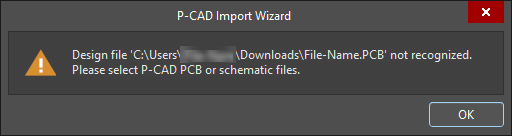
This can be due to the P-Cad file being exported/saved in an older version (before 2006.)
You can use a text editor to open the file to see version information:
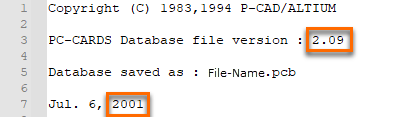
There are two options available when encountering this error.
1 If you still have access to P-CAD with a valid license for P-CAD 2006, you can open the file with that version, then use File ► Save as, and then import the newly saved file into Altium Designer.
(What a resaved P-CAD file will look like when opened in a text editor)

2 If P-CAD software is not accessible, an alternate approach would be to contact the Altium Service Bureaus.
Here's a link:
Service Bureaus
You can use the search feature to find a service bureau that has P-CAD in their "Services provided" section.