KB: SOLIDWORKS에서 실크스크린 표시
Updated: January 23, 2025
 Altium Designer
Starting in version: 20.1
Up to Current
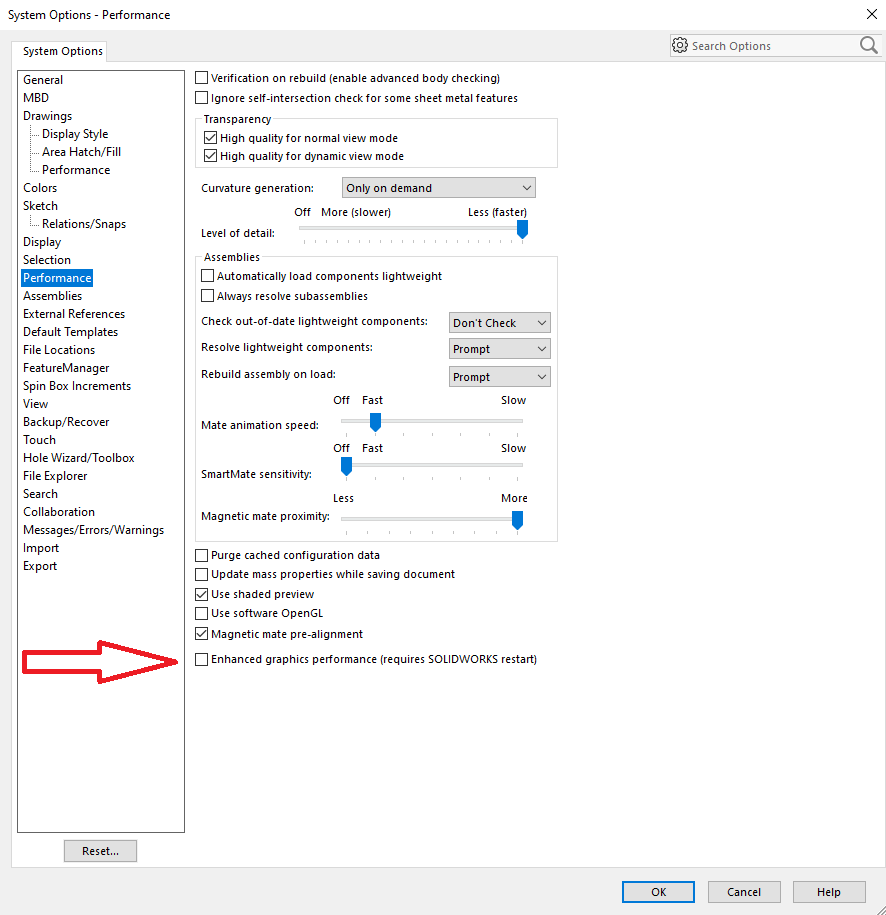
ECAD / MCAD CoDesigner 전송이 SOLIDWORKS에서 실크스크린을 표시하지 않습니다. 때때로 구리, 실크스크린, 솔더 마스크를 나타내는 데칼이 일부 비디오 카드의 렌더링 문제로 인해 SW 2019+에서 표시되지 않을 수 있습니다. 해결책은 SOLIDWORKS 환경 설정에서 이 플래그를 변경하는 것일 수 있습니다.
Solution Details
In SOLIDWORKS, click the Gear icon to access the preferences.
Click Performance and enable the option: “Performance » Enhanced graphics performance”