
KB: 보드 모양 편집
 Altium Designer
보드 모양을 편집하는 방법.
Solution Details
Try these steps:
1 from top menu, View » Board Planning Mode (or simply hit '1' for the keyboard shortcut)
2 from top menu, Design » Edit Board Shape (or simply hit 'd' twice for the keyboard shortcut)
(see note below)
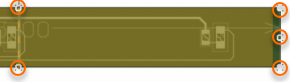
3 left-click and drag white edit handles, which appear as you hover over a board edge
Here's a link to the relevant section of documentation on Board Shape for editing the board shape:
Board Shape
Here's additional information that may be helpful:
How to Change Board Sizes in Altium Designer
Circuit Board Sizes and Shapes, How to Make a PCB
Defining the PCB Shape - video
Interactively Defining and Editing the Board Shape
Note: For AD21 and newer, If you don't see the Edit Board Shape under the Design menu, you many need to enable Legacy.PCB.RighidFlex Preferences » System » General » Advanced... button, search for "flex", then check the box in the Value column for Legacy.PCB.RighidFlex, close and restart Altium.