
KB: Resolving Undeclared Identifier Error in Altium
Updated: December 10, 2025
 Altium Designer
The “Undeclared Identifier: [query identifier] at Line ##, Char: $$$” error in Altium occurs when a design rule uses an undefined scope or an incorrectly written query. This often happens with rules referencing conditions like HasFootprint that are not properly defined. Such rules are highlighted in red and accompanied by error messages indicating incorrect definitions. To resolve this, review the design rules and ensure that all queries are correctly written and applied using Altium’s query syntax.
Solution Details
Error Message
When applying design rules in Altium, you may encounter an error stating: “Undeclared Identifier: [query identifier] at Line ##, Char: $$$.” This indicates that the query used in the rule is invalid or references an undefined identifier.
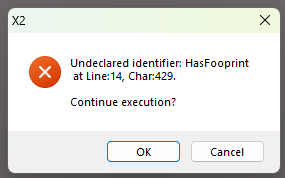
Common Cause of the Error
- The query syntax is incorrect or contains typos.
- The identifier (e.g.,
HasFootprint) is not recognized because it is not defined in the current context. - The rule scope is improperly set, causing Altium to fail in applying the condition.
Resolution
To resolve the issue:
- Verify that all design rule queries are correctly written and valid.
- Check for rules highlighted in red, as these indicate incorrect definitions.
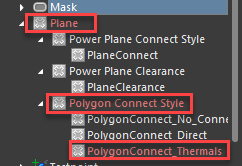
- Test each query individually to confirm it returns valid results.
Step-by-Step Instructions
- Open PCB Rules and Constraints Editor in Altium.
- Navigate to the rule that triggered the error.
- Review the query in the Scope field:
- Ensure the syntax matches Altium’s query language.
- Correct any typos or undefined identifiers.
- Use the Query Builder or Query Test feature:
- Test the query to confirm it returns valid objects.
- If the query fails or displays in red, adjust it until valid.
- Apply changes and revalidate the design rules.
Additional Notes
- Common identifiers like
HasFootprintmust be used correctly; refer to Altium’s query syntax documentation for guidance. - Always validate queries before applying them to avoid compilation errors.