
KB: What Does the White Arrow on Some Documents Mean?
 Altium Designer
Solution Details
The location of the Project file, PrjPcb, on your computer hard drive defines the top level of its folder directory structure. Documents physically located in the project folder or a sub-folder on disk are associated in the project file using relative referencing. Documents that are stored outside this folder path are associated with the project file using absolute referencing.
In the Project Panel, to distinguish documents with an absolute path outside the project directory structure, a small arrow is displayed at the bottom left corner of their icon as shown by this example:
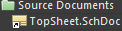 .
.
To summarize, adding documents to a project, such as a schematic sheet, a link to each document is entered into the project file. The documents can be stored anywhere on your network; they do not need to be in the same folder as the project file. If they do exist in a directory outside where the project exists or its sub-directories, then the small arrow symbol appears on the document’s icon in the Projects panel.
It is also worth noting that as a managed project in Altium 365, due to the requirement of how git version control works, you would need to have all associated project files under the same folder, so as not to cause this arrow icon to appear.
Further reading is available in our documentation on the Projects panel here: Project Documents Tree