
KB: ActiveBOM - Info from Selected SPNs Is Not Loading
Updated: декабря 10, 2025
 Altium Designer
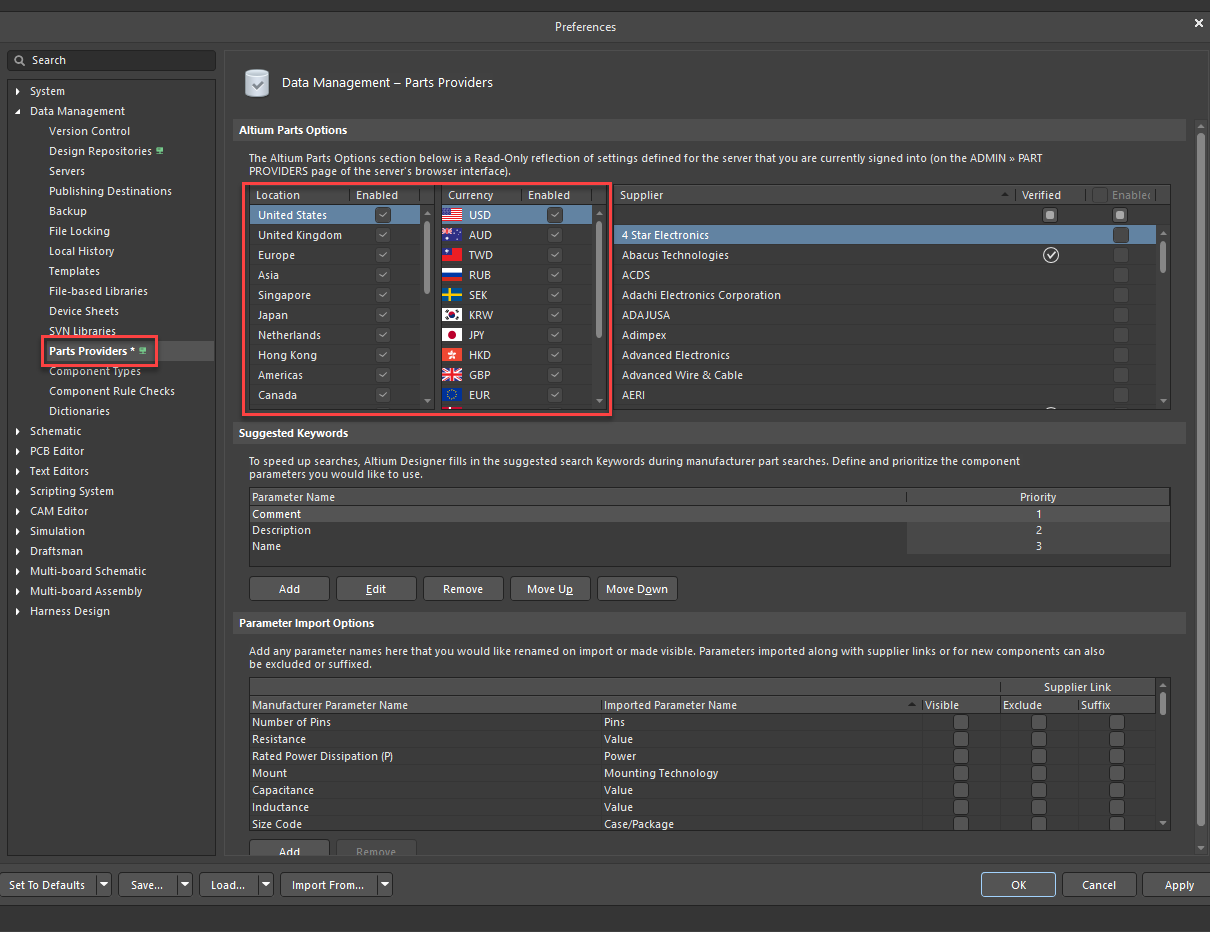
If selected Supplier Part Numbers (SPNs) in ActiveBOM show no pricing information, the issue is likely due to disabled US location or US Dollar settings in Preferences » Data Management » Parts Providers. Altium servers primarily source pricing data from US-based suppliers in USD, which is then converted to other currencies. If these settings are disabled, pricing cannot be retrieved. Enabling US location and currency settings ensures proper price data loading for SPNs.
Solution Details
Issue Overview
When working with ActiveBOM in Altium Designer, you may notice that selected Supplier Part Numbers (SPNs) do not display any pricing information. This can lead to incomplete BOM data and delays in procurement planning.
Root Cause Analysis
- Altium servers source pricing data primarily from US-based suppliers in USD.
- If the US location or US Dollar currency settings are disabled in Parts Providers preferences, pricing data cannot be retrieved.
- Prices are initially provided in USD and then converted to other currencies, so disabling these options blocks the data feed.
Resolution Steps
To resolve the issue:
- Enable US location and US Dollar currency settings in Preferences » Data Management » Parts Providers.
- Verify that the relevant suppliers are active in your configuration.
Step-by-Step Instructions
- Go to Preferences » Data Management » Parts Providers.
- Locate the settings for Locations and Currencies.
- Ensure that United States is selected under Locations.
- Ensure that USD is enabled under Currencies.
- Click OK to save changes and refresh ActiveBOM.
Additional Notes
- Disabling US settings will prevent pricing data from loading for most suppliers.
- After enabling settings, refresh ActiveBOM to update pricing information.
- BugCrunch Report: User-submitted issue related to this topic. Click the link to view details and vote for prioritization: BC:17658