
KB: Different Net Names are not flagged in Multi-board Connection Manager
 Altium Designer
Solution Details
ERC reports names but manager highlights conflicts
In a Multi-board project, the Connection Manager highlights Unresolved Conflict issues, but it does not highlight Different Net Names issues. This can make it appear as though the tool is not detecting a net name mismatch, even when Multi-board ERC reports differently named nets in the Messages panel.
The two checks can appear together. For example, if two wires are re-routed in a schematic without renaming the nets, ERC may report both an Unresolved Conflict and Different Net Names. The unresolved conflict is highlighted in the Connection Manager, but the different net names condition is not highlighted there.
Run Multi-board validation with Design » Run ERC. Review detected warnings and errors in the Messages panel. Different Net Names should be reviewed through ERC messages rather than expected as a highlighted Connection Manager conflict.
Connectivity and naming use different scopes
Unresolved Conflict and Different Net Names are separate ERC checks. An Unresolved Conflict occurs when nets have been swapped without intentional renaming in the source schematics. The Connection Manager highlights this because it is a connectivity issue in the Multi-board System connectivity table.
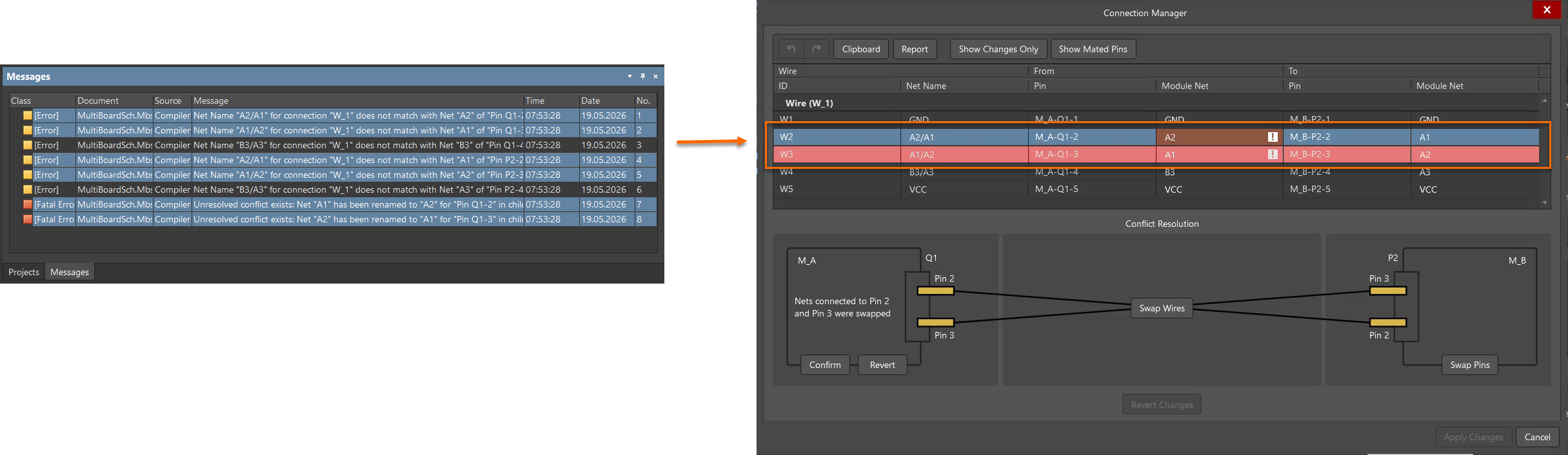
Different Net Names is a naming condition between connected child project nets. The Connection Manager does not highlight this as a conflict because differently named nets may be intentionally connected in a Multi-board System design. It is not always required for nets in different PCB projects to have the same name.
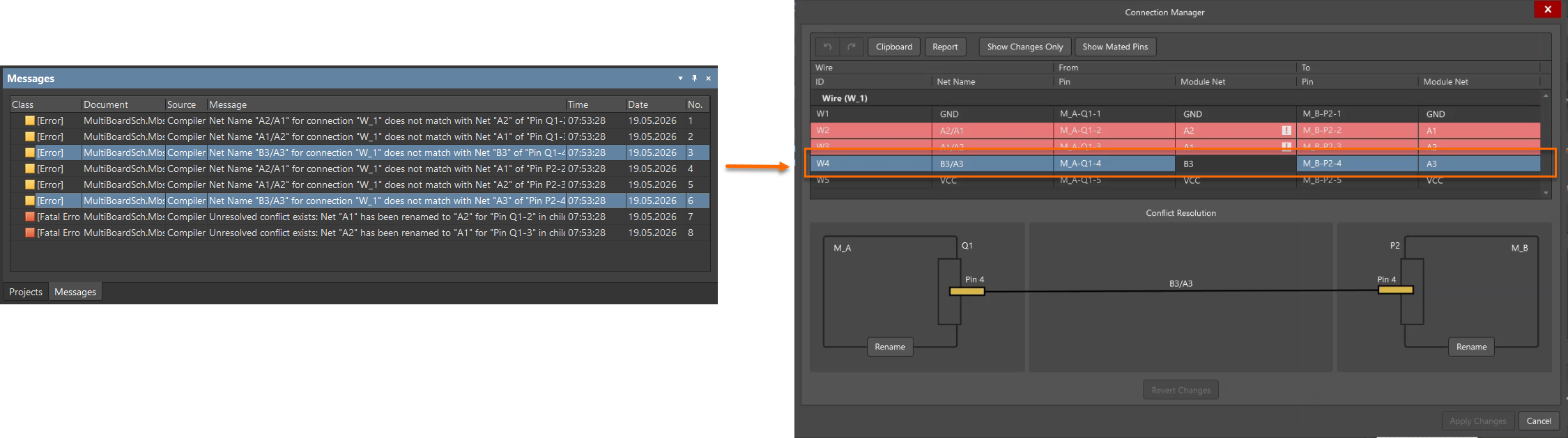
Multi-board designs support bidirectional exchange of pin and net data. Connectivity data can be imported from child projects into the Multi-board System, and Multi-board connectivity data can be passed back to the source PCB projects. Because of this, resolving a conflict and resolving a naming issue can happen at different levels: the Multi-board System connectivity table and the child projects.
Resolve conflicts before syncing child projects
- If differently named nets are intentionally connected, review the ERC message and confirm that the Multi-board System connectivity is correct.
- If an Unresolved Conflict is reported, resolve the highlighted connectivity issue in the Connection Manager.
- If Different Net Names remains after the conflict is resolved, decide whether the connected child project nets should use the same name.
- If the connected nets should have the same name, use the Rename button in the Connection Manager to rename the child project net to the Multi-board System net name.
- After using Rename, run Design » Update Child Projects to pass the Multi-board connectivity data back to the source PCB projects.
- Perform Design » Update Child Projects after conflicts have been resolved in the Connection Manager, so the child projects synchronize to the correct state of the Multi-board design.
Run ERC, rename, and update projects
- Open the Multi-board project.
- Run Multi-board project ERC validation with Design » Run ERC.
- Open the Messages panel.
- Review whether the reported issue is Different Net Names, Unresolved Conflict, or both.
- If an Unresolved Conflict is reported, open the Connection Manager with Design » Connection Manager.
- Resolve or reject the updated connection data from the child projects in the Connection Manager. This resolves the highlighted connectivity conflict at the Multi-board System connectivity table level.
- Run ERC validation again and review whether the Different Net Names message remains.
- If the connected nets should have the same name, use the Rename button in the Connection Manager on one of the child projects.
- Confirm that the child project net is renamed to match the Multi-board System net name.
- Run Design » Update Child Projects to apply the renamed net to the child projects. Resolved mismatched net names can be synchronized by a direct update to the target in the child project.
- Run ERC validation again and review the Messages panel to confirm that the Different Net Names message is cleared.
Additional Notes
The Multi-board System has local net or connection names. The Rename button changes child project net names to match the Multi-board System net name. The Connection Manager discretely indicates when child project net names are already synchronized with Multi-board System net names by greying out the Rename button.