
KB: How to Select the Designators of a Particular Group of Components Using Rectangle Box Selection
Updated: ноября 11, 2025
 Altium Designer
Users may want to select only the designators of specific components or a group of components in a schematic or PCB layout. This can be achieved using rectangle box selection in combination with the Properties panel. By selecting the components first and then switching the selection to their designators, users can isolate and manipulate designators independently—for example, to move them to a different layer or adjust their placement.
Solution Details
Selecting Designators from a Group of Components
Problem Description
Users often need to select only the designators of a specific group of components, such as when repositioning them or moving them to another layer. However, using rectangle box selection alone selects the entire component, not just the designator.
Why This Happens
Designators are sub-elements of components. Rectangle selection targets the full component object, so additional steps are needed to isolate and select only the designators.
What to Do
To select only the designators of a group of components:
- Use rectangle selection or schematic cross-select mode to select the components.
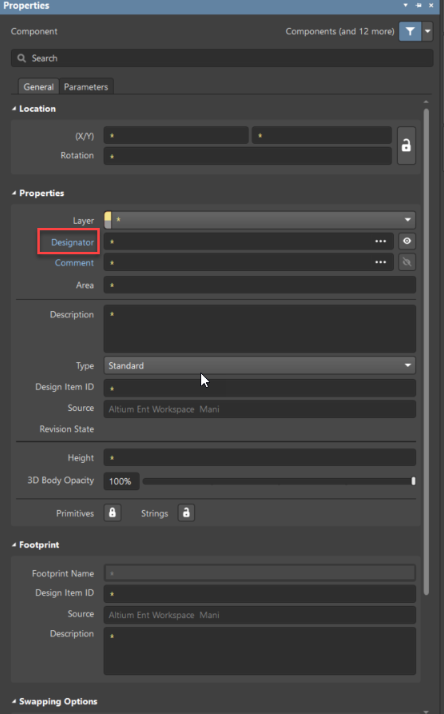
- Use the Properties panel to switch the selection to their designators.
How to Do It
- Select the required components using rectangle selection or schematic cross-select mode.
- Open the Properties panel.
- Click on the Designator text field (highlighted in blue).
- This switches the selection to the designators of the selected components.
- You can now move the selected designators to another layer or adjust their placement.
Additional Notes
- Ensure the Properties panel is visible. If not, enable it via View » Panels » Properties.
- This method works in both schematic and PCB documents depending on the selection mode used.