
KB: Route traces between flex and rigid regions
Updated: ноября 20, 2024
 Altium Designer
Cannot route traces between flex and rigid regions as something is blocking at the boundary
The most probable cause is Board Outline Clearance rule with a Split Continuation value set to non-zero value, which is causing the split line to be treated as an obstacle.
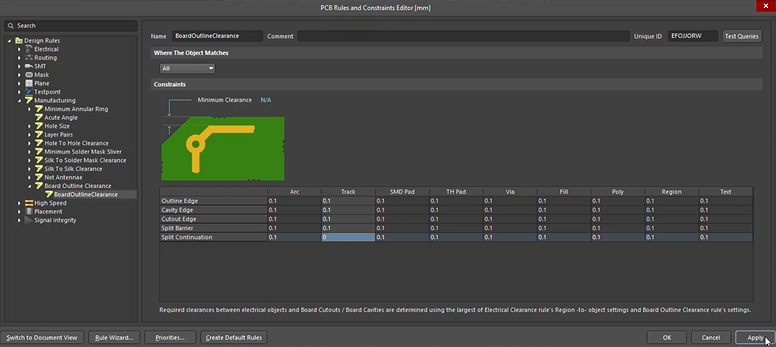
Design ► Rules, then, in the left pane, expand Design Rules ► Manufacturing ► Board Outline Clearance ► BoardOutlineClearance, and set "0" along the (bottom) row Split Continuation for the Track column
Solution Details
To overcome this issue, you will need to revise your Board Outline Clearance rule. From the menu bar, use Design » Rules, then, in the left pane, expand Design Rules » Manufacturing » Board Outline Clearance » BoardOutlineClearance, and set "0" along the (bottom) row Split Continuation for the Track column, to allow track primitive to go across the boundary.
Here's documentation with more details about this rule:
Manufacturing - Board Outline Clearance