
Agentic Engineering
AI agents provide substantial advantages for engineering tasks like requirements capturing by significantly enhancing efficiency and automating complex, repetitive workflows. Requirements Portal's Engineering Assistant leverages AI technologies to provide you with fast, automated review tool for your requirements that allows you to ask questions about requirements in your current project in free-form, natural language and get quick answers without manually filtering or searching through the requirements, for example:
-
How many requirements are not verified?
-
Are there any engineering gaps in these requirements?
-
Show me all requirements about the power supply.
-
Which requirements need to be taken into account for PCB design?
-
Do any requirements conflict with each other?
-
Give me an overview of all battery-related requirements.
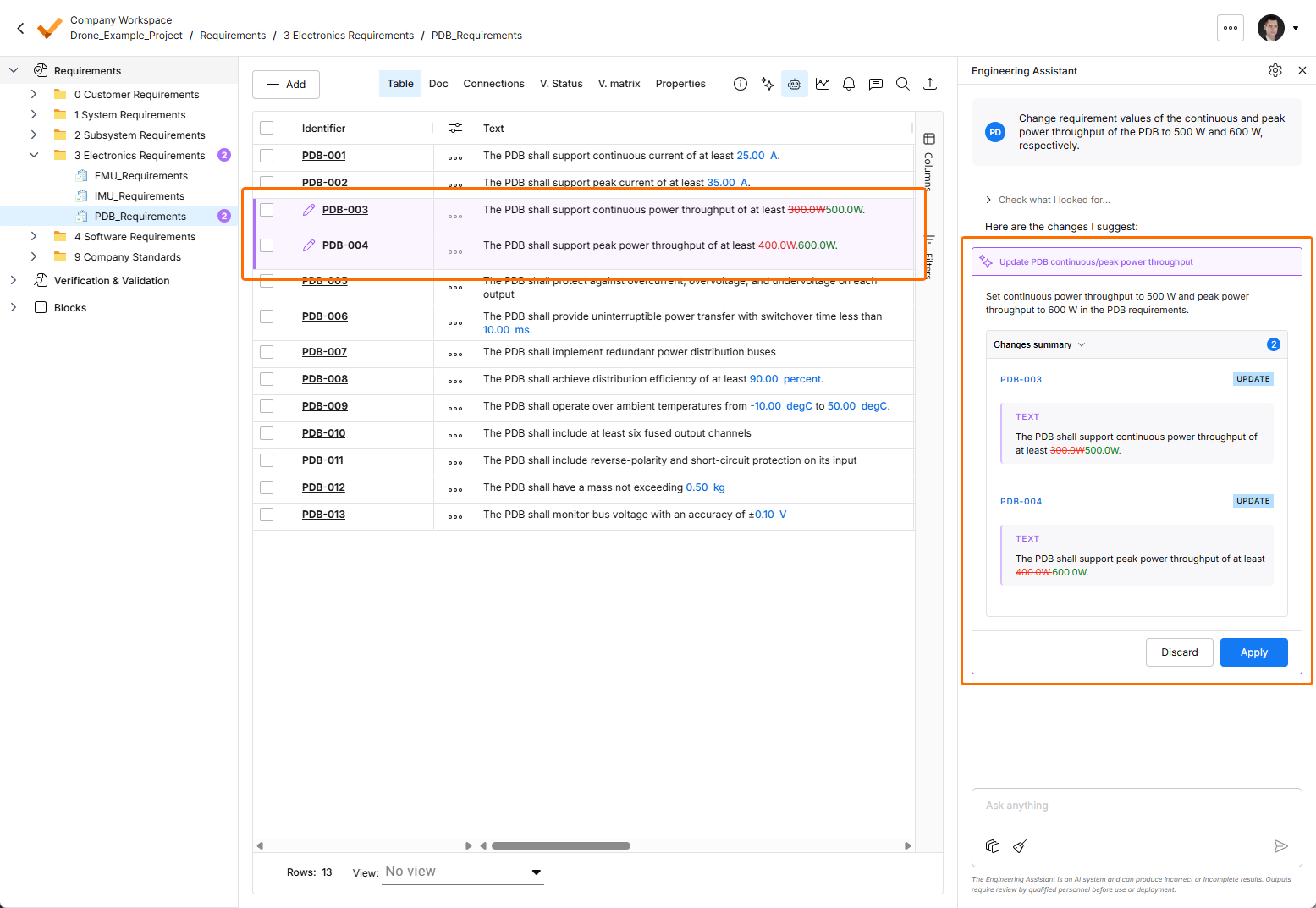
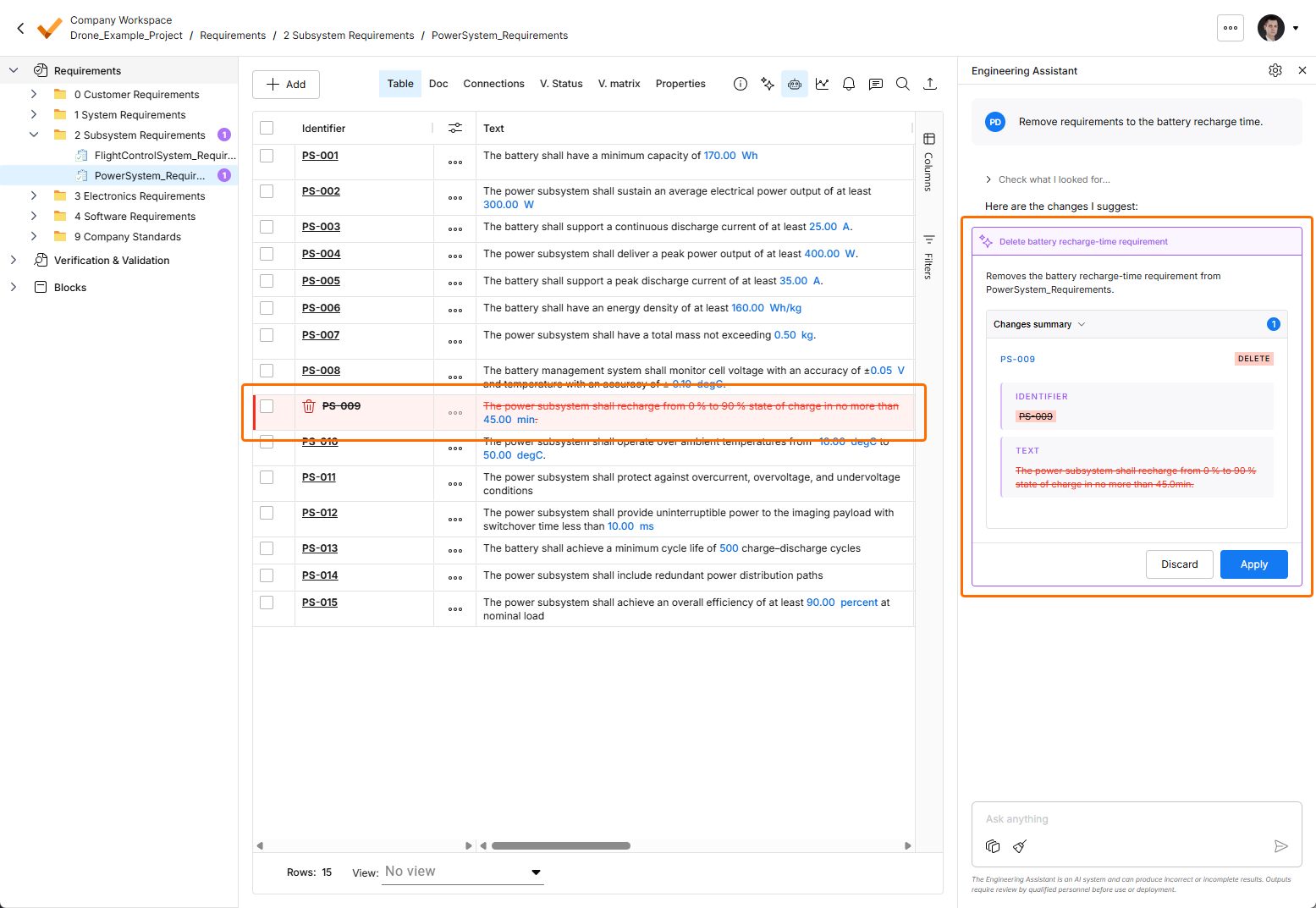
The Engineering Assistant is also able to modify, create, or delete requirements. When you submit a request to create a new or change or delete an existing requirement, the Engineering Assistant will provide you a summary of changes to be applied, and you can review them and then either apply or discard the changes. Examples of such requests:
-
Generate requirements for a lightweight drone power supply that takes a 6S LiPo input, provides regulated 5 V / 5 A and 12 V / 3 A outputs, and weighs under 150 g. It should handle vibration and -10°C to +50°C operation, with protection for short circuit, reverse polarity, overtemperature, and low battery.
-
Change the required maximum operating temperature for all parts to 60°C.
-
Can you identify all requirements that affect the sizing of the power system and ensure they are verifiable?
-
In the new design, I've replaced the camera with an IR sensor. Remove all requirements that were related to the camera.
 icon at the top right, selecting Settings from the menu that appears, and then selecting ValiAssistant from list in the left-hand pane) –
 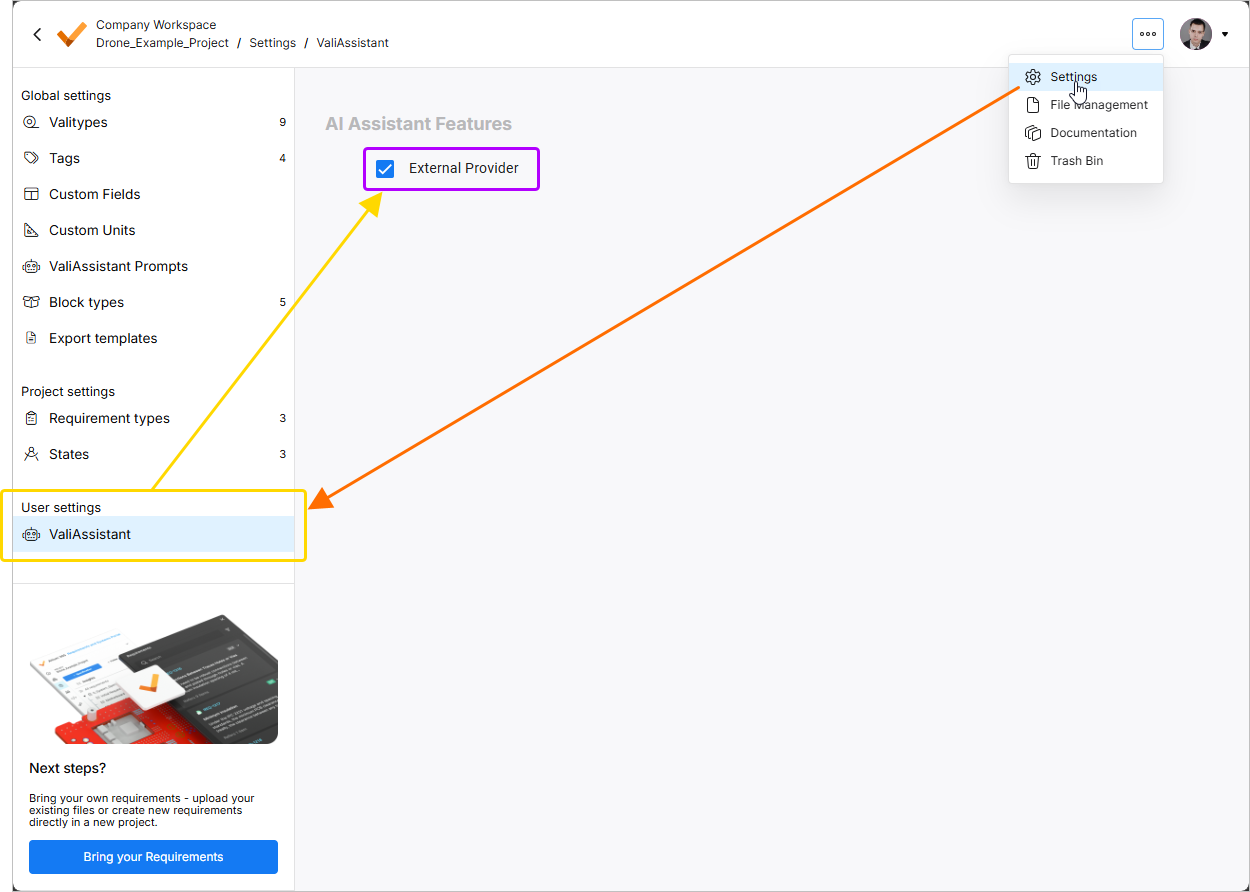 .
.
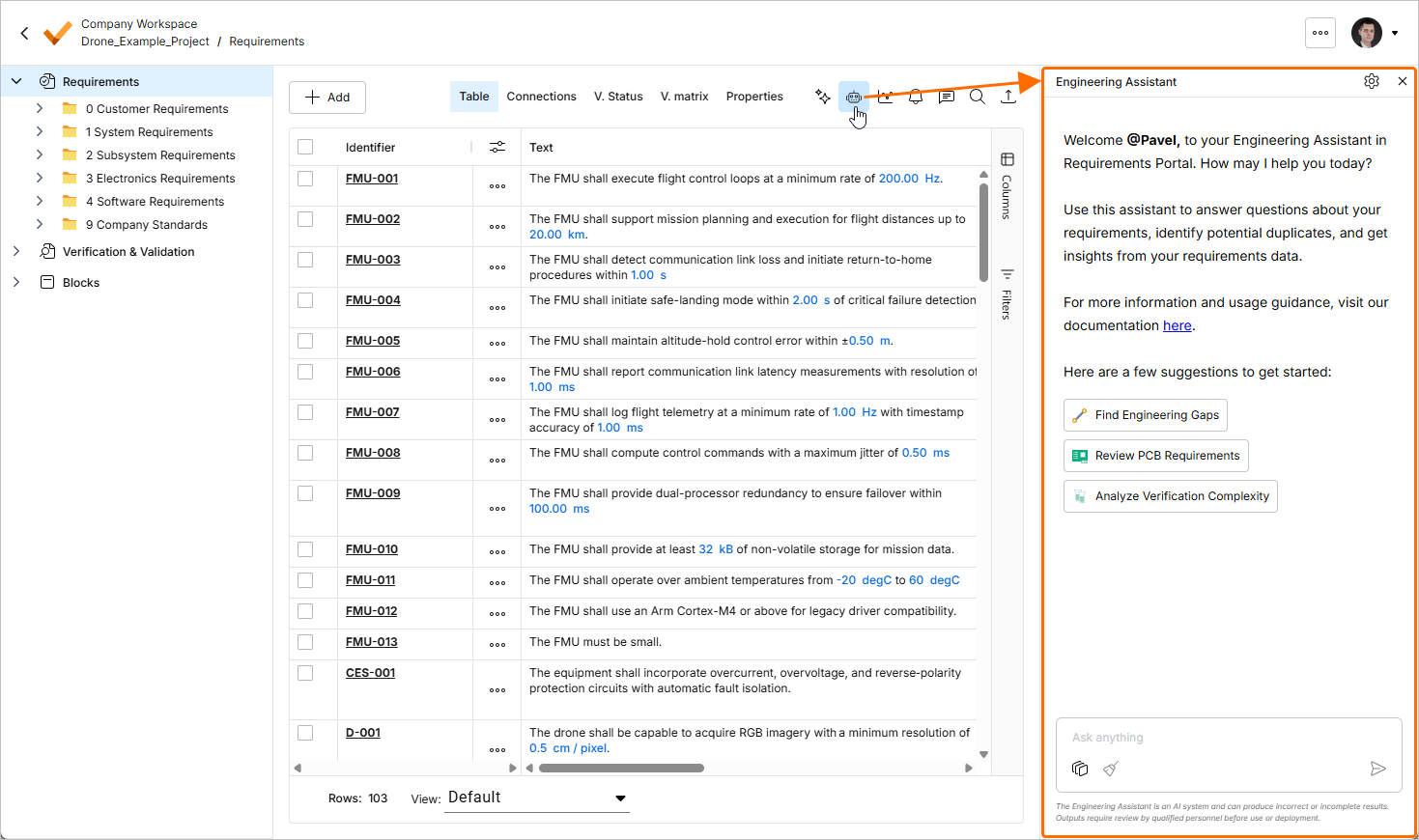
The Engineering Assistant is accessed via the Engineering Assistant pane available in the Requirement Module by clicking the  icon at the top right.
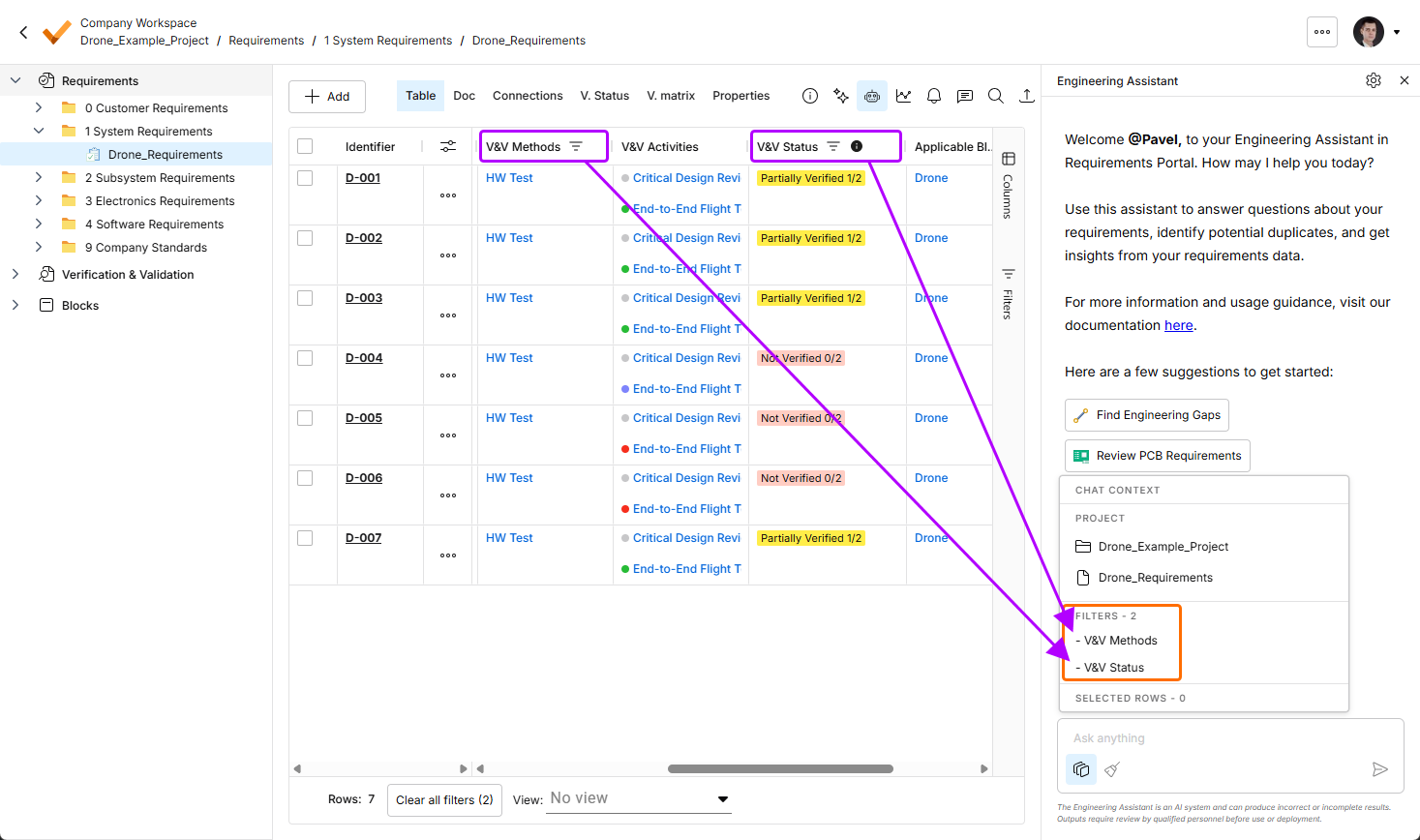
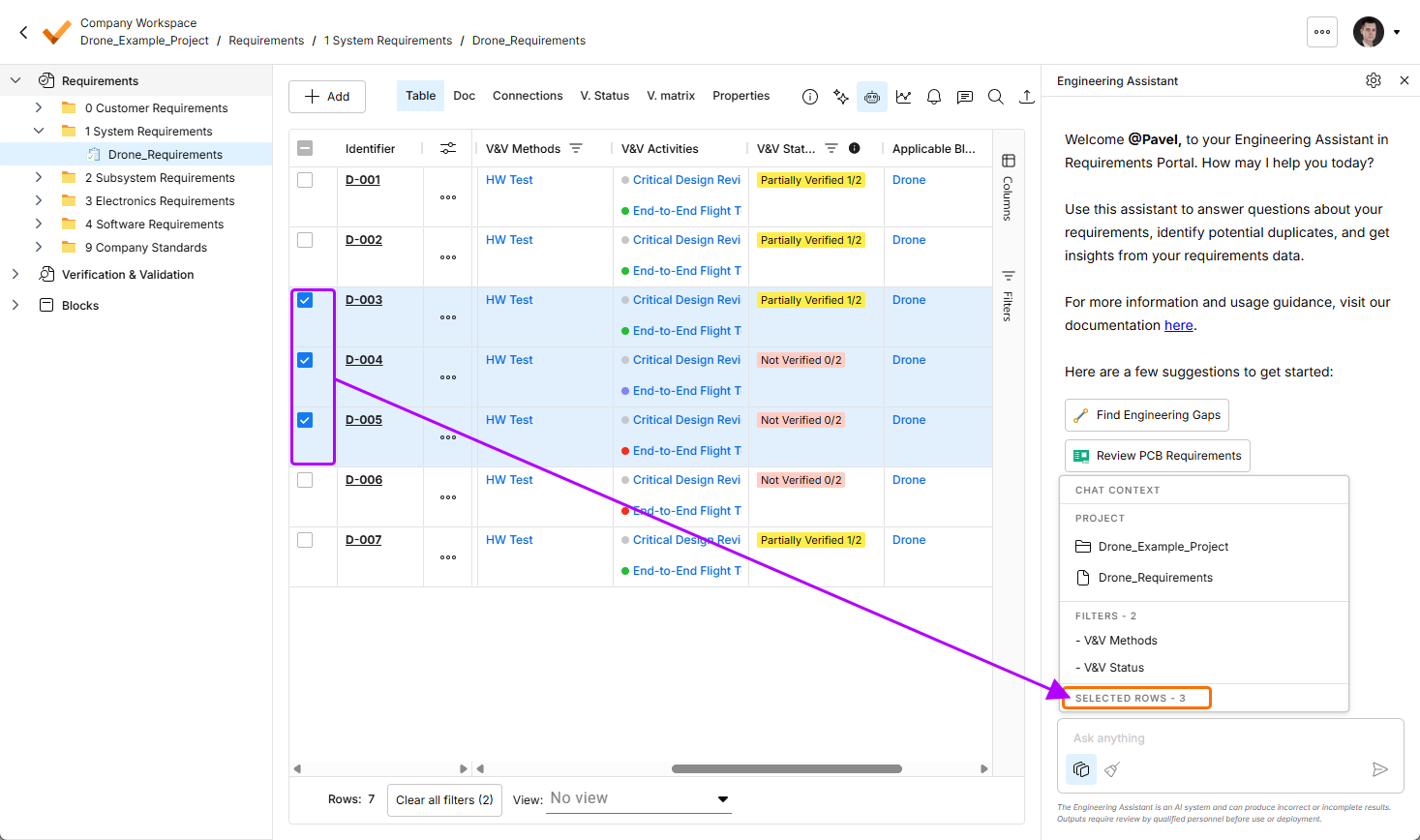
You can see the current chat context by clicking the  button at the bottom of the Engineering Assistant pane. The Chat Context pop-up will open presenting the following information:
-
Project – shows the name of the current project and the name of the currently selected folder, specification, or section.
-
Filters – shows the number of filters currently applied to the table and the list of columns to which the filters are applied.
-
Rows selected – shows the number of currently selected requirement rows.
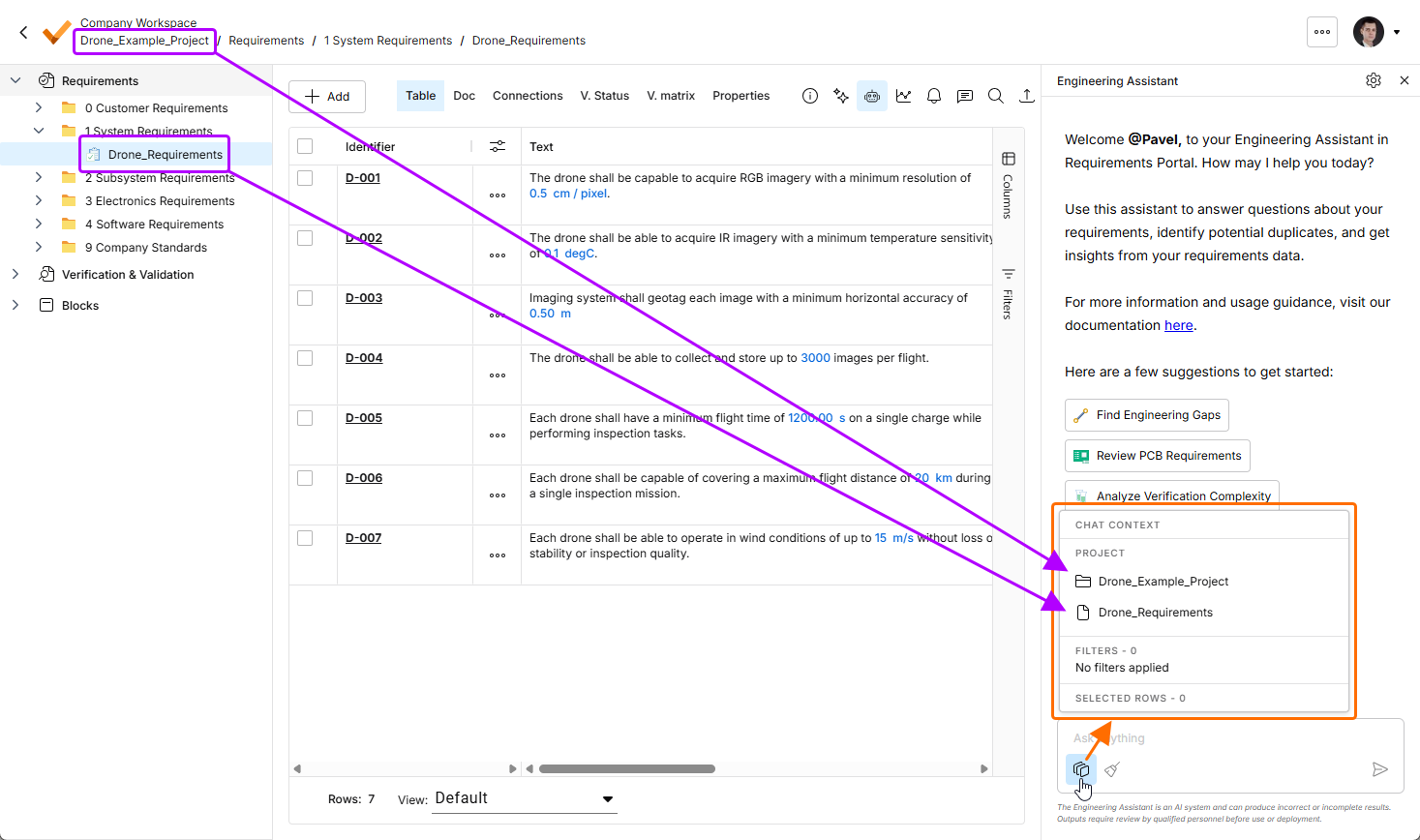
Click the button to open the Chat Context pop-up. In this example, the Project region shows the name of the current project (Drone_Example_Project) and the name of the currently selected specification (Drone_Requirements).
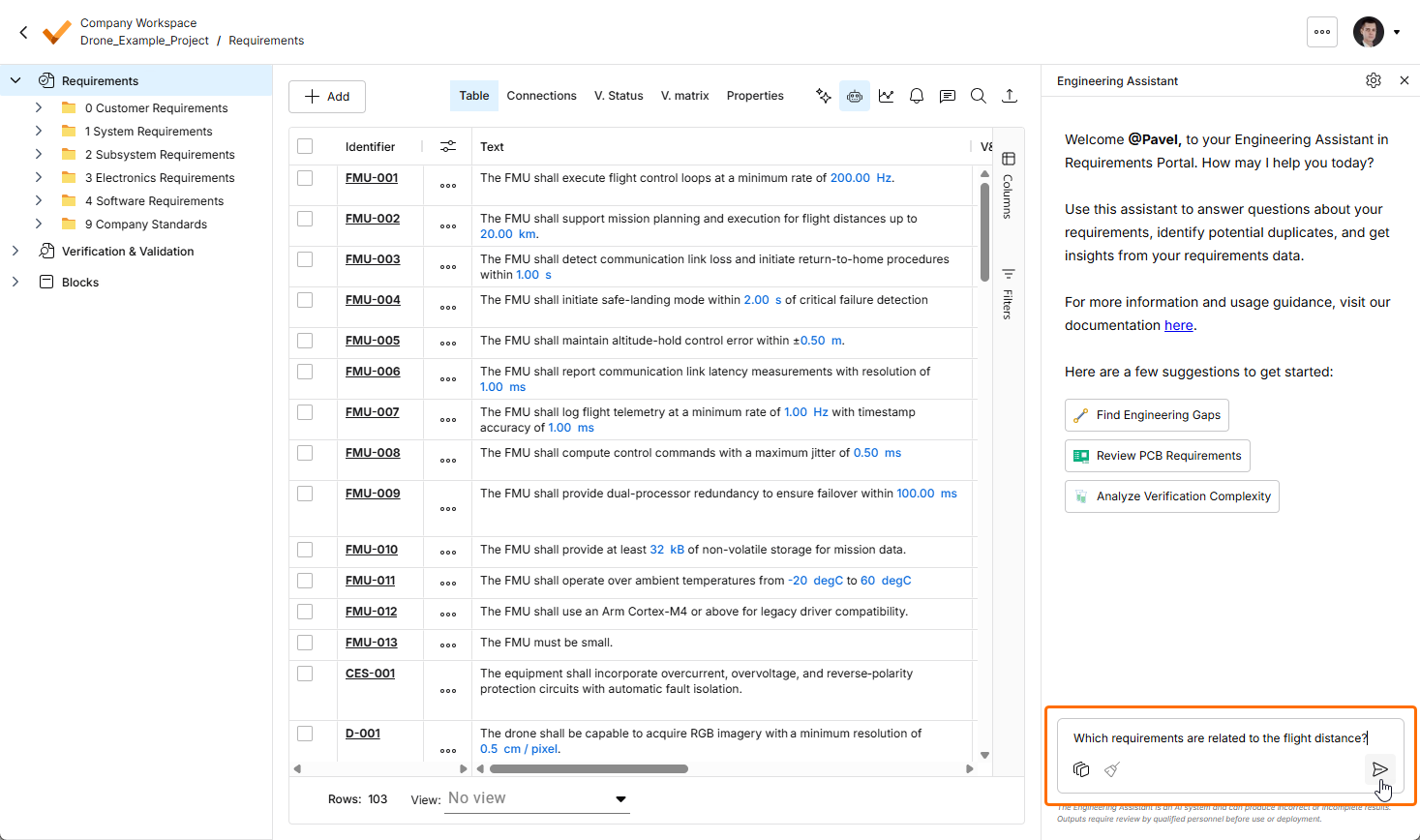
To use the Engineering Assistant, type your query into the Ask anything field at the bottom of the Engineering Assistant pane and click the  icon or press
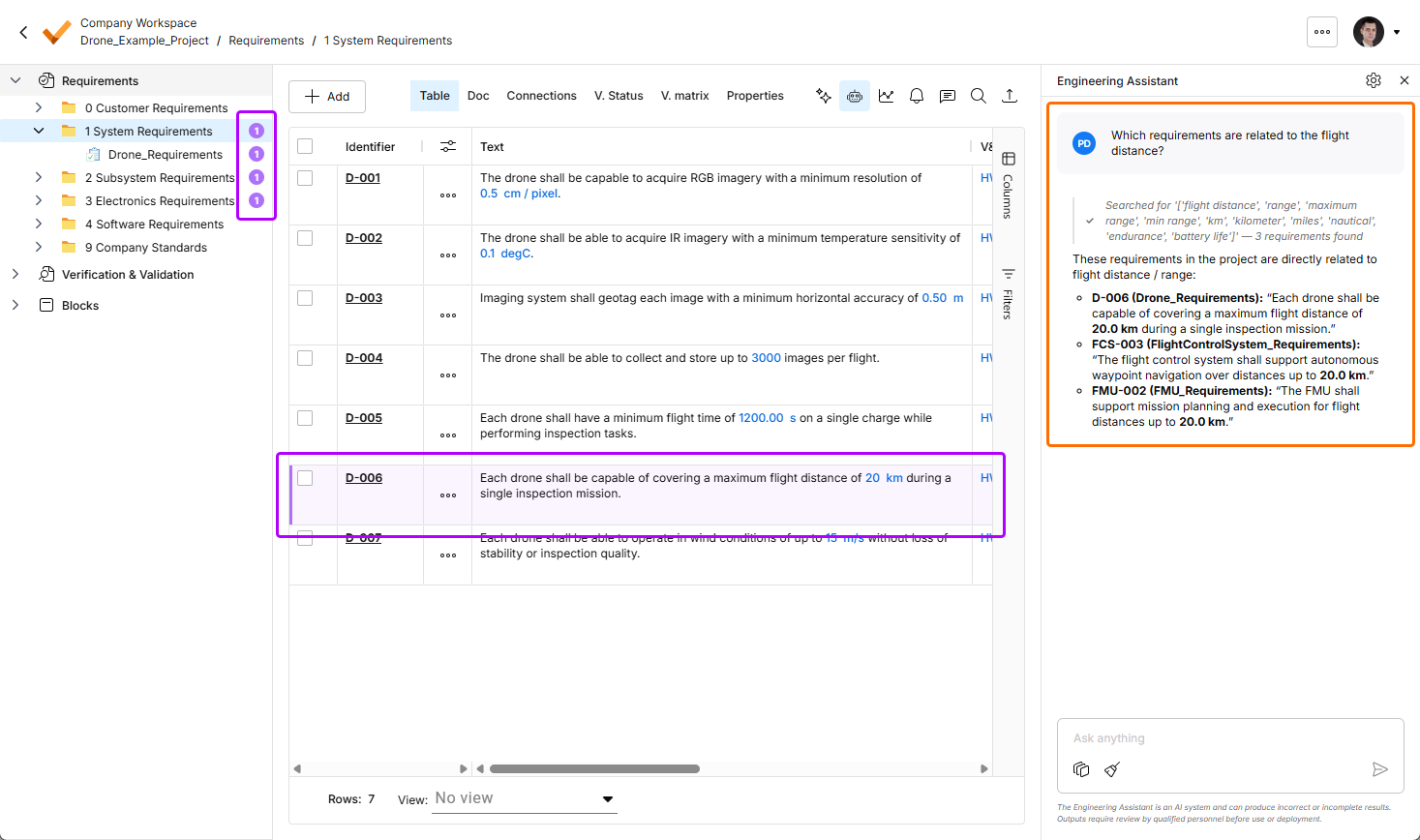
 Enter. The Engineering Assistant will analyze the requirements and present a relevant answer in the pane. Depending on the query, the Engineering Assistant will return a numeric answer, a list of requirement IDs, or a brief summary. The requirement(s) related to the query will be highlighted in the requirements table, and the number of related requirements is shown in the project tree next to the corresponding specifications, sections, and folders.
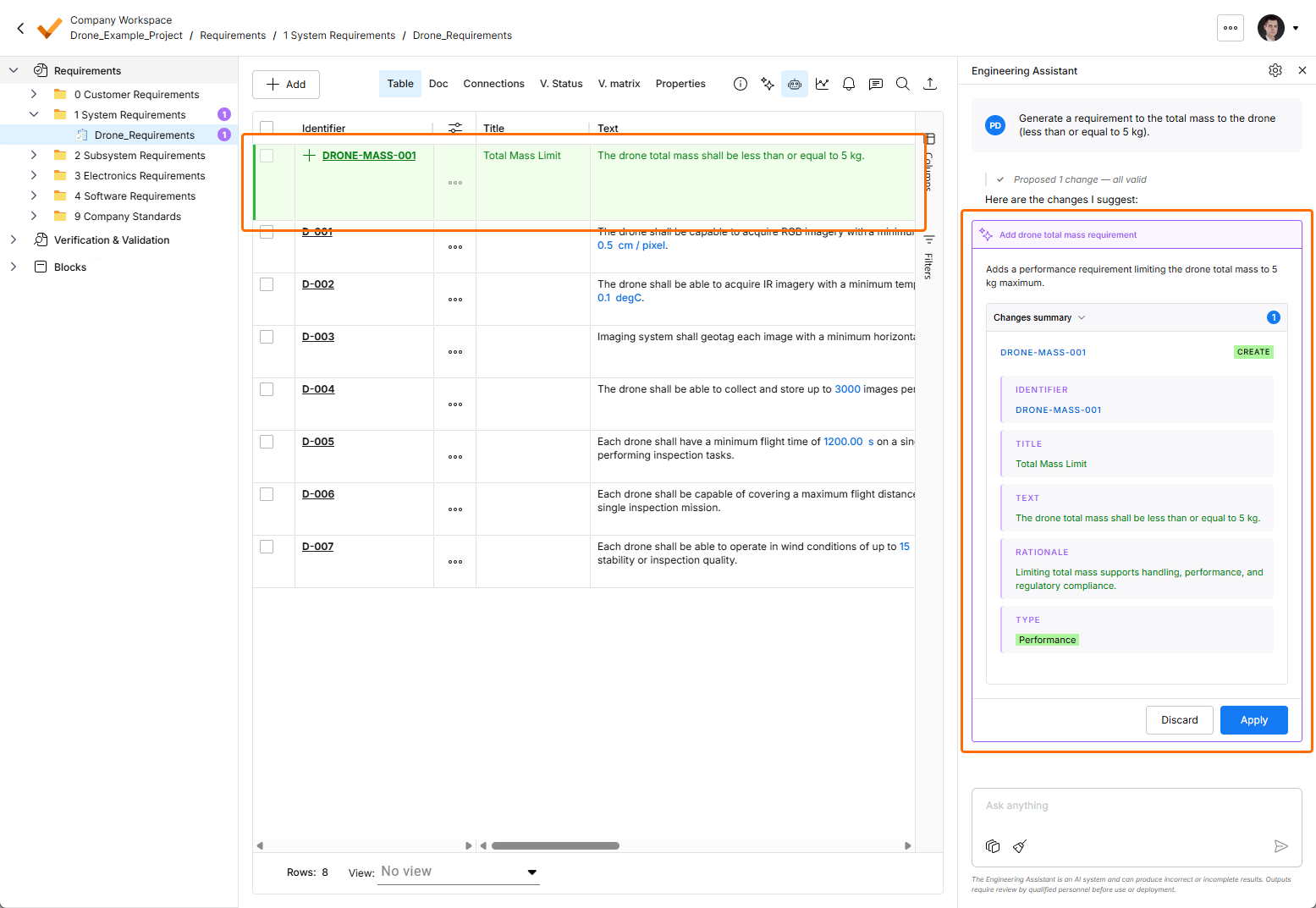
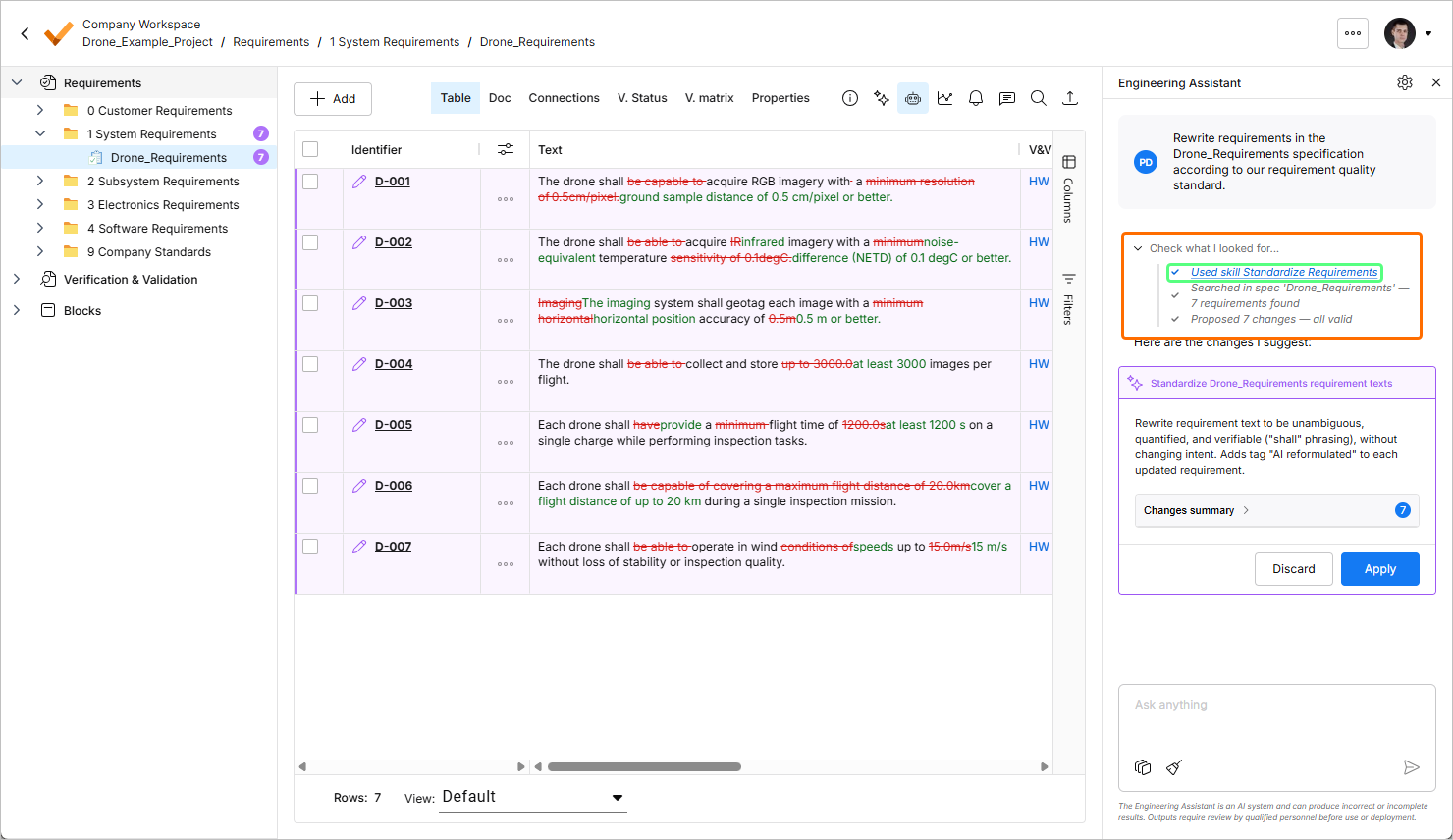
When you submit a request to the Engineering Assistant to create a new or change or delete an existing requirement, suggested changes will be shown in a dedicated tile within the Engineering Assistant pane where you can review them (by expanding the Changes summary collapsible region) and then either apply or discard the changes. Also, suggested changes will be visible in the requirements table as follows:
-
New requirements are highlighted in green, with the icon in the
 icon in the Identifier column.
-
Changed requirements are highlighted in purple, with the
 icon in the Identifier column. Actual changes are also highlighted in the table.
-
Requirements suggested for removal are highlighted in red, with the
 icon in the Identifier column.
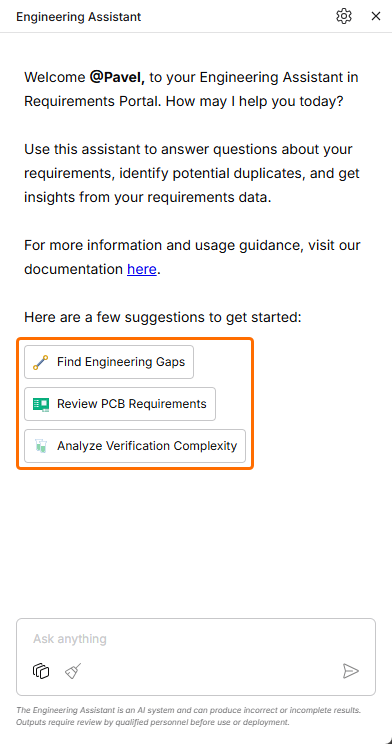 ).
).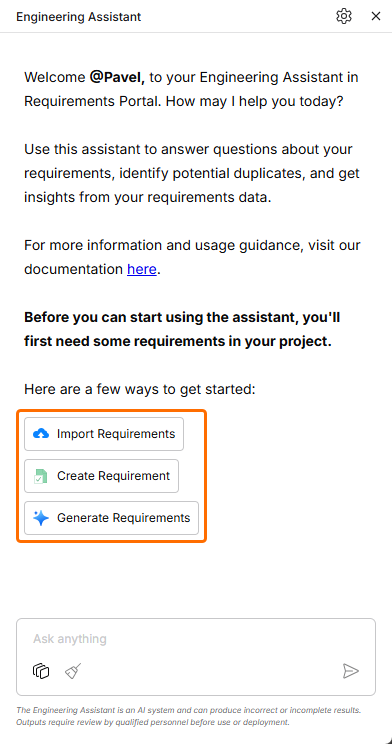 ).
). icon at the bottom of the Engineering Assistant pane. Note that only one conversation at the time is available (i.e., there is no history of conversations).
Using and Managing AI Skills
The Engineering Assistant functionality has been updated with the ability to use Skills. A skill is a reusable instruction set that the Engineering Assistant can execute in to perform a specific task more consistently. A skill packages how a specific engineering task should be done – the intent, the boundaries, the inputs it needs, the steps to follow – so that the same outcome is produced consistently, regardless of who runs it or when and without each user having to explain the same instructions every time.
A skill can be treated as:
-
A repeatable engineering workflow
-
An organizational standard made executable
-
A way to package expertise and make it reusable
Skills are invoked automatically by the AI which selects and applies them automatically based on your intent. You do not need to memorize commands or manually select skills. When you send a message, the Engineering Assistant:
-
Analyzes your intent and current context.
-
Reviews the skills available in the Workspace.
-
Compares your request against each skill's Short Description to determine which skills are relevant.
-
Selects the best matching skill.
-
Follows the skill's Instructions to perform the task.
-
Returns the result for you to review.
For example, when you send Rewrite these requirements using our company writing standard, the Engineering Assistant detects the intent (requirement standardization), identifies the skill whose short description best matches that request, executes the instructions defined in that skill, and returns the improved requirements.
Skill Use Examples
-
Break Down Complex Requirements – analyze selected requirements and split them into smaller, independently testable requirements while preserving the original intent.
Example prompt:
Break down these requirements. -
Apply Requirement Writing Standards – review requirements and rewrite them according to your organization's requirement-writing guidelines. Typical checks include ambiguity, non-verifiable language, missing actors, and unclear acceptance criteria.
Example prompt:
Rewrite these requirements according to our requirement quality standard. -
Translate Requirements – translate requirements from one language to another while preserving technical meaning, terminology, IDs, and traceability references.
Example prompt:
Translate these requirements to German. -
Classify Requirements – apply an organizational classification scheme to requirements, such as Electronics, Mechanical, Software, Safety, Security, or other company-specific taxonomies.
Example prompt:
Classify these requirements according to our applicability model. -
Generate Verification Criteria – analyze requirements and propose verification methods, acceptance criteria, or test conditions that could be used to demonstrate compliance always in the same way.
Example prompt:
Generate verification criteria for these requirements. -
Summarize a Specification/Section/Group of Requirements – generate a concise and structured summary of a specification, requirement section, or requirement set.
Example prompt:
Summarize the selected requirements.
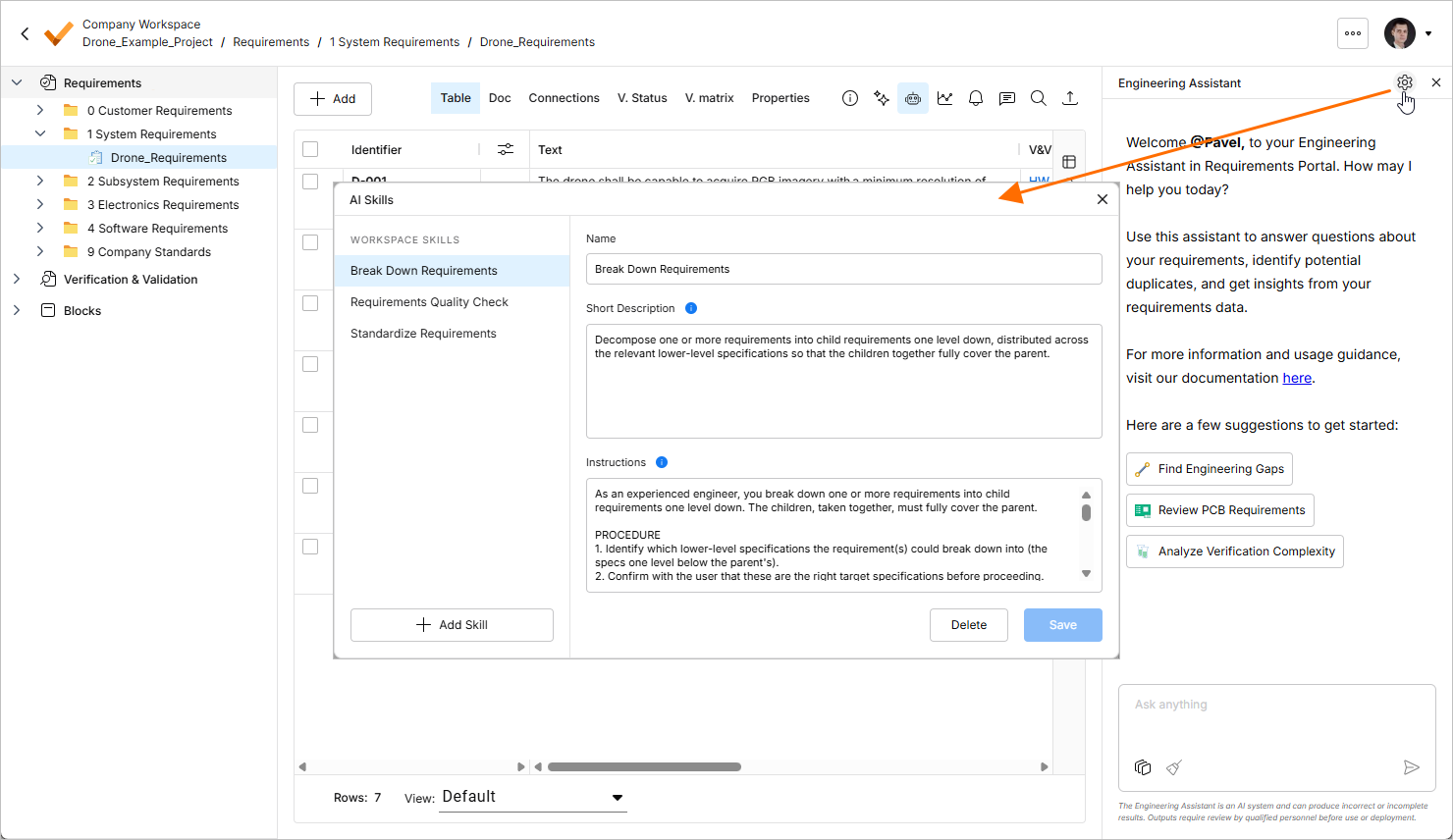
A set of available skills is managed using the AI Skills window accessed by clicking the  button at the top right of the Engineering Assistant pane. From this window, you can add new and change and delete existing skills.
-
Existing skills are listed in the left-hand side Workspace Skills region of the window. Click an entry to show the selected skill's details.
-
To add a new skill, click the
 button at the bottom left of the window. An entry for a new skill will appear in the list. Define Name, Short Description, and Instructions for a new skill and then click the
  button at the bottom right.
Refer to the Best Practices for Formulating a Skill collapsible section below for details about each field.
-
To edit an existing skill, select it in the list, change its fields as required, and then click the
 button at the bottom right.
-
To delete an existing skill, select it in the list, click the
 button at the bottom right, and then confirm the deletion.
 icon at the top right, selecting Settings from the menu that appears, and then selecting AI Skills from list in the left-hand pane)
Best Practices for Formulating a Skill
A good skill helps the AI understand two things:
-
When the skill should be used
-
What the AI should do when the skill runs
When you define a skill,
This is expressed through three fields, where each field has a different purpose:
-
Name – helps you to recognize the skill.
-
Short Description – helps the AI decide when the skill is relevant.
-
Instructions – define the behavior the AI should follow once the skill is selected.
Refer to the sections below for details about each field.
Name
The Name should be short, clear, and action-oriented. It should help you quickly understand what the skill is intended to do. A good name usually describes the action and the type of engineering data the skill works on.
A strong skill name should be:
-
Specific enough to distinguish the skill from others
-
Short enough to scan easily in the skills list
-
Focused on the main task the skill performs
-
Written in language users naturally understand
Avoid names that are too broad or generic. If the name could apply to many different tasks, it is probably not specific enough.
Short Description
The Short Description helps the AI understand what the skill is about and when it should be triggered. This field is important because you do not need to manually select a skill. The assistant analyzes your prompt, compares it with the available skills, and decides whether a skill is relevant.
A good short description should explain:
-
What task the skill performs
-
What type of engineering data it applies to
-
When the skill should be used
-
What outcome the skill is expected to produce
The short description should be concise, but not vague. It should include enough context for the AI to distinguish this skill from similar skills.
A weak short description only says what domain the skill belongs to. A strong short description explains the specific task, the expected context, and the trigger situation. For example, instead of describing a skill as something that "helps with requirements", the description should explain whether the skill reviews requirement quality, breaks down complex requirements, translates requirement text, detects conflicts, generates verification criteria, or performs another specific action.
The better the short description explains the skill’s purpose and usage context, the more reliably the assistant can decide when to apply it.
Instructions
The Instructions define what the AI should do once the skill has been selected. This is the most important field for controlling the skill’s behavior. While the short description helps the AI decide when to use the skill, the instructions define how the skill should run.
Good instructions should be written as clear, step-by-step guidance. They should not only describe the final output, but also the reasoning and constraints the AI should follow while producing that output.
Instructions should explain:
-
What the AI should analyze first – the assistant should usually understand the engineering intent, context, structure, or relationships before changing or generating anything.
-
What steps the AI should perform – the behavior should be broken into explicit steps, so the output is repeatable and predictable.
-
What the AI should preserve – this may include original intent, requirement IDs, technical terms, units, values, constraints, references, applicability, hierarchy, or traceability context.
-
What the AI must not do – good skills explicitly prevent the AI from inventing missing engineering details, changing intent, introducing new assumptions, or applying changes without user review.
-
How the AI should handle uncertainty – if information is missing, ambiguous, or insufficient, the skill should instruct the AI to state the issue clearly instead of guessing.
-
What output format is expected – the skill should define whether the result should be a table, bullet list, rewritten text, summary, checklist, or structured report.
Good instructions are especially important for engineering work because the assistant may be working with data that affects specifications, validation, design decisions, or downstream implementation. The skill should therefore guide the AI to be useful without being overconfident.
Other Notes
-
The goal is not to write a long prompt. The goal is to define a clear operating procedure for the AI.
-
Keep Skills Focused
A skill should perform one repeatable task well.
If a skill tries to do too many things, it becomes harder for the assistant to know when to use it and harder for users to trust the output. For example, one skill should not combine requirement decomposition, translation, quality review, traceability analysis, and verification generation unless those actions are intentionally part of one tightly defined workflow.
If the skill purpose requires multiple unrelated actions, split it into separate skills.
-
Define Boundaries Clearly
Good skills are explicit about boundaries.
This is especially important when working with requirements, specifications, and engineering data. The assistant should know what it is allowed to change, what it should only suggest, and what it must never assume.
Useful boundaries include:
-
Do not change the original engineering intent
-
Do not invent values, constraints, or design decisions
-
Do not remove IDs or references
-
Do not assume missing verification methods
-
Do not apply changes automatically without user review
-
Do not treat unclear information as fact
Clear boundaries reduce the risk of plausible but incorrect engineering output.
-
-
Define the Output Format
A skill should tell the AI how to return the result.
A consistent output format makes the skill easier to review, compare, and reuse.
Depending on the skill, the output may be:
-
A table
-
A bullet list
-
A rewritten requirement
-
A structured report
-
A checklist
-
A summary
-
A list of proposed changes
-
A set of questions or open issues
The output format should match the purpose of the skill. For example, review-oriented skills often work well as tables with issue, explanation, and recommendation columns. Rewrite-oriented skills often work well when they show the original text, proposed output, and rationale.
-