CircuitMaker 中“主页”选项卡上各编辑器通用的命令

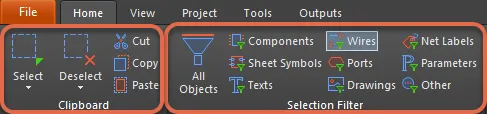
The following common regions/commands can be accessed from the Home tab. The commands will differ depending on which editor the regions are accessed from. The image below displays the regions/commands from the PCB editor.

  • Use the Clipboard commands to select/deselect, cut, copy, and paste items to and from the current document. 
  • The Select & Deselect commands enable you to quickly select and deselect design objects. 
  • Use the Selection Filter region to simplify the selection process by allowing you to quickly create a filter that only allows the object-kinds of interest to be available for selection.
AI-LocalizedAI 翻译
如您发现任何问题,请选中相关文本/图片,并按 Ctrl + Enter 键向我们提交反馈。