
KB:一次性更改项目中所有组件的生命周期状态
Updated: 一月 23, 2025
 A365
A365
一旦组件在项目中使用,更改其生命周期状态是明智的,例如从草稿更改为原型。所有已在项目中使用的组件都可以在资源管理器面板中一次性更改其状态。
Solution Details
Lifecycle states for all components used in a project or project release can be changed in the Children tab of the Explorer panel in Classic View.
1 View » Panel » Explorer and click the gear icon at the top-right to set to Classic View
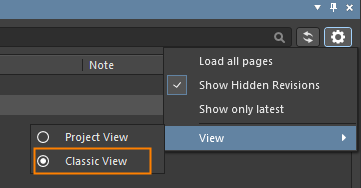
2 Select the project or project release in the Explorer panel
3 Multi-select all of the component CMP- items in the Children tab by shift+click the first and last components
4 Right-click over the selected components and choose "Operations - Change state..."

5 Click Process in the "Batch state change" dialog to transition all of the components to the next lifecycle state
