
KB: Project Release Fails Due to Long Project Parameters or Windows Long Path Limitations
 Altium Designer
Solution Details
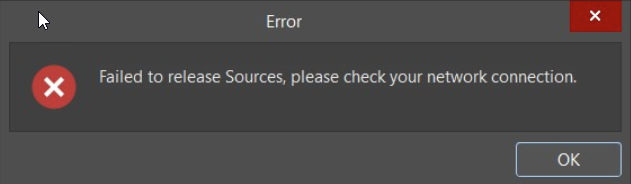
Release fails during Sources upload stage
When releasing a project to Workspace, the release fails during the “Sources” stage with a network‑related error message. Other projects release successfully from the same environment, and the issue may reproduce across multiple users working on the same project. In some cases, Workspace backend logs show data length errors, while in other cases the failure occurs entirely on the client side during release preparation.
Hidden length limits in parameter and paths
This behavior can occur due to two distinct root causes that present with similar symptoms:
1. Long Project Parameter Names or Values
Project parameters are not treated as simple metadata. During release preparation, parameter names and values may be reused internally for source packaging and release metadata generation. Very long parameter values—such as Teams meeting URLs, Jira links, or other copied external references—can exceed internal identifier limits (for example, HRID) or contribute to effective path expansion. This can cause release failures even when Windows long path support is enabled.
2. Windows Long Path Limitation
During release preparation, Altium Designer generates temporary directories and collects source files locally before upload. If the effective file path exceeds Windows or runtime limits, the release fails on the client side before the upload to Workspace begins.
Validate parameters before changing OS setting
- Review and clean up project parameters to eliminate long names of values.
- Only if the issue persists, verify Windows long path support on the client system.
Step-by-step validation and remediation
Step 1 – Check Project Parameters (Recommended First Step)
- Open the project parameters in Altium Designer.
- Review parameter names and values for excessive length, especially:
- Teams meeting URLs
- Jira, SharePoint, or other external links
- Auto‑generated IDs or long descriptive text
- Remove or shorten any suspicious parameter.
- Retry the project release.
Tip: If you see URLs, meeting links, or copied external references used as project parameter values, treat them as suspicious even if they are under 200 characters. Such values can still exceed internal identifier limits during release preparation.
If the release succeeds, the issue was caused by internal metadata or identifier length constraints.
Step 2 – Check Windows Long Path Support
If the release still fails after cleaning up project parameters, verify that Windows long path support is enabled on the client machine running Altium Designer.
Configuration steps for enabling Windows long path support are fully documented in the official Altium Designer documentation: Support for Long Path Names
Best Practices
- Keep project parameter names and values short and meaningful.
- Avoid embedding long URLs or meeting links in project parameters.
- Use external documentation or notes for detailed references instead of parameters.
Important Notes
- Windows long path support resolves filesystem path limitations only. It does not address issues caused by excessively long project parameter names or values.
- It does not override internal metadata or database constraints (such as HRID limits).
- An internal development ticket exists to improve handling, validation, and error messaging for long project parameter values.
- Altium On-Prem Enterprise Server long path configuration alone does not resolve client‑side release failures.
References
Altium provides separate documentation for long path support depending on the product. Please ensure the correct documentation is referenced:
- Altium Designer (Client‑side long path support)
Applies to the Windows machine running Altium Designer and affects local release preparation:
Support for Long Path Names (Altium Designer) - Altium On-Prem Enterprise Server (Server‑side long path support)
Applies only to Enterprise Server configuration and does not address client‑side release failures:
Support for Long Path Names (Altium On-Prem Enterprise Server)