
TRANSLATE: KB: プロジェクト内のすべてのコンポーネントのライフサイクル状態を一度に変更する
Updated: 1月 23, 2025
 A365
A365
プロジェクトでコンポーネントが使用されると、そのライフサイクル状態を変更することが理にかなっています。たとえば、ドラフトからプロトタイプへの変更などです。プロジェクトで使用されたすべてのコンポーネントは、エクスプローラーパネルで一度に状態を変更できます。
Solution Details
Lifecycle states for all components used in a project or project release can be changed in the Children tab of the Explorer panel in Classic View.
1 View » Panel » Explorer and click the gear icon at the top-right to set to Classic View
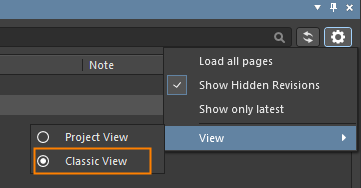
2 Select the project or project release in the Explorer panel
3 Multi-select all of the component CMP- items in the Children tab by shift+click the first and last components
4 Right-click over the selected components and choose "Operations - Change state..."

5 Click Process in the "Batch state change" dialog to transition all of the components to the next lifecycle state
