KB: シミュレーション結果の予期しない動作を防ぐために、Spiceモデルのピンを回路図シンボルにマッピングする
Updated: 12月 18, 2025

Altium Designer
設計内のすべての部品にSpiceモデルがリンクされていることは非常に重要ですが、それ以上に重要なのは、リンクされたモデルのピンが対応する回路図シンボルと正しくマッピングされていることです。なぜなら、コンパイラがそのようなピンマッピングの不一致を自動的に検出する手段がなく、明確なエラーが表示されないまま予期しない結果が出力される可能性があるためです。
ソリューションの詳細
Spiceモデルをコンポーネントに関連付ける一般的な手順については、以下をご参照ください:
設計へのシミュレーションモデルの追加
ピンマッピングは、schdocでシンボルを選択し、プロパティパネルの「全般」タブ内「パラメータ」セクションで、Simulationオブジェクトをダブルクリックすると表示されるダイアログの「Pin Mapping」セクションで確認・修正できます。
すべての.SUBCKTステートメントでは、Spiceの標準表記として、ピン名はピンインデックスの昇順(1から開始)で記載されます。
シミュレーションモデルのリンク
.MODELステートメントについては、Berkeley Spice 3f5で以下のように暗黙的に定義されています:
http://bwrcs.eecs.berkeley.edu/Classes/IcBook/SPICE/UserGuide/elements_fr.html
例えばBJTの場合、モデル内のピン順はC(1)、B(2)、E(3)となっており、回路図シンボルが異なる場合は手動でマッピングする必要があります。
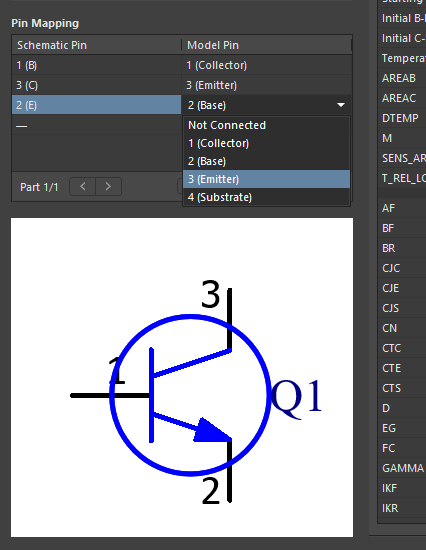
補足として、A365の管理コンポーネントのピンマッピングはバッチ編集モードで行う必要があります:
ピンマッピング
ファイルベースのDBLibでは、シミュレーションモデル関連の属性を以下のように指定できます:
シミュレーションモデルのマッピング
各属性について、データベースに余分なスペースなどが含まれていないか確認してください。これが原因でモデルが正しくリンクされないことが知られています。
マルチパートコンポーネントの場合、デフォルトではシンボルの各パートがシミュレーションエンジンによって個別のコンポーネントとして割り当てられたSpiceモデルで扱われます。シミュレーションからパートを除外するには、Sim Modelダイアログの「シミュレーションからパートを除外」チェックボックスをオンにしてください。
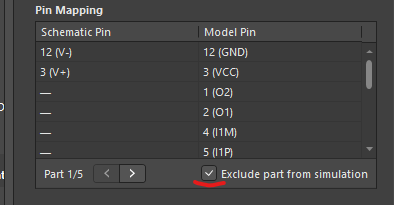
同種のマルチパートコンポーネント(同一回路モデルの複数コピー)の場合、同じマッピングをすべてのパートに適用できます。
一方、異種コンポーネントの場合は、すべての異なるモデルを.SUBCKTラッパーステートメントで1つのファイルにまとめる必要があります。
例:
.SUBCKT MMDT3946 1 2 3 4 5 6
Q1 3 5 4 DI_MMDT3946_PNP
Q2 6 2 1 DI_MMDT3946_NPN
モデルリンクに関する旧リファレンスも有効です:
https://youtu.be/xFafdcH6J6Y?t=601

AI で翻訳
問題が見つかった場合、文字/画像を選択し、Ctrl + Enter キーを押してフィードバックをお送りください。
