
파일 메뉴
Updated: April 06, 2022
다음 명령은 어떤 편집기에서든 File 메뉴에서 사용할 수 있습니다.
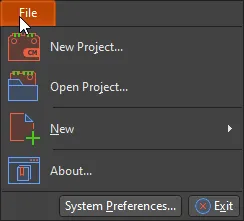
New Project 명령을 사용하면 새 프로젝트를 만들기 위해 Create Project 대화상자를 열 수 있습니다.
Open Project 는 프로젝트를 검색하고 열 수 있는 Open Project 대화상자에 액세스하는 데 사용됩니다.
New 명령을 사용하면 활성 프로젝트에 새 회로도 또는 PCB 문서를 추가할 수 있습니다
System Preferences 는 서로 다른 기능 영역 전반에 걸쳐 전역 시스템 환경설정을 설정할 수 있는 중앙 위치입니다. 이러한 설정은 프로젝트 및 관련 문서 전반에 적용됩니다.
 AI로 번역됨