
홈 탭
Updated: February 04, 2022
다음의 일반적인 영역/명령은 Home 탭에서 액세스할 수 있습니다. 명령은 어떤 편집기에서 해당 영역에 액세스하느냐에 따라 달라집니다. 아래 이미지는 PCB 편집기의 영역/명령을 보여줍니다.
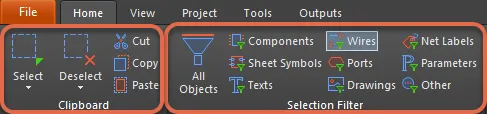
- 현재 문서에서 항목을 선택/선택 해제하고, 잘라내기, 복사, 붙여넣기를 수행하려면 Clipboard 명령을 사용합니다.
- Select & Deselect 명령을 사용하면 설계 객체를 빠르게 선택하고 선택 해제할 수 있습니다.
- Selection Filter 영역을 사용하면 관심 있는 객체 종류만 선택 가능하도록 하는 필터를 빠르게 생성할 수 있어, 선택 과정을 단순화할 수 있습니다.
 AI로 번역됨