
TRANSLATE: KB: 프로젝트의 모든 구성 요소의 라이프사이클 상태를 한 번에 변경하기
Updated: January 23, 2025
 A365
A365
프로젝트에서 구성 요소를 사용하게 되면, 예를 들어 초안에서 프로토타입으로 그들의 라이프사이클 상태를 변경하는 것이 현명합니다. 프로젝트에서 사용된 모든 구성 요소는 탐색기 패널에서 한 번에 상태를 변경할 수 있습니다.
Solution Details
Lifecycle states for all components used in a project or project release can be changed in the Children tab of the Explorer panel in Classic View.
1 View » Panel » Explorer and click the gear icon at the top-right to set to Classic View
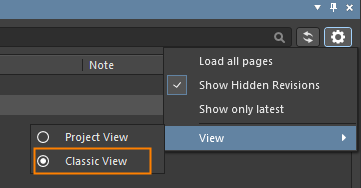
2 Select the project or project release in the Explorer panel
3 Multi-select all of the component CMP- items in the Children tab by shift+click the first and last components
4 Right-click over the selected components and choose "Operations - Change state..."

5 Click Process in the "Batch state change" dialog to transition all of the components to the next lifecycle state
