
Вкладка «Главная»
Updated: февраля 04, 2022
Следующие распространённые области/команды доступны на вкладке Home . Набор команд будет отличаться в зависимости от того, из какого редактора выполняется доступ к этим областям. На изображении ниже показаны области/команды из редактора PCB.
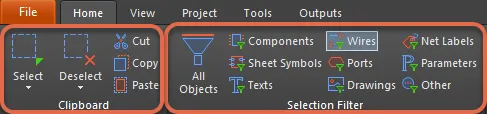
- Используйте команды Clipboard для выбора/снятия выбора, вырезания, копирования и вставки элементов в текущий документ и из него.
- Команды Select & Deselect позволяют быстро выбирать и снимать выбор с объектов проекта.
- Используйте область Selection Filter для упрощения процесса выбора, позволяя быстро создать фильтр, который оставляет доступными для выбора только интересующие типы объектов.
 Локализовано с помощью ИИ