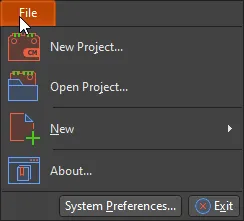
CircuitMaker 中“文件”菜单中可用的命令

The following commands can be accessed from the File menu in any editor.

Use the New Project command to open the Create Project dialog in order to create a new project. 

Open Project is used to access the Open Project dialog in which you can search for and open projects. 

Use the New command to add a new schematic or PCB document to the active project.

Use the Import command to import files of other design types.

System Preferences is a central location where you can set up global system preferences across different functional areas. These settings apply across projects and relevant documents.

AI-LocalizedAI 翻译
如您发现任何问题,请选中相关文本/图片,并按 Ctrl + Enter 键向我们提交反馈。