
Kształt płytki PCB i wycięcie w płytce PCB
Polecenie Board Shape definiuje obrys, czyli granice płytki, a polecenie Board Cutout umożliwia umieszczenie regionu, który tworzy wycięcie (pustkę) w wylewce poligonu. Do poleceń można uzyskać dostęp z edytora PCB, wybierając Home | Board | Board Shape oraz Home | Board | Board Cutout.

Board Shape
Kształt płytki, nazywany również obrysem płytki, to zamknięty wielokąt definiujący granice (zasięg) płytki. Oprócz tego, że stanowi wizualną wskazówkę dotyczącą dostępnej przestrzeni do rozmieszczania elementów i prowadzenia ścieżek, kształt płytki jest także używany przez wewnętrzne warstwy zasilania jako odniesienie dla odsunięcia krawędzi plane’u zasilania (edge pullback) oraz jako krawędź do dzielenia plane’ów zasilania. Po utworzeniu nowego pliku PCB otwiera się on z domyślnym kształtem płytki.
Użyj listy rozwijanej Board Shape, aby uzyskać dostęp do następujących poleceń.

- Redefine Board Shape - użyj, aby interaktywnie narysować nowy kształt.
- Move Board Shape - użyj, aby przesunąć położenie kształtu płytki w obrębie przestrzeni projektu.
- Edit Board Shape - użyj, aby interaktywnie modyfikować kształt płytki, przesuwając wierzchołki lub przesuwając krawędzie kształtu.
- Define From Selected Objects - zaznacz zestaw prymitywów linii i/lub łuków, które definiują zamknięty kształt, a następnie użyj tego polecenia, aby przedefiniować kształt płytki tak, by odpowiadał temu kształtowi.
- Create Primitives From Board Shape - użyj, gdy kształt płytki istnieje, ale obecnie nie ma żadnych obiektów wzdłuż granicy.
Przedefiniowanie kształtu płytki
Po uruchomieniu polecenia Redefine Board Shape kursor zmieni się w krzyżyk i przejdziesz do standardowego trybu umieszczania obiektów wielokątnych. Definicja kształtu płytki odbywa się poprzez wykonanie następującej sekwencji działań:
- Ustaw kursor i kliknij, aby zakotwiczyć wierzchołek początkowy kształtu płytki.
- Przesuń kursor, aby przygotować się do umieszczenia drugiego wierzchołka. Domyślne zachowanie polega na umieszczaniu dwóch krawędzi przy każdym kliknięciu, z definiowanym przez użytkownika kształtem narożnika pomiędzy nimi. Więcej informacji o zmianie trybów narożników znajduje się w sekcji Placement Modes poniżej.
- Kontynuuj przesuwanie myszy i klikaj, aby umieszczać kolejne wierzchołki.
- Po umieszczeniu ostatniego wierzchołka kliknij prawym przyciskiem myszy lub naciśnij Esc, aby zamknąć i zakończyć definiowanie kształtu płytki. Nie ma potrzeby ręcznego domykania kształtu, ponieważ oprogramowanie automatycznie uzupełni kształt, łącząc punkt początkowy z ostatnio umieszczonym punktem.
Tryby umieszczania
Podczas przedefiniowywania kształtu płytki dostępnych jest pięć trybów narożników, z czego cztery mają również podtryby kierunku narożnika. W trakcie przedefiniowywania:
- Naciśnij Shift+Spacebar, aby przełączać się między pięcioma dostępnymi trybami narożników: 45 stopni, 45 stopni z łukiem, 90 stopni, 90 stopni z łukiem oraz Dowolny kąt.
- Naciśnij Spacebar, aby przełączać się między dwoma podtrybami kierunku narożnika.
- W jednym z trybów narożników z łukiem przytrzymaj klawisz < lub > , aby zmniejszyć lub zwiększyć łuk. Przytrzymaj klawisz Shift podczas naciskania, aby przyspieszyć zmianę rozmiaru łuku.
- Naciśnij klawisz skrótu 1, aby przełączać się między umieszczaniem dwóch krawędzi na kliknięcie a jednej krawędzi na kliknięcie. W tym drugim trybie przerywana krawędź jest nazywana segmentem podglądu (look-ahead segment) (jak pokazano na ostatnim obrazie w zestawie poniżej).
- Naciśnij klawisz Backspace, aby usunąć ostatni wierzchołek.


Graficzna edycja kształtu płytki
Po uruchomieniu polecenia Edit Board Shape istniejący kształt płytki zmieni kolor na zielony. Zewnętrzny obrys kształtu jest zdefiniowany przez serię krawędzi, gdzie każda krawędź jest reprezentowana przez wierzchołek końcowy na każdym końcu (pokazany jako pełny biały kwadrat) oraz wierzchołek środkowy pośrodku (pokazany jako pusty biały kwadrat). Każdy wierzchołek końcowy reprezentuje miejsce, w którym spotykają się dwie krawędzie.
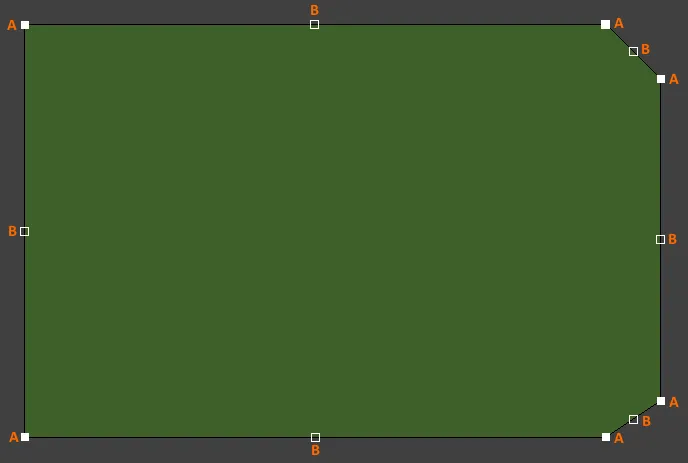
- Kliknij i przeciągnij A, aby przesunąć odpowiedni wierzchołek końcowy.
- Kliknij i przeciągnij B, aby przesunąć odpowiedni wierzchołek środkowy, skutecznie tworząc nowy wierzchołek końcowy i dzieląc pierwotną krawędź na dwie.
- Kliknij w dowolnym miejscu wzdłuż krawędzi, z dala od uchwytów edycji, i przeciągnij, aby przesunąć tę krawędź.
- Ctrl+kliknij w dowolnym miejscu wzdłuż krawędzi, z dala od uchwytów edycji, aby wstawić nowy wierzchołek końcowy.
- Kliknij i przytrzymaj wierzchołek końcowy, a następnie naciśnij Delete, aby usunąć ten wierzchołek.
Graficzne przesuwanie kształtu płytki
Po uruchomieniu polecenia Move Board Shape istniejący kształt płytki zmieni kolor na zielony, a kopia obrysu kształtu zostanie „przyczepiona” do kursora. Przesuń kształt do żądanego nowego położenia w przestrzeni projektu i kliknij, aby zatwierdzić umieszczenie. Podczas przesuwania kształt płytki można obracać lub odbijać lustrzanie:
- Naciśnij Spacebar, aby obrócić kształt płytki przeciwnie do ruchu wskazówek zegara, lub Shift+Spacebar, aby obrócić zgodnie z ruchem wskazówek zegara. Wielkość kroku Rotation Step jest zdefiniowana na stronie PCB Editor – General w System Preferences.
- Naciśnij klawisze X lub Y, aby odbić lustrzanie kształt płytki odpowiednio względem osi X lub osi Y.

Definiowanie kształtu na podstawie zaznaczonych obiektów
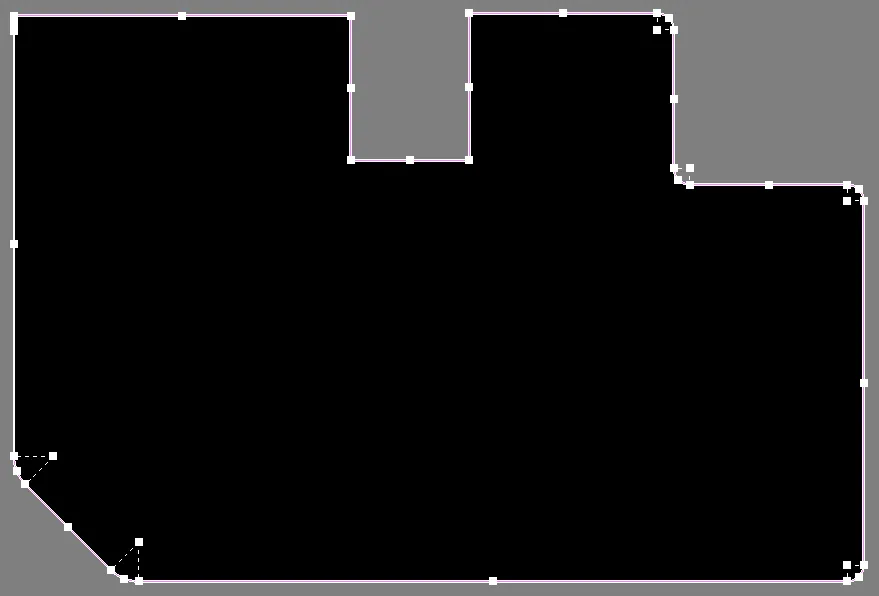
Kształt płytki można również zdefiniować na podstawie zaznaczonych obiektów. Zwykle będzie to zestaw linii i/lub łuków umieszczonych na warstwie mechanicznej. Gdy wszystkie obiekty są zaznaczone, wybierz polecenie Define from selected objects. Kształt płytki zostanie zaktualizowany tak, aby podążać ścieżką zdefiniowaną przez zaznaczone linie. Jeśli oprogramowanie nie będzie w stanie podążać po osi środkowej zaznaczonych obiektów, pojawi się okno dialogowe z ostrzeżeniem.
Tworzenie prymitywów na podstawie kształtu płytki
Oprócz definiowania kształtu płytki na podstawie zaznaczonych prymitywów możliwe jest także tworzenie prymitywów z kształtu płytki. Użyj polecenia Create Primitives from Board Shape , gdy kształt płytki istnieje, ale obecnie nie ma żadnych obiektów wzdłuż granicy. Sytuacje, w których to polecenie może być przydatne, obejmują:
- Gdy chcesz zmodyfikować kształt płytki (lub wycięcia w płytce), najpierw modyfikując prymitywy ścieżek (track) i łuków.
- Gdy potrzebujesz granicy keepout dla płytki lub granic keepout dla wycięć w płytce.
Board Cutout
Board Cutout to region skonfigurowany jako obiekt negatywny, który tworzy wycięcie (pustkę) w wylewce poligonu. Region nie zostanie wypełniony miedzią podczas wylewania poligonu. Gdy jest używany jako negatywny region wycięcia w płytce (poprzez umieszczenie go na warstwie multi-layer), definiuje obszar, który staje się otworem przechodzącym przez gotową płytkę. Regiony wycięć w płytce są przenoszone do plików Gerber i ODB++ do celów produkcyjnych poprzez użycie dedykowanej warstwy Rout.
Wycinanie otworu w kształcie płytki
Wycięcie w płytce można umieścić w dowolnym miejscu w obrębie kształtu płytki.

Gdy tworzysz nowy plik PCB, domyślny arkusz jest tworzony automatycznie. Początkowo nie jest wyświetlany, ale po włączeniu w panelu Inspector pojawia się jako biały kształt za obiektami projektu obecnymi w przestrzeni projektu. Podfolder \Templates w CircuitMaker zawiera różne szablonowe pliki PCB, które obejmują ramki arkusza dla różnych rozmiarów papieru. Otwórz szablon o odpowiednim rozmiarze i skopiuj zawartość odpowiednich warstw mechanicznych do bieżącego projektu PCB.
Odsunięcie poligonu od krawędzi wycięcia w płytce
Poligony, które nakładają się na pełny region wycięcia w płytce, zostaną wylane tak blisko krawędzi wycięcia, jak pozwala na to odpowiednia reguła projektowa. W razie potrzeby można utworzyć specyficzną regułę projektową Clearance, która mogłaby na przykład mieć zakres zastosowania pomiędzy IsBoardCutoutRegion a InPolygon.
Definiowanie ścieżki narzędzia routującego wokół krawędzi płytki i wycięć
Powszechnie stosowanym podejściem do wycięcia gotowej płytki z panelu produkcyjnego jest frezowanie lub routowanie płytki z panelu. Wycięcia w płytce również mogą być routowane. Ścieżka narzędzia routującego (Route Tool path) jest definiowana przez umieszczenie obiektów Line i/lub Arc na warstwie mechanicznej. Można to zrobić ręcznie lub automatycznie przez oprogramowanie.
Aby zdefiniować ścieżkę narzędzia routującego dla płytki i wszelkich wycięć w płytce:

- Użyj polecenia Create Primitives From Board Shape , aby otworzyć okno dialogowe Line/Arc Primitives From Board Shape.
- Zdefiniuj odpowiedni Width dla obiektów, które będą definiować ścieżkę narzędzia routującego.
- Wybierz dostępną warstwę mechaniczną. Ta warstwa powinna być zarezerwowana wyłącznie do definicji ścieżki narzędzia routującego.
- Włącz opcję Include Cutouts , jeśli płytka ma w sobie wycięcia.
- Włącz opcję Route Tool Outline . Gdy ta opcja jest włączona, obiekty linii/łuków są umieszczane tak, aby ich krawędź stykała się z krawędzią kształtu płytki oraz krawędzią wycięcia.
- Włącz opcję Delete Existing Non-Net Lines/Arcs On Layer , aby usunąć istniejące linie/łuki, które nie są powiązane z konkretną siecią (net) na wybranej warstwie.
- Kliknij OK , aby utworzyć obiekty Route Tool na wybranej warstwie mechanicznej.
- Używana warstwa mechaniczna musi być ustawiona jako warstwa Route Tool. Aby to zrobić, przejdź do karty Layers & Colors w panelu View Configuration panel. Kliknij prawym przyciskiem myszy w siatce warstw i wybierz polecenie Add Mechanical Layer . W wyświetlonym oknie dialogowym Edit Layer ustaw Layer Type na Route Tool Path. Ten typ warstwy służy do wskazania warstwy zawierającej mechaniczne informacje o trasowaniu. Zwróć uwagę, że nazwa zdefiniowana przez użytkownika nie jest dozwolona, gdy Layer Type jest ustawione na Route Tool Path. Wynika to z faktu, że starsze wersje oprogramowania używają nazwy warstwy Route Tool Path do identyfikacji warstwy zawierającej informacje o trasie (nazywane również informacjami o trasowaniu). Ustalenie stałego nazewnictwa tej warstwy zapewnia, że projekt będzie nadal działał poprawnie w starszej wersji.
Obrazy poniżej pokazują ścieżkę Route Tool zdefiniowaną na warstwie mechanicznej.


Board Cutout po lewej, a po prawej ścieżka Route Tool zdefiniowana na obrazie.
 Tłumaczenie SI