
Форма платы и вырез в плате
Команда Board Shape задаёт границу (контур), то есть габариты платы, а команда Board Cutout позволяет разместить область, которая создаёт вырез (пустоту) в полигональной заливке. Эти команды доступны в редакторе PCB через меню Home | Board | Board Shape и Home | Board | Board Cutout.

Board Shape
Форма платы (board shape), также называемая контуром платы (board outline), — это замкнутый полигон, который определяет границу, или габариты, платы. Помимо того, что она служит визуальным ориентиром доступного пространства для размещения компонентов и трассировки, форма платы также используется внутренними силовыми слоями (power planes) как опорная граница для отступа края силового слоя (edge pullback) и как граница для разделения силовых слоёв. При создании нового PCB-файла он открывается с формой платы по умолчанию.
Используйте выпадающий список Board Shape для доступа к следующим командам.

- Redefine Board Shape - используйте для интерактивного рисования новой формы.
- Move Board Shape - используйте для перемещения формы платы в пределах рабочего пространства проекта.
- Edit Board Shape - используйте для интерактивного изменения формы платы путём перемещения вершин или сдвига рёбер формы.
- Define From Selected Objects - выберите набор примитивов линий и/или дуг, которые задают замкнутую форму, затем используйте эту команду, чтобы переопределить форму платы в соответствии с этой формой.
- Create Primitives From Board Shape - используйте, когда форма платы существует, но вдоль границы в данный момент нет объектов.
Переопределение формы платы
После запуска команды Redefine Board Shape курсор изменится на перекрестие, и вы перейдёте в стандартный режим размещения полигональных объектов. Определение формы платы выполняется следующей последовательностью действий:
- Установите курсор и щёлкните, чтобы зафиксировать начальную вершину формы платы.
- Переместите курсор, чтобы разместить вторую вершину. Поведение по умолчанию — размещать два ребра за один щелчок, с заданной пользователем формой угла между ними. Подробнее о смене режимов углов см. в разделе Placement Modes ниже.
- Продолжайте перемещать мышь и щёлкать, чтобы размещать последующие вершины.
- После размещения последней вершины щёлкните правой кнопкой мыши или нажмите Esc, чтобы замкнуть и завершить определение формы платы. Вручную замыкать контур не требуется — программа автоматически завершит форму, соединив начальную точку с последней размещённой точкой.
Режимы размещения
При переопределении формы платы доступно пять режимов углов, четыре из которых также имеют подрежимы направления угла. Во время переопределения:
- Нажимайте Shift+Spacebar, чтобы циклически переключаться между пятью режимами углов: 45 градусов, 45 градусов с дугой, 90 градусов, 90 градусов с дугой и Произвольный угол.
- Нажимайте Spacebar, чтобы переключаться между двумя подрежимами направления угла.
- В любом из режимов угла с дугой удерживайте клавиши < или > , чтобы уменьшать или увеличивать дугу. Удерживайте клавишу Shift при нажатии, чтобы ускорить изменение размера дуги.
- Нажмите сочетание клавиш 1, чтобы переключаться между размещением двух рёбер за щелчок и одного ребра за щелчок. Во втором режиме пунктирное ребро называется упреждающим сегментом (look-ahead segment) (как показано на последнем изображении в наборе ниже).
- Нажмите клавишу Backspace, чтобы удалить последнюю вершину.


Графическое редактирование формы платы
После запуска команды Edit Board Shape существующая форма платы станет зелёной. Внешний контур формы задаётся серией рёбер, где каждое ребро представлено конечной вершиной на каждом конце (показана как сплошной белый квадрат) и центральной вершиной посередине (показана как полый белый квадрат). Каждая конечная вершина соответствует месту соединения двух рёбер.
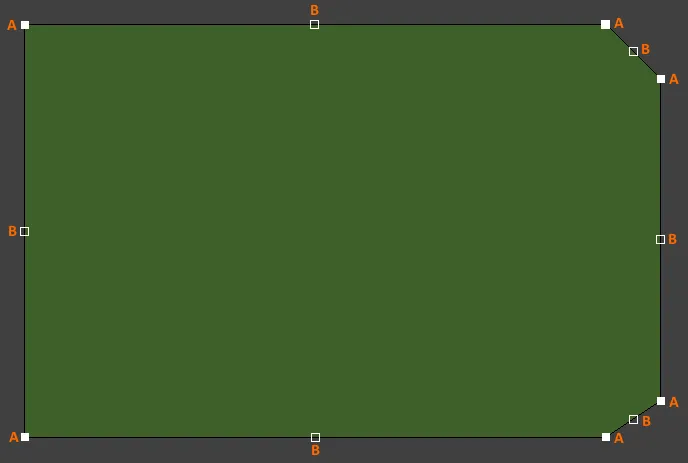
- Щёлкните и перетащите A, чтобы переместить соответствующую конечную вершину.
- Щёлкните и перетащите B, чтобы переместить соответствующую центральную вершину, фактически создавая новую конечную вершину и разделяя исходное ребро на два.
- Щёлкните в любом месте вдоль ребра, вдали от маркеров редактирования, и перетащите, чтобы сдвинуть это ребро.
- Ctrl+щёлкните в любом месте вдоль ребра, вдали от маркеров редактирования, чтобы вставить новую конечную вершину.
- Щёлкните и удерживайте конечную вершину, затем нажмите Delete, чтобы удалить эту вершину.
Графическое перемещение формы платы
После запуска команды Move Board Shape существующая форма платы станет зелёной, а контурная копия формы будет «прикреплена» к курсору. Переместите форму в нужное новое положение в пределах рабочего пространства и щёлкните, чтобы выполнить размещение. Во время перемещения форму платы можно поворачивать или зеркалировать:
- Нажмите Spacebar, чтобы повернуть форму платы против часовой стрелки, или Shift+Spacebar — по часовой стрелке. Шаг Rotation Step задаётся на странице PCB Editor – General в System Preferences.
- Нажмите клавиши X или Y, чтобы зеркалировать форму платы относительно оси X или оси Y соответственно.

Определение формы по выбранным объектам
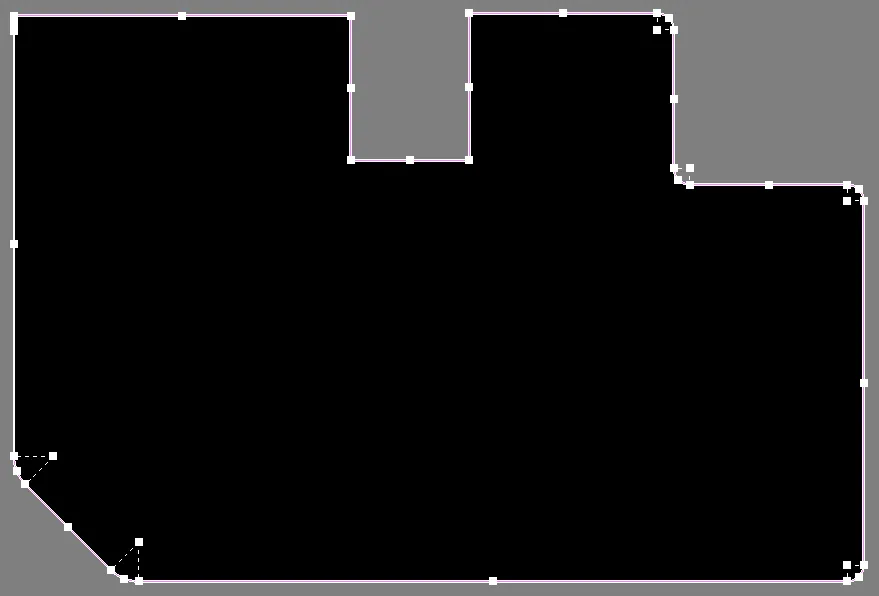
Форму платы также можно определить по выбранным объектам. Обычно это набор линий и/или дуг, размещённых на механическом слое. После выбора всех объектов выполните команду Define from selected objects. Форма платы обновится, следуя траектории, заданной выбранными линиями. Если программе не удаётся пройти по осевой линии выбранных объектов, появится диалог предупреждения.
Создание примитивов из формы платы
Помимо определения формы платы по выбранным примитивам, также можно создавать примитивы из формы платы. Используйте команду Create Primitives from Board Shape , когда форма платы существует, но вдоль границы в данный момент нет объектов. Ситуации, когда эта команда может быть полезна, включают:
- Когда вы хотите изменить форму платы (или вырезы в плате), предварительно изменяя примитивы дорожек и дуг.
- Когда вам нужна граница keepout для платы или границы keepout для вырезов в плате.
Board Cutout
Board Cutout — это область, настроенная как отрицательный объект, который создаёт вырез (пустоту) в полигональной заливке. Эта область не будет заполняться медью при заливке полигона. При использовании в качестве отрицательной области для выреза в плате (при размещении на multi-layer) она определяет участок, который становится сквозным отверстием в готовой плате. Области вырезов в плате передаются в файлы Gerber и ODB++ для производства через выделенный слой Rout.
Вырез отверстия в форме платы
Вырез в плате можно разместить в любом месте внутри формы платы.

Когда вы создаёте новый PCB-файл, автоматически создаётся лист по умолчанию. Изначально он не отображается, но при включении в панели Inspector panel он появляется как белая фигура позади объектов проекта в рабочем пространстве. Подпапка CircuitMaker \Templates содержит различные шаблонные PCB-файлы, включающие рамки листа для разных размеров бумаги. Откройте шаблон нужного размера и скопируйте содержимое соответствующих механических слоёв в ваш текущий PCB-дизайн.
Отступ полигона от края выреза в плате
Полигоны, перекрывающие сплошную область выреза в плате, будут заливаться настолько близко к краю выреза, насколько это допускается соответствующим design rule. При необходимости можно создать отдельное правило Clearance, которое, например, можно ограничить областью применения между IsBoardCutoutRegion и InPolygon.
Определение траектории Route Tool вокруг края платы и вырезов
Распространённый подход для отделения готовой платы от производственной панели — фрезерование или вырезание (routing) платы из панели. Вырезы в плате также могут быть выфрезерованы. Траектория Route Tool задаётся размещением объектов Line и/или Arc на механическом слое. Это можно сделать вручную или автоматически средствами программы.
Чтобы задать траекторию Route Tool для платы и любых вырезов в плате:

- Используйте команду Create Primitives From Board Shape , чтобы открыть диалог Line/Arc Primitives From Board Shape.
- Задайте подходящий Width для объектов, которые будут определять траекторию Route Tool.
- Выберите доступный механический слой. Этот слой следует зарезервировать только для определения траектории Route Tool.
- Включите опцию Include Cutouts , если в плате есть вырезы.
- Включите опцию Route Tool Outline . Когда эта опция включена, объекты линий/дуг размещаются так, что их край касается края формы платы и края выреза.
Включите опцию Delete Existing Non-Net Lines/Arcs On Layer , чтобы удалить существующие линии/дуги, не связанные с конкретной цепью (net) на выбранном слое. - Нажмите OK для создания объектов Route Tool на выбранном механическом слое.
- Используемый механический слой должен быть задан как слой Route Tool. Для этого откройте вкладку Layers & Colors панели View Configuration panel. Щелкните правой кнопкой мыши в сетке слоёв и выберите команду Add Mechanical Layer . В появившемся Edit Layer диалоговом окне задайте Layer Type как Route Tool Path. Этот тип слоя используется для указания слоя, содержащего механическую информацию о маршрутизации. Обратите внимание: пользовательское имя не допускается, когда Layer Type установлено в Route Tool Path. Причина в том, что более старые версии ПО используют имя слоя Route Tool Path для определения слоя, содержащего информацию о маршруте (также называемую информацией о маршрутизации). Фиксация имени этого слоя гарантирует, что проект продолжит корректно работать в более старой версии.
На изображениях ниже показан путь Route Tool, заданный на механическом слое.


Слева — Board Cutout , а справа — изображение с определённым путём Route Tool.
 Локализовано с помощью ИИ