Using Desktop Layouts to Manage Your CircuitMaker Working Environment

The Desktop Layout commands allow you to manage the layout of the desktop for your CircuitMaker working environment. This feature allows you to arrange the application's document windows, panels and toolbars.

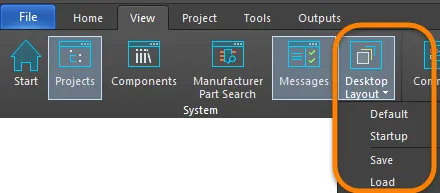
The Desktop Layout functions are accessed by choosing View | System | Desktop Layout from any editor.

  • Default - click to change the desktop layout to the default as defined in the software upon installation.
  • Startup - click to change the desktop layout to the state when the software starts up.
  • Save - click to open the Save Desktop Layout dialog to save the current desktop layout. The saved file type is *.TLT.  
  • Load - click to open the Restore Desktop Layout dialog to load an existing layout (*.TLT) file.

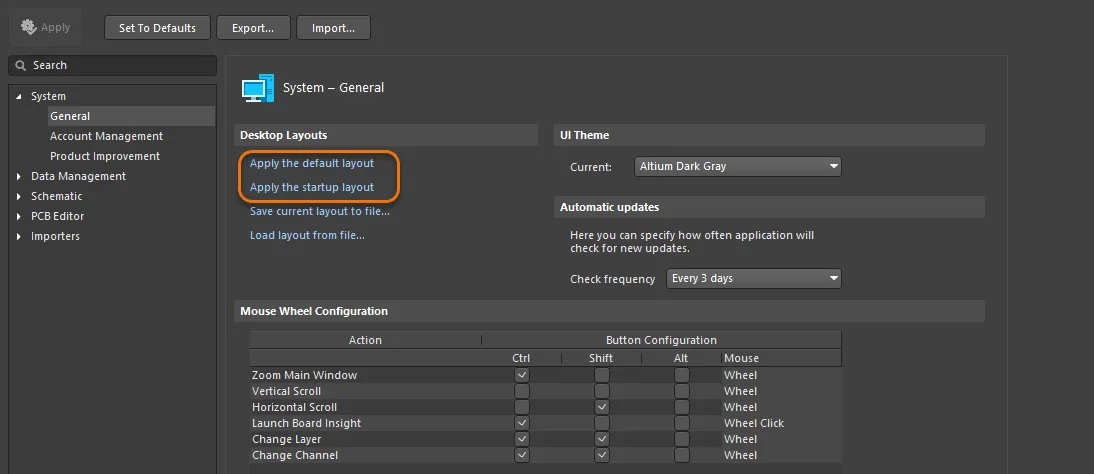
System - General Preferences

You also can use the Desktop Layouts region on the System - General page of the System Preferences to change your layout to default or startup by clicking the respective link.

如您发现任何问题,请选中相关文本/图片,并按 Ctrl + Enter 键向我们提交反馈。