
填充

已放置的 Fill(填充)
Fill 是一种矩形对象,可放置在任意层上。放置在信号层时,Fill 会成为一块实心铜区域,可用于提供屏蔽或承载大电流。不同尺寸的 Fill 可以组合以覆盖不规则形状区域 ,也可以与走线或圆弧段组合并连接到某个网络。
Fill 也可以放置在非电气层上。例如,在 Keep-Out 层放置 Fill 以指定自动布线的“禁布”区域。在 Power Plane、Solder Mask 或 Paste Mask 层上放置 Fill 以在该层创建一个空缺(void)。在 PCB Library Editor 中,Fill 可用于定义元件封装(footprint)。
Fill Object
在 PCB 和 PCB Library 编辑器中,可通过以下方式放置 Fill:
- 在 PCB 编辑器中,选择 Home | Place | Fill。

- 在 PCB 库编辑器中:
- 从主菜单选择 Home | Place | More » Fill。
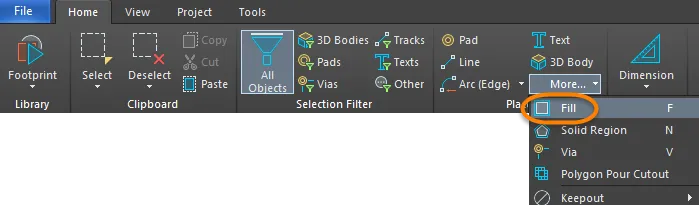
- 在设计空间中右键,然后从菜单中选择 Place » Fill。
启动命令后,光标将变为十字准星,并进入 Fill 放置模式。放置时按以下步骤操作:
- 单击或按 Enter 以锚定 Fill 的第一个角点。
- 移动光标以调整 Fill 的尺寸 ,然后单击或按 Enter 以锚定对角的角点并完成 Fill 放置。
- 继续放置更多 Fill ,或右键单击或按 Esc 退出放置模式。
放置过程中还可执行以下附加操作:
- 按 Tab 键暂停放置,并访问 Fill 面板的 Inspector 模式,以便即时更改其属性。单击设计空间中的暂停按钮叠加层(
 )以继续放置。
 - 按 L 键将 Fill 翻转到电路板的另一面。注意:只有在锚定 Fill 的第一个角点之前才可执行此操作。
- 按 + 和 - 键(数字小键盘)在设计中所有可见层之间向前/向后循环,以快速更改放置层。
- 按 Alt 键可将移动方向约束为水平或垂直轴,具体取决于初始移动方向。
图形化编辑
此编辑方法允许你在设计空间中直接选择已放置的 Fill 对象,并以图形方式更改其尺寸、形状或位置 。
当选中 Fill 对象时,可使用以下编辑手柄:
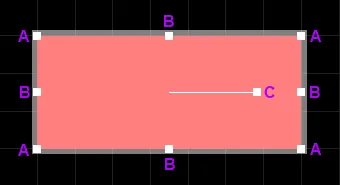
已选中的 Fill
- 单击并拖动 A 可同时在垂直和水平方向调整 Fill 的大小。
- 单击并拖动 B 可分别在垂直和水平方向调整 Fill 的大小。
- 单击并拖动 C 可绕其中心点旋转 Fill。
- 在 Fill 上远离编辑手柄的位置单击并拖动可重新定位。拖动时,Fill 还可旋转或镜像:
- 按 Spacebar 可逆时针旋转 Fill,或按 Shift+Spacebar 顺时针旋转。旋转角度遵循 System Preferences 的 PCB Editor – General 页面中定义的 Rotation Step 值。
- 按 X 或 Y 键可沿 X 轴或 Y 轴镜像 Fill。
非图形化编辑
此编辑方法使用 Inspector 面板来修改 Fill 对象的属性。

放置过程中,可按 Tab 键访问 Inspector 面板的 Fill 模式。Fill 放置完成后,将显示所有选项。
放置后,可通过以下方式之一访问 Inspector 面板的 Fill 模式:
- 如果 Inspector 面板已打开,选择 Fill 对象。
- 选中 Fill 后,从主功能区选择 View | Schematic | Inspector 。
编辑多个对象
Inspector 面板支持多对象编辑:可修改当前所选对象中相同的属性设置。当手动选择多个相同类型的对象时,Inspector 面板中未显示为星号(*)的字段条目可对所有选中对象进行编辑。
Fill Properties
当在设计空间中选中已放置的 Fill 时,所有 Fill 对象属性都可在 Inspector 面板中编辑。
位置
- (X/Y)
- X (第一个字段)- Fill 参考点相对于当前设计空间原点的当前 X(水平)坐标。编辑可更改 Fill 的 X 位置。数值可用公制或英制输入;当输入的单位不是当前默认单位时,请在数值中包含单位。
- Y (第二个字段)- Fill 参考点相对于当前原点的当前 Y(垂直)坐标。编辑可更改 Fill 的 Y 位置。数值可用公制或英制输入;当输入的单位不是当前默认单位时,请在数值中包含单位。
- Rotation - Fill 的旋转角度(度),从 0 度(3 o'clock 水平)起逆时针测量。编辑可更改 Fill 的旋转。最小角度分辨率为 0.001°。
属性
- Net - 使用下拉列表选择该 Fill 所属的网络。活动板设计中的所有网络都会列在下拉列表中。选择 No Net 表示该 Fill 不连接到任何网络。原语的 Net 属性由设计规则检查器(DRC)用于判断 PCB 对象的放置是否合法。如果没有网络,单击
 可跳转到设计空间中的特定网络。
- Layer - Fill 所在的层。除系统层外,Fill 可放置在任何层上。使用下拉列表选择其他层。
- Area -指定 Fill 对象的面积值。
- 长度 - 显示长度。
- Width - 显示宽度。
Paste Mask Expansion
- Rule - 选择后,Fill 的助焊膏层扩展将遵循适用的 Paste Mask Expansion 设计规则中定义的值。若选择此选项,相关数值将被禁用。
- Manual - 选择后,将覆盖适用设计规则,并在下方字段中为该 Fill 指定助焊膏层扩展值。
Solder Mask Expansion
- Rule - 勾选后,Fill 的阻焊层扩展将遵循适用的 Solder Mask Expansion 设计规则中定义的值。若选择此选项,相关数值将被禁用。
- Manual - 勾选后,将覆盖适用设计规则,并在下方字段中为该 Fill 指定阻焊层扩展值。
 AI 翻译
AI 翻译