
Requirements Settings - Verification Methods
The default verification methods available when the deployment is created are Analysis, Inspection, Review, Rules, and Test. Note that each verification method has its closeout references. A closeout reference in Requirements & Systems Portal means the references that verify or prove the verification method. The current closeout references available in Requirements & Systems Portal are:
Closeout references |
Meaning |
|---|---|
Analysis |
Adding an analysis document from the Analyses Module. |
Upload |
Attaching documents/models as references to the verification method. |
Manual |
As the name says, it manually changes the status of the verification method. |
Rules |
Using the boolean comparison to compare the current design property with the requirement’s property. |
Test |
Adding the test procedure and doing automatic verification whenever the test runs are performed. |
Here’s what the default verification methods with their default closeout references are shown in the Figure Verification Method Options. The user can change the closeout references to the default ones and also create a verification method with their closeout references.
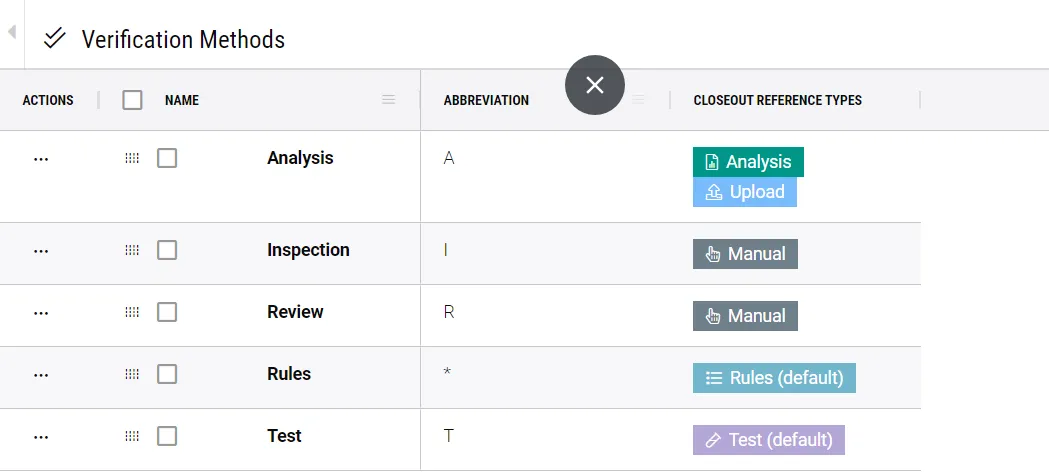 Verification Method Options - Requirements & Systems Portal's interface shows the available verification methods and options for closeout reference types.
For example, the user would like to add a new verification method, “Script”, with the closeout reference “Upload”. Within the verification method settings, on the right side corner, click on “+” and add the name, abbreviation and the closeout reference as shown in the video below:
Adding new Verification method - Video demonstrating how to add new verification method with the closeout references types